Latest iOS 16 Beta Adds Full-Screen Music Player for Lock Screen
Apple today seeded revised third betas of iOS 16 and iPadOS 16 to developers, along with the first iOS and iPadOS 16 public betas. Both of these updates add a new Lock Screen feature - a full-screen music player.
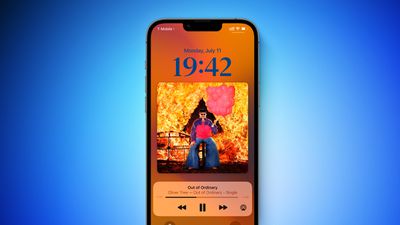
Since iOS 10, the music player on the Lock Screen has been available as a smaller card-style player that only takes up a small portion of the screen with a miniature version of the album art.
With the latest iOS 16 beta, album art is shown front and center, and a separate smaller music player is available below it for controlling playback. The album art dictates the color of the background of the Lock Screen, but if you tap at the bottom of the display, you can go back to your standard wallpaper and minimize the player.
To get back to the album art interface, just tap on the album icon on the minimized player.
The larger music player on the Lock Screen is part of the iOS 16 Lock Screen overhaul that allows users to customize their Lock Screens with unique colors, fonts, and looks. Apple demonstrated the new full-screen music player at WWDC, but it was not available in the iOS 16 beta until today.
Popular Stories
In May, Apple agreed to pay $250 million to settle a U.S. class action lawsuit over Siri AI's delayed launch, and the settlement website is now live.
Apple will pay an estimated $25 per eligible iPhone to eligible customers, who can submit a claim via the settlement website between September 21 and December 21 of this year. The exact payment may be higher or lower than $25 depending on the...
Apple is developing an all-new operating system that is essentially a mix of tvOS, watchOS, and iOS, according to Bloomberg's Mark Gurman.
In his latest Power On newsletter, Gurman reiterated that the operating system will feature a grid of app icons, widgets, and customizable clock faces.
The new software platform is intended for Apple's long-rumored smart home hub. With built-in facial...
Apple's 20th-anniversary iPhone lineup could feature slightly larger displays than the iPhone 18 Pro models, if a new leak shared on Weibo is accurate.
Prolific Chinese leaker Digital Chat Station claims that early iPhone 20 Pro display specifications include a 6.41-inch screen with a resolution of approximately 2,686 × 1,236 pixels, while the iPhone 20 Pro Max is said to have a 6.96-inch...

























![Apple Watch Ultra 3 Drops to Record Low $599.97 on Amazon [Updated]](https://images.macrumors.com/t/99z85mg_XjeuFDPW3me6tOe0oOw=/112x112/article-new/2026/09/apple-watch-ultra-3-new.jpeg)