macOS Ventura Tidbits: 'About This Mac' Redesigned, New Game Controller Menu, Background Sounds, and More

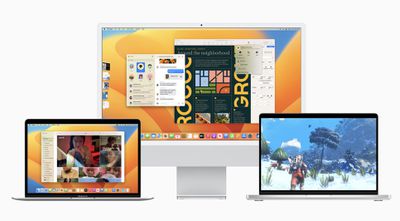
Apple seeded the first beta of macOS Ventura to developers yesterday for testing, and early adopters are beginning to discover smaller changes in the update. We've rounded up some of the more notable macOS Ventura tidbits that we have uncovered below.
macos ventura 1

"About This Mac" Redesigned

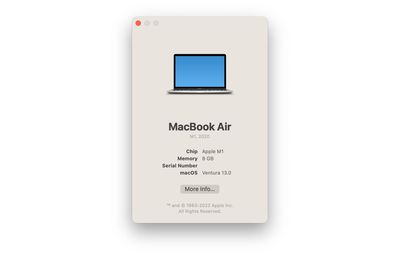
Apple has simplified the About This Mac window on macOS Ventura. The window still lists a Mac's type of processor, amount of memory, serial number, and the macOS version installed, but all other system information has been migrated to the System Settings app, which is a redesigned and renamed version of the former System Preferences app.
About This Mac macOS Ventura
Clicking on the "More Info" button at the bottom of About This Mac opens the General menu of System Settings, which itself contains a "System Report" button that leads to a more advanced overview of a Mac's hardware, software, networking, and more.

Game Controller Menu

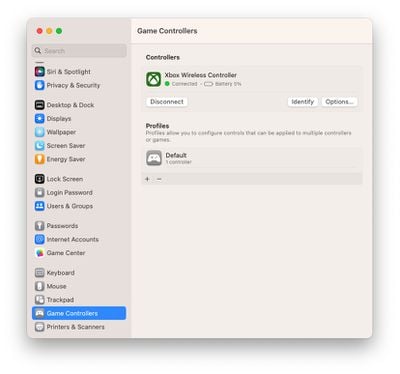
Speaking of System Settings, there is a new game controller menu in the app for managing game controllers connected to a Mac. The menu allows macOS Ventura users to map a controller's buttons and thumbsticks to a Mac's keyboard, adjust haptic feedback levels, create profiles with presets for multiple controllers, and more.
Game Controllers Menu macOS Ventura
macOS Ventura features newly added support for some of the most popular racing wheels, pedals, and shifters for use in racing games on the Mac, including Logitech's G920 and G29 racing wheels, according to Apple's developer website. Apple also says that macOS Ventura supports many additional Bluetooth and USB game controllers, with users discovering that this includes the Nintendo Switch's Joy-Cons and Pro Controller.

Background Sounds

macOS Ventura brings preinstalled background sounds to the Mac. Apple says this feature allows calming sounds, such as ocean or rain, to mask unwanted environmental noise and help minimize distractions. The background sounds feature first launched on the iPhone and iPad with the release of iOS 15 and iPadOS 15 last year.
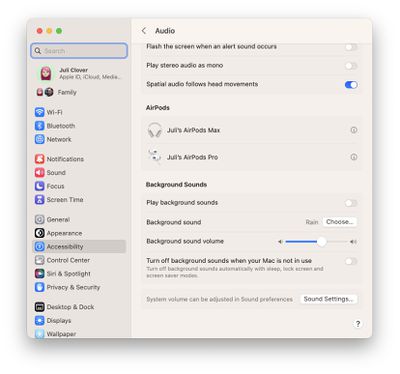
macOS Ventura Background Sounds
Background sounds on the Mac can be turned on in the System Settings app under Accessibility > Audio. In this menu, you can choose which background sound to play, adjust the background sound volume separate from system volume, and optionally turn off background sounds when your Mac is asleep or in screensaver mode.

Other Features and Tidbits

  • macOS Ventura adds Clock and Weather apps to the Mac.
  • In the Photos app, the Hidden and Recently Deleted albums are now locked by default and can be unlocked using your Mac's password or Touch ID.
  • Playlists have improved sorting options in the Music app.
  • Siri has received a slight redesign with a focus on simplicity and "more focused" results.

macOS Ventura will be released to all users in the fall — likely around October. Apple said a public beta will be available starting in July.

Image Sources: MacRumors Forums and Reddit

Related Forum: macOS Ventura

Popular Stories

iOS 26

iOS 26.2 Coming Soon With These 8 New Features on Your iPhone

Thursday December 11, 2025 8:49 am PST by
Apple seeded the second iOS 26.2 Release Candidate to developers earlier this week, meaning the update will be released to the general public very soon. Apple confirmed iOS 26.2 would be released in December, but it did not provide a specific date. We expect the update to be released by early next week. iOS 26.2 includes a handful of new features and changes on the iPhone, such as a new...
iOS 26

iOS 26.4 and iOS 27 Features Revealed in New Leak

Friday December 12, 2025 10:56 am PST by
Macworld's Filipe Espósito today revealed a handful of features that Apple is allegedly planning for iOS 26.4, iOS 27, and even iOS 28. The report said the features are referenced within the code for a leaked internal build of iOS 26 that is not meant to be seen by the public. However, it appears that Espósito and/or his sources managed to gain access to it, providing us with a sneak peek...
AirPods Pro Firmware Feature

Apple Releases New Firmware for AirPods Pro 2 and AirPods Pro 3

Thursday December 11, 2025 11:28 am PST by
Apple today released new firmware designed for the AirPods Pro 3 and the prior-generation AirPods Pro 2. The AirPods Pro 3 firmware is 8B30, up from 8B25, while the AirPods Pro 2 firmware is 8B28, up from 8B21. There's no word on what's include in the updated firmware, but the AirPods Pro 2 and AirPods Pro 3 are getting expanded support for Live Translation in the European Union in iOS...
iOS 26

Apple Releases iOS 26.2 With Alarms for Reminders, Lock Screen Changes, Enhanced Safety Alerts and More

Friday December 12, 2025 10:10 am PST by
Apple today released iOS 26.2, the second major update to the iOS 26 operating system that came out in September, iOS 26.2 comes a little over a month after iOS 26.1 launched. ‌iOS 26‌.2 is compatible with the ‌iPhone‌ 11 series and later, as well as the second-generation ‌iPhone‌ SE. The new software can be downloaded on eligible iPhones over-the-air by going to Settings >...
Google maps feaure

Google Maps Quietly Added This Long-Overdue Feature for Drivers

Wednesday December 10, 2025 2:52 am PST by
Google Maps on iOS quietly gained a new feature recently that automatically recognizes where you've parked your vehicle and saves the location for you. Announced on LinkedIn by Rio Akasaka, Google Maps' senior product manager, the new feature auto-detects your parked location even if you don't use the parking pin function, saves it for up to 48 hours, and then automatically removes it once...
AirTag 2 Mock Feature

Apple AirTag 2: Four New Features Found in iOS 26 Code

Thursday December 11, 2025 10:31 am PST by
The AirTag 2 will include a handful of new features that will improve tracking capabilities, according to a new report from Macworld. The site says that it was able to access an internal build of iOS 26, which includes references to multiple unreleased products. Here's what's supposedly coming: An improved pairing process, though no details were provided. AirTag pairing is already...
macOS Tahoe 26 Thumb

Apple Releases macOS Tahoe 26.2 With Edge Light

Friday December 12, 2025 10:08 am PST by
Apple today released macOS Tahoe 26.2, the second major update to the macOS Tahoe operating system that came out in September. macOS Tahoe 26.2 comes five weeks after Apple released macOS Tahoe 26.1. Mac users can download the macOS Tahoe update by using the Software Update section of System Settings. macOS Tahoe 26.2 includes Edge Light, a feature that illuminates your face with soft...
iOS 26

15 New Things Your iPhone Can Do in iOS 26.2

Friday December 5, 2025 9:40 am PST by
Apple is about to release iOS 26.2, the second major point update for iPhones since iOS 26 was rolled out in September, and there are at least 15 notable changes and improvements worth checking out. We've rounded them up below. Apple is expected to roll out iOS 26.2 to compatible devices sometime between December 8 and December 16. When the update drops, you can check Apple's servers for the ...

Top Rated Comments

ct2k7 Avatar
46 months ago
I prefer the old 'About this Mac'
Score: 28 Votes (Like | Disagree)
Apple Knowledge Navigator Avatar
46 months ago
Don't understand why they put background sounds in Accessibility. You don't need to have additional needs in order to benefit from some choice of background noise, they should have put into Control Centre (unless it's been overlooked).
Score: 15 Votes (Like | Disagree)
jav6454 Avatar
46 months ago
Some of these reskins are pointless.
Score: 12 Votes (Like | Disagree)
metrocon Avatar
46 months ago
It's giving me some old-school OS X vibes...


Attachment Image
Score: 8 Votes (Like | Disagree)
TheYayAreaLiving ?️ Avatar
46 months ago
Does it look like "True Tone" is on or am I tripping? The screen looks too yellow.
Score: 7 Votes (Like | Disagree)
Kylo83 Avatar
46 months ago
What exactly is new? Did this take 5min to make
Score: 5 Votes (Like | Disagree)