Apple bucked a trend when it unveiled macOS Monterey in June featuring an abstract wallpaper graphic, breaking an eight-year tradition of using a photo of the natural landscape that inspired the latest Calfornia-themed version name.
This change came as a shock to YouTuber and photographer Andrew Levitt and his friends Jacob Phillips and Taylor Gray, whom together have made recreating macOS wallpapers something of a tradition.
Once the trio of friends had come to terms with the new abstract wallpaper, they concluded that it was supposed to represent Monterey Canyon, which is deep underwater and impossible to photograph. So, instead they decided to create their own Monterey landscape, but finding the right shot came with its own problems, as their intrepid video diary explains.
After several false starts, the group eventually found an ideal location – Lone Cypress on Pebble Beach – and, using time-lapse photography, were able to create a not only a still image but also a dynamic wallpaper that changes according to the time of day.
"Missing" Monterey Dynamic Wallpaper
They have since made both the still shot and the dynamic version available to download. The following steps explain how to install the dynamic version of the Monterey wallpaper.
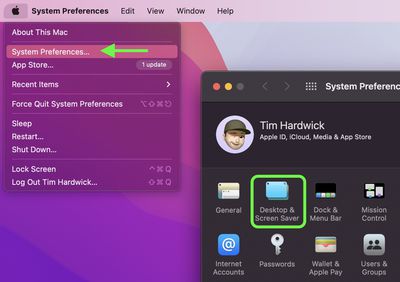
Click the Apple symbol in the menu bar and select System Preferences....
Click Desktop & Screen Saver in the preferences pane.
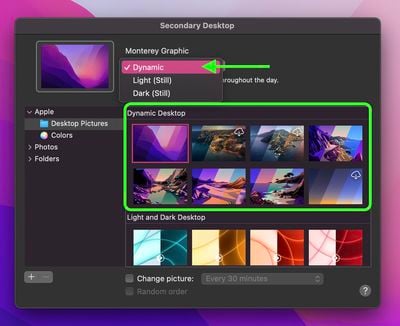
Select one of the official wallpapers that come with macOS, such as "Catalina," "Big Sur," or "Monterey Graphic," and set it to Dynamic.
Open a Finder window and navigate to the "macOS Monterey.heic" wallpaper you downloaded.
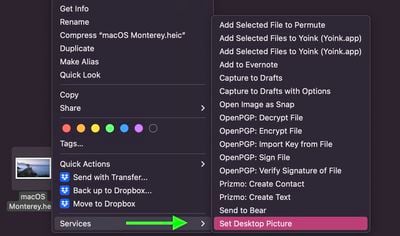
Right-click (or Ctrl-click) on the file and select Services -> Set Desktop Picture from the contextual menu.
Monday January 26, 2026 1:55 pm PST by Joe Rossignol
Apple today introduced its first two physical products of 2026: a second-generation AirTag and the Black Unity Connection Braided Solo Loop for the Apple Watch.
Read our coverage of each announcement to learn more:Apple Unveils New AirTag With Longer Range, Louder Speaker, and More
Apple Introduces New Black Unity Apple Watch BandBoth the new AirTag and the Black Unity Connection Braided...
Monday January 26, 2026 6:07 am PST by Joe Rossignol
Apple today introduced the second-generation AirTag, with key features including longer range for tracking items and a louder speaker.
For those who are not familiar, the AirTag is a small accessory that you can attach to your backpack, keys, or other items. Then, you can track the location of those items in the Find My app on the iPhone, iPad, Mac, Apple Watch, and iCloud.com.
The new...
Monday January 26, 2026 3:56 pm PST by Juli Clover
Alongside iOS 26.2.1, Apple today released an updated version of iOS 12 for devices that are still running that operating system update, eight years after the software was first released.
iOS 12.5.8 is available for the iPhone 5s and the iPhone 6, meaning Apple is continuing to support these devices for 13 and 12 years after launch, respectively. The iPhone 5s came out in September 2013,...
Sunday January 25, 2026 6:02 pm PST by Joe Rossignol
2026 promises to be yet another busy year for Apple, with the company rumored to be planning more than 20 product announcements over the coming months.
Beyond the usual updates to iPhones, iPads, Macs, and Apple Watches, Apple is expected to release its all-new smart home hub, which was reportedly delayed until the more personalized version of Siri is ready. Other unique products rumored for ...
Sunday January 25, 2026 11:46 am PST by Joe Rossignol
Apple plans to release new MacBook Pro, MacBook Air, Mac Studio, and Studio Display models in the first half of this year, according to Bloomberg's Mark Gurman.
In his Power On newsletter today, Gurman added that redesigned MacBook Pro models with an OLED touch screen "should be hitting toward the end of 2026," meaning that the MacBook Pro line would be upgraded twice this year.
First up...
I'll only use the default desktop picture provided by Apple with each Mac OS release. I'm sure Apple went through millions of desktop pictures before choosing one.