iOS 15 Doesn't Offer a Way to Disable Apple TV Keyboard Notifications
iOS 15 was released last week with a long list of new features, but there is one change that is proving to be an annoyance to users.
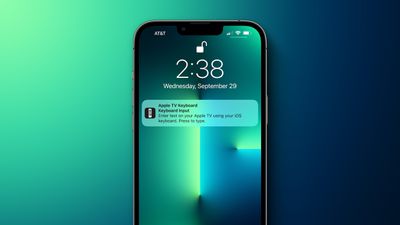
On the Apple TV, users who prefer not to input text using the Siri Remote can use a nearby iPhone or iPad to type. Whenever a text field appears on the Apple TV, a notification appears on the iPhone or iPad, and after tapping the notification, users can use the on-screen keyboard on the iPhone or iPad to enter text on the Apple TV.
The issue is that iOS 15 and iPadOS 15 no longer offer a way to disable the Apple TV keyboard notifications, despite Apple advertising this option in its tvOS 15 User Guide. On devices running iOS 14 and iPadOS 14, there was a toggle switch for turning off the notifications in Settings > Notifications > Apple TV Keyboard.
The inability to turn off the Apple TV keyboard notifications has prompted complaints from users. We've reached out to Apple to see if the company will consider reintroducing the toggle switch in a future software update, and we'll update this story if we hear back.
Popular Stories
MacRumors contributor Aaron Perris has uncovered an image file from Apple for an unreleased Apple TV 4K, suggesting that a new model will finally be released soon. The image is specifically for an "Apple TV 4K (4th generation)" model.
Apple TV 4K (4th generation) image (on a gradient)
The image reveals that the Apple TV will have the same external design as the current model, with all of its...
Just two days before Apple's "Welcome home" experience in New York, Bloomberg's Mark Gurman has leaked several details about the new products set to be unveiled, including an all-new smart home hub, a HomePod mini 2, and a new Apple TV 4K.
Here is an all-in-one summary of the details shared by Gurman:Apple's home hub with a touch-enabled display will be named HomeView, seemingly confirming a ...
The next iPad mini, HomePod mini, and Apple TV 4K models have all leaked, just a few weeks before the devices are expected to be announced. Specifically, MacRumors contributor Aaron Perris discovered a few of Apple's official images of the devices, confirming their existence and some new features that are planned.
The most notable iPad mini details revealed in today's leak include an A20 Pro ...



















































