

macOS Monterey Features Dedicated Password Section in System Preferences, Built-In Authenticator and More - MacRumors
Skip to Content

macOS Monterey Features Dedicated Password Section in System Preferences, Built-In Authenticator and More

macOS Monterey makes several improvements to password management, positioning iCloud Keychain as an ideal password service to replace third-party services like Lastpass and 1Password.
passwords system preferences
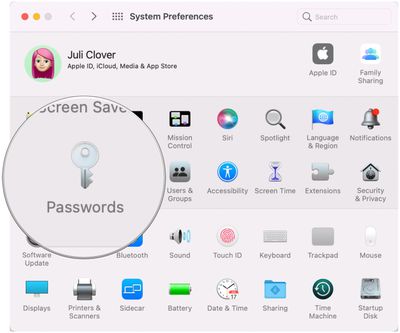
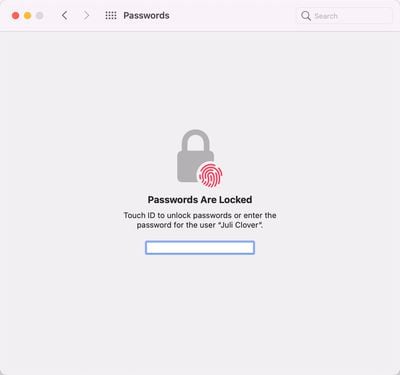
In System Preferences, there's a new "Passwords" section that houses all of your ‌iCloud‌ Keychain logins and passwords so they're easier to get to, edit, and manage. There's a similar Passwords section that's been on iOS for some time now, so now there's one streamlined way to access your passwords across Apple devices.
passwords monterey 2
Prior to now, passwords on Mac were accessible through the Preferences interface in Safari, but the System Preferences option is easier to find. As with the prior version of the feature, Safari will suggest passwords automatically and detect compromised passwords for you.

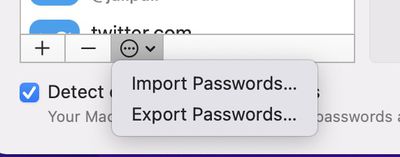
New in Monterey is an option to import and export passwords, so you can move your logins between ‌iCloud‌ Keychain and other password management apps. ‌iCloud‌ Keychain does not have as many entry fields as some password managers, but it supports username, password, and website data.
importing password monterey
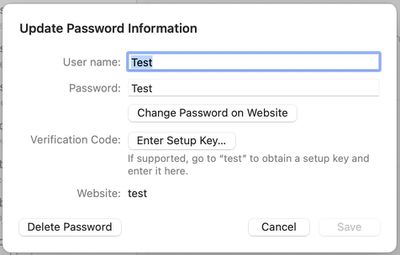
There's also a built-in authenticator feature, which is coming to iOS and iPadOS 15 too. For sites and apps that use codes for two-factor authentication, you can store those codes right in ‌iCloud‌ Keychain and have them autofilled when you log in.
adding password monterey
Direct authenticator support will allow iPhone and Mac users to choose to use Apple's solution over third-party apps and software like Authy and Google Authenticator.
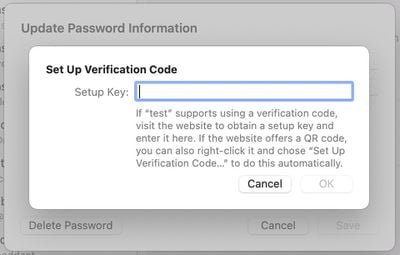
two factor verification monterey
Other smaller changes include an ‌iCloud‌ Passwords extension for autofilling saved ‌iCloud‌ Passwords in the Edge browser, which is handy for Windows users who need cross platform password access in the browser, plus there's a new ‌iCloud‌ Passwords app included with ‌iCloud‌ for Windows.

The macOS Monterey password changes are live now in the developer beta, with Apple planning to release a public beta in July before the software sees a public launch this fall.


Related Forum: macOS Monterey

Popular Stories

Apple Wallet

iOS 27 Will Add Two New Apple Wallet Features to Your iPhone

Monday June 1, 2026 12:15 pm PDT by
Apple is set to unveil iOS 27 during its WWDC 2026 keynote on Monday, June 8, and the update will reportedly include two new Apple Wallet features. First, iOS 27 will reportedly let users create their own digital passes by scanning items like movie tickets, concert passes, and gym membership cards. Many apps already offer Apple Wallet passes, but now users will be able to create a custom...

HomePod mini and Apple TV Sage

New Apple TV and HomePod Mini Are 'Nearly Ready' to Launch, New Siri Remote Also Rumored

Sunday May 31, 2026 8:47 am PDT by
New models of the Apple TV 4K and HomePod mini are "nearly ready to go," according to the latest word from Bloomberg's Mark Gurman. Subscribe to the MacRumors YouTube channel for more videos. Both devices have been ready "for months," but Apple is holding off on launching them until the more personalized version of Siri is available, he said. "I am told the hardware for the next Apple TV...
Dynamic Island iPhone 18 Pro Feature

iPhone 18 Pro Battery Capacities Allegedly Leaked

Tuesday June 2, 2026 1:54 am PDT by
Battery capacities for Apple's upcoming iPhone 18 Pro have allegedly surfaced, and the numbers suggest only a modest increase over the iPhone 17 Pro. According to prolific Weibo-based leaker Digital Chat Station, Apple is testing the iPhone 18 Pro with different battery capacities for the China and U.S. versions of the device, similar to last year's iPhone 17 Pro models. The Chinese model is ...

Top Rated Comments

spawnofbill Avatar
65 months ago
Does... Does no one know about the Keychain Access app in the Utilities folder? It's been there since 10.5! It's synced to iCloud Keychain since day one.
Score: 53 Votes (Like | Disagree)
Amazing Iceman Avatar
65 months ago

What I would really like is for Apple to stop trying to force us to use 2 factor authorization.
If we don't want it, we don't want it. Get that stupid red dot off of System Preferences
2FA can make the difference on a hacking attempt. Some day you will appreciate it.
Score: 44 Votes (Like | Disagree)
sniffies Avatar
65 months ago
Still missing a couple of important things that 1Password has:

- Option to upload attachments that, for example, contain backup codes

- Generate passwords inside the new System Preferences section

Yeah, yeah, I know, you can do it inside Keychain Access app, but this article is not about Keychain Access app, it’s about the new System Preferences section.
Score: 19 Votes (Like | Disagree)
HeavenDynamic Avatar
65 months ago
Much needed addition. Going to Safari preferences to see my passwords always felt like a 2010 experience.
Score: 17 Votes (Like | Disagree)
A MacBook lover Avatar
65 months ago
Does anyone actually use memoji’s? I was cool when it launched but now seems like a graveyard, yet it remains apples major focus….sigh
Score: 13 Votes (Like | Disagree)
65 months ago
I am a 1password fan and share password records with my wife as well as have a lot of secure notes like passports, vax records, and a lot of other stuff. It's more than just passwords we may need in an emergency.
Score: 8 Votes (Like | Disagree)







































