Spotify Launches New Design for Desktop App and Web Player
Spotify today announced that it has overhauled its desktop app and web player with an "improved look and feel" that offers design parity and also makes both the app and the web experience easier to use.
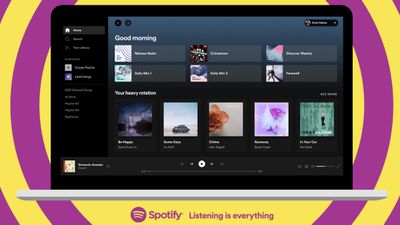
According to Spotify, it took "months" of tests, research, and user feedback to develop the new, cleaner design that's simpler while also offering all of the useful features from the desktop app.
Using the desktop app and then switching to the web player will feel like a seamless experience now that the two share the same general design. There's a redesigned Home experience, search has been relocated to the left side of the navigation page, and listener profile pages feature top artists and tracks. Users can now start a radio session for any song or artist using the "..." menu.
It's easier than ever to edit and customize playlists, and there's a new embedded search bar for quickly locating new songs and podcast episodes to add. With a new dropdown menu in the top-right corner, Spotify desktop app users can edit Queue and view Recently played.
Spotify users on Mac can download the new Spotify app for desktop from the Spotify website or use Spotify in the browser through open.spotify.com.
Popular Stories
Some iPhone Duos are already experiencing hinge issues that cause display cracks, based on photos shared on Reddit and the MacRumors forums. Almost all of the display faults are right along the hinge, and most result in a line of bright pixels across one side of the screen.
An iPhone Duo owner in Australia said his device cracked after being opened fewer than 20 times, and there was no...
Apple has temporarily removed Keynote, Pages, and Numbers from the App Store, just after releasing an update that added iPhone Duo support and a new Intelligent Assistant.
It is not clear if the apps were removed intentionally, or if it is a bug. Apple has not said when the apps will be reinstated, but if it was in error, they should return soon.
Update: The Mac versions are back without...
Apple Music has a 404 page easter egg on the web: a functional iPod that appears when you load a page that does not exist, such as music.apple.com/macrumors.
"Page Not Found," says Apple. "Give this a spin instead."
Apple is clever with this. If you navigate to music.apple.com/ipod instead, the page says "Looking for something?" instead of "Page Not Found."
The easter egg is only...