YouTube Investigating Issue With 'Something Went Wrong' Error in Apple TV App - MacRumors
Skip to Content

YouTube Investigating Issue With 'Something Went Wrong' Error in Apple TV App

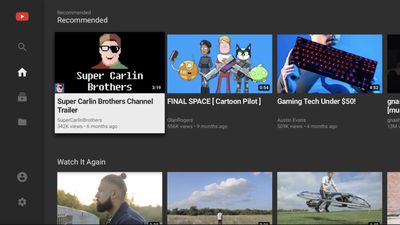
In recent days, some Apple TV 4K and Apple TV HD users have been receiving a "something went wrong" error message when attempting to load videos using the YouTube app on tvOS. The issue does not appear to be widespread, and it seems to arise only when a user is signed into their YouTube account on the Apple TV.
youtube tvos app
YouTube has confirmed on Twitter that it is investigating the issue and working on a fix, but in the meantime, some users in the Apple Support Communities have found success with a workaround that involves deleting and reinstalling the YouTube app on the Apple TV and then signing in with the "using my phone" option.

YouTube has not provided a timeframe for when the issue will be resolved.

Related Roundup: Apple TV
Tag: YouTube
Buyer's Guide: Apple TV (Don't Buy)

Popular Stories

General visionOS watchOS and tvOS Betas Feature Redux

Apple Releases Second watchOS 26.6, tvOS 26.6 and visionOS 26.6 Betas

Monday June 15, 2026 10:06 am PDT by
Apple today provided developers with the second betas of upcoming watchOS 26.6, tvOS 26.6, and visionOS 26.6 betas for testing purposes. The software comes three weeks after Apple seeded the first betas. The software updates are available through the Settings app on each device, and because these are developer betas, a free developer account is required. There's no word on what's in the...
Apple TV 2025 Thumb 2 Sans Text

tvOS 27: Apple Music Gains Hi-Res Lossless Audio on Apple TV 4K

Wednesday June 10, 2026 1:44 am PDT by
Apple Music is bringing Hi-Res Lossless Audio to tvOS 27, in addition to standard Lossless Audio. Apple says subscribers with compatible external speaker outputs will be able to enjoy their favorite songs in the highest audio quality and experience studio-quality sound directly through their Apple TV 4K. As of tvOS 26, Apple TV 4K supports Apple Music Lossless audio up to 24-bit/48 kHz,...
Apple TV Remote Icon

iOS 27 Lets You Add Apple TV Remote to Your iPhone's Home Screen

Thursday June 11, 2026 11:51 am PDT by

Starting with iOS 27, the virtual Apple TV remote can be added to the iPhone's Home Screen again, rather than being limited to Control Center. To do so, swipe down on the Home Screen and search for "remote." Next, tap and hold on the Remote app and drag it to your Home Screen. Alternatively, you can find it in the App Library. Apple used to offer an Apple TV Remote app in the App Store, but...

Top Rated Comments

69 months ago
Why does Google insist on creating their own user interface for the Youtube app. The old app was much better and followed Apple's guidelines. This, one is horrible for scrolling through long list of my subscriptions and no way to select individual videos from playlists.
Score: 8 Votes (Like | Disagree)
breather Avatar
69 months ago
YouTube on the Apple Tv is pretty bad in general.
Score: 7 Votes (Like | Disagree)
iamdmann Avatar
69 months ago
I have this issue in safari on my phone/iPad constantly. I've always assumed it's because of my content blockers, but that wouldn't be the case on ATV.
Score: 4 Votes (Like | Disagree)
Hakiroto Avatar
69 months ago

There doesn’t seem to be a brave soul among any of these major companies willing to provide descriptive errors or change logs. HIGHLY annoying and frustrating.
Ah, yeah. The old "Fix bugs" change log that you see so often. Frustrating.
Score: 3 Votes (Like | Disagree)
69 months ago
Been seeing this error message ever since they rolled out YT Premium monthly extortion subscription. I suspect it has to do with YT/G serving up ads.
Score: 3 Votes (Like | Disagree)
69 months ago

The YouTube app does not work properly both on my iPhone and iPad. Sometimes the videos in the home screen does not load and suddenly while watching videos it would say that I am offline. But there is a temporary easy fix. Turning off and turning on WiFi fixes it. But this happens ever single day. Any ideas why this happens?
You can also consider deleting the app. I access YT directly in Safari. By adding a shortcut to the homepage, I barely notice the difference And I now have Picture in Picture and zero ads.
Score: 3 Votes (Like | Disagree)