

Apple today seeded the first betas of new iOS and iPadOS 14.5 updates to developers for testing purposes, a week after releasing the iOS 14.4 update with bug fixes and feature updates.

iOS and iPadOS 14.5 can be downloaded through the Apple Developer Center or over the air after the proper profile has been installed on an iPhone or iPad.
iOS 14.5 is the update where Apple will begin enforcing its App Tracking Transparency privacy feature, which will require app developers to ask for and receive a user's permission to access their random advertising identifier (known as the IDFA) to track user activity across apps and websites.
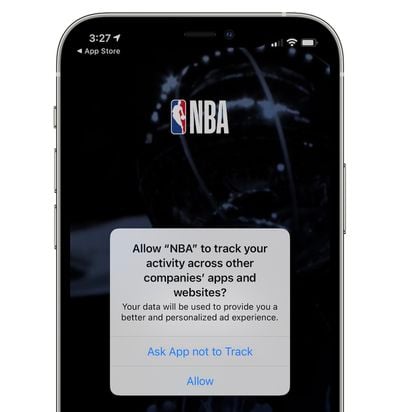
Going forward, when an app wants to access the IDFA, users will see a prompt with options to "Allow Tracking" or "Ask App Not to Track." These features have already been implemented in iOS 14 and they are available to developers, but with iOS 14.5, they will be required rather than voluntary.
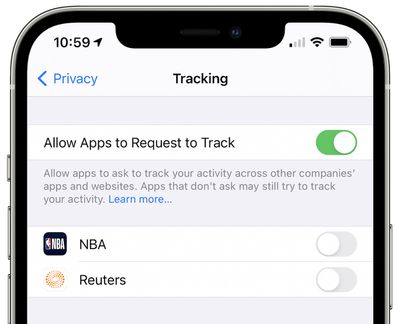
Selecting "Ask App Not to Track" will prevent the app's developer from accessing the user's IDFA, and developers will also have to respect the user's tracking preference and refrain from using other methods to track users. Disobeying this rule could cause an app to face removal from the App Store. Tracking preferences can be managed by going to Settings > Privacy > Tracking.
There's no word yet on what else might be included in the iOS 14.5 update, but it likely focuses on performance improvements and bug fixes for issues that weren't able to be addressed in the iOS 14.4 release. When we've downloaded the update and found what's new, we'll add an update to this article.
Apple has said iOS 14.5 and iPadOS 14.5 will be released to the public in the early spring.

Tuesday February 3, 2026 7:47 am PST by Joe Rossignol
While the iOS 26.3 Release Candidate is now available ahead of a public release, the first iOS 26.4 beta is likely still at least a week away. Following beta testing, iOS 26.4 will likely be released to the general public in March or April.
Below, we have recapped known or rumored iOS 26.3 and iOS 26.4 features so far.
iOS 26.3
iPhone to Android Transfer Tool
iOS 26.3 makes it easier...
Tuesday February 3, 2026 12:45 pm PST by Joe Rossignol
Apple recently acquired Israeli startup Q.ai for close to $2 billion, according to Financial Times sources. That would make this Apple's second-biggest acquisition ever, after it paid $3 billion for the popular headphone maker Beats in 2014.
This is also the largest known Apple acquisition since the company purchased Intel's smartphone modem business and patents for $1 billion in 2019....
Tuesday February 3, 2026 8:55 am PST by Joe Rossignol
In 2022, Apple introduced a new Apple Home architecture that is "more reliable and efficient," and the deadline to upgrade and avoid issues is fast approaching.
In an email this week, Apple gave customers a final reminder to upgrade their Home app by February 10, 2026. Apple says users who do not upgrade may experience issues with accessories and automations, or lose access to their smart...
Thursday February 5, 2026 12:54 pm PST by Joe Rossignol
Apple turns 50 this year, and its CEO Tim Cook has promised to celebrate the milestone. The big day falls on April 1, 2026.
"I've been unusually reflective lately about Apple because we have been working on what do we do to mark this moment," Cook told employees today, according to Bloomberg's Mark Gurman. "When you really stop and pause and think about the last 50 years, it makes your heart ...
Tuesday February 3, 2026 12:12 pm PST by Juli Clover
New M5 Pro and M5 Max MacBook Pro models are slated to launch in the near future, according to information shared with MacRumors by an Apple Premium Reseller.
Subscribe to the MacRumors YouTube channel for more videos.
The third-party Apple retailer said that MacBook Pro stock is very low currently because there is an imminent new product introduction. Apple typically coordinates supply with...
There should be an option in iPhone settings that just auto denies all apps the permission to track me.
edit: I'm stupid, apparently turning off "Allow app to request to track" automatically denies all tracking requests, which is exactly what I need. Apple could've made that a little more clear, had to click read more and scroll through a wall of text to figure out that turning it off actually auto denies.
















