

tvOS 26.4 Adds These New Features to Your Apple TV - MacRumors
Skip to Content

tvOS 26.4 Adds These New Features to Your Apple TV

Apple this week released tvOS 26.4, and the software update includes a handful of new features and changes for the Apple TV.
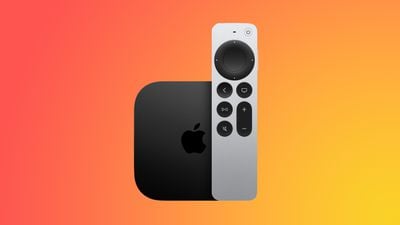
apple tv 4k new orange
tvOS 26.4 is compatible with all Apple TV 4K and Apple TV HD models released since 2015. To update your Apple TV, open the Settings app on the device, navigate to System → Software Updates, and select Update Software.

Below, we have recapped what is new in tvOS 26.4.

tvOS 26.4: New Features

Genius Browse
tvos 26 genius browse overview
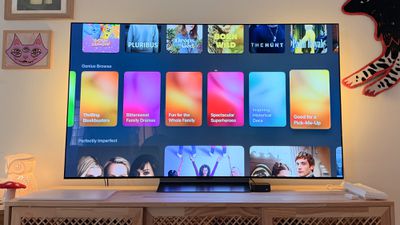
Apple added a new "Genius Browse" section to the ‌Apple TV‌ app on tvOS 26.4. Genius Browse is a content discovery feature that provides recommendations for TV shows and movies across multiple suggested categories. Suggestions vary based on content preferences, and the options are updated regularly.

Examples of categories include "Bittersweet Family Dramas" and "Good for a Pick-Me-Up."

Continuous Audio Connection

Apple says tvOS 26.4 fixes an issue with audio playback on Apple TV 4K that can occur when sound transitions between programs with different formats.

Specifically, there is a new "Continuous Audio Connection" setting in the Settings app, under Video and Audio → Audio Format → HDMI Output.

"Apple TV uses a Dolby MAT connection for glitch-free playback across formats," reads Apple's description of the setting. "Older receivers may indicate an Atmos connection, but original mixes will not be modified."

Subtitle Styling

You can now change the style of subtitles/captions while you are watching content in the Apple TV app and other apps that use the Apple TV's default video player, without needing to open the Settings app. You can adjust the size and appearance of the subtitles, opt for subtitles to have a transparent background, and so forth.

To turn on subtitles from the video player, look for the speech bubble button.

No More iTunes TV Shows and Movies Apps
apple tv itunes tv shows movies
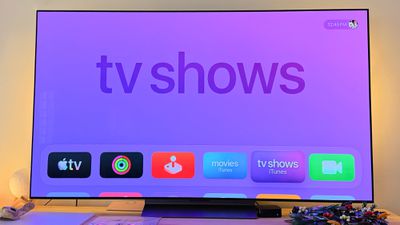
tvOS 26.4 finally removes the preinstalled iTunes TV Shows and iTunes Movies apps from the Apple TV, with all content now found in the Apple TV app.

Performance Improvements

Apple says tvOS 26.4 includes performance and stability improvements.

tvOS 26.4: Release Notes

Here are Apple's release notes for tvOS 26.4:

This update fixes an issue with audio playback on Apple TV 4K that can occur when sound transitions between programs with different formats, like Dolby Atmos and stereo. iTunes Movies and TV Shows apps removed with all content and playback consolidated into Apple TV app. This update also includes performance and stability improvements.

Some tvOS features are limited to newer Apple TV models.

Related Roundup: Apple TV
Buyer's Guide: Apple TV (Don't Buy)

Popular Stories

tvOS 27 Feature

Apple Seeds tvOS 27 Beta 2 to Developers

Monday June 22, 2026 10:06 am PDT by
Apple today seeded the second beta of tvOS 27 to developers for testing purposes, with the update coming two weeks after Apple released the first beta following the WWDC keynote. The beta can be downloaded and installed through the Settings app on the Apple TV. A free developer account is required. tvOS 27 has few new features compared to the other 27 software updates, but it does add a...
General visionOS watchOS and tvOS Betas Feature Redux

Apple Releases Third watchOS 26.6, tvOS 26.6 and visionOS 26.6 Betas

Monday June 29, 2026 10:08 am PDT by
Apple today provided developers with the third betas of upcoming watchOS 26.6, tvOS 26.6, and visionOS 26.6 betas for testing purposes. The software comes two weeks after Apple seeded the second betas. The software updates are available through the Settings app on each device, and because these are developer betas, a free developer account is required. There's no word on what's in the...


New Apple TV Logo

Apple TV Time-Limited Deal: $5.99/Month for Amazon Prime Members

Wednesday June 17, 2026 3:04 am PDT by
Apple has partnered up with Amazon to make Apple TV available at $5.99 per month for Prime members for a limited time. Apple TV is available as an add-on subscription through Prime Video in the U.S. This promotional deal lets Prime members sign up to the streaming platform for over 50% off the usual $12.99/month price for up to two months, after which the standard price applies. The promo...

Top Rated Comments

16 weeks ago
I really wish they would’ve kept the movies app the way it was, don’t love clunking around the Apple TV app.
Score: 12 Votes (Like | Disagree)
Moonjumper Avatar
16 weeks ago
Can Genius Browse be deactivated? I want to see the content I own, not what Apple thinks I may want to get. Hiding my purchased content has been one of the worst changes over time on Apple platforms.
Score: 6 Votes (Like | Disagree)
16 weeks ago

I really wish they would’ve kept the movies app the way it was, don’t love clunking around the Apple TV app.
Since Cook does not understand software, he just lets the minions do as they wish.

And it seems that Apple's software developers deem different as innovation, ignoring decades of usability studies and knowledge.
Score: 5 Votes (Like | Disagree)
840quadra Avatar
16 weeks ago
Was hoping the continuous Audio was related to paired HomePod connections, not just HDMI.

Random hiccups with a stereo pairs, auto of sync audio (with the video), and dropped connections after the unit sleeps are getting old.

Been through 2 home routers, and while my newest ubiquity setup is far superior, these things still act up on occasion.
Score: 5 Votes (Like | Disagree)
16 weeks ago
Damn I thought this was a new Apple TV...
Score: 5 Votes (Like | Disagree)
Chopper9 Avatar
15 weeks ago

I really wish they would’ve kept the movies app the way it was, don’t love clunking around the Apple TV app.
Every software iteration gets worse and worse. Loved the simplicity of Movies, TV Shows, Trailers, etc. Now you have to click 15 times, hold down this, go here for that.... I don't know who is in charge of the ATV interface, but they needs tarred, feathered, and publicly shamed.
Score: 3 Votes (Like | Disagree)








































