MacRumors Giveaway: Win an X1 Keyboard and iPad Stand From Satechi - MacRumors
Skip to Content

MacRumors Giveaway: Win an X1 Keyboard and iPad Stand From Satechi

For this week's giveaway, we've teamed up with Satechi to offer MacRumors readers a chance to win a Slim X1 Bluetooth Backlit Keyboard and an Aluminum Desktop Stand for the iPad, both of which are Satechi's newest accessories.

satechi slim x1
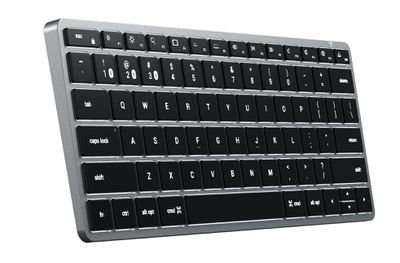
Announced last week, the $70 Slim X1 Bluetooth Backlit Keyboard is a compact, travel-friendly keyboard that works with Apple's Macs and iPads. At 11 inches long and 4.5 inches wide, it tucks neatly in a bag or backpack for taking on the go, but it still has a full QWERTY layout.
satechi x1 keyboard 2
For those who prefer something larger for desktop use, Satechi also has the Slim X3 Keyboard, which features the same design but with a numeric keypad and additional function keys. Both versions are available with either Bluetooth connectivity or a wired connection.


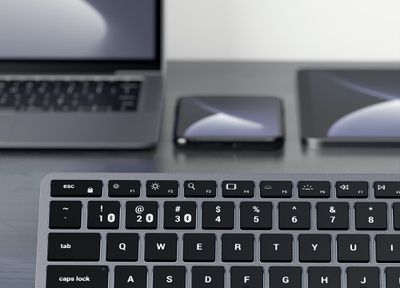
The keys are backlit with 10 adjustable brightness levels, and multiple Bluetooth connections are supported so you can swap between a Mac, ‌iPad‌, and iPhone with just the press of a button. There are built-in macOS and iOS function keys, and a USB-C port is included to recharge the keyboard.

satechi x1 keyboard 1
Designed specifically with Apple users in mind, the keyboard has an aluminum build that is meant to match Apple devices, and no special setup is required for it to work. It is compatible with 2012 and newer Macs, the iPhone X and later, and Apple's iPads.
satechi x1 keyboard 3
Alongside the Slim X1 Bluetooth Backlit Keyboard, Satechi unveiled the Aluminum Desktop Stand, which is built to work with Apple's modern iPads, including the 2019/2020 iPad Pro and 2020 iPad Air, but it is also compatible with iPhones and any other 4-inch to 13-inch smartphone or tablet.

satechi ipad stand
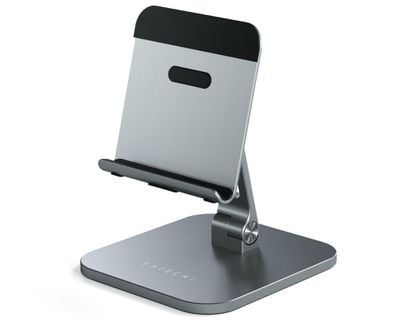
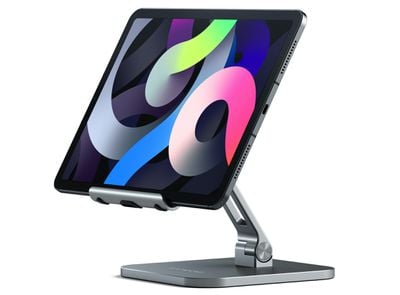
Priced at $45, the Aluminum Desktop Stand is designed to turn the ‌iPad‌ into a multi-purpose workstation. An adjustable mount and base hinges allow for the ‌iPad‌ to be positioned just where you need it, and the stand can be used in either landscape or portrait mode.
satechi ipad stand empty
The mount is adjustable to 180 degrees, while the hinges can be adjusted 135 degrees, allowing for quite a bit of flexibility for hands-free video watching, FaceTime calls, fitness videos, and work when paired with a keyboard. It can even be folded down and used as a sketching base.
satechi ipad stand landscape
As the name suggests, Satechi created the Aluminum Desktop Stand from aluminum in an effort to match Apple's devices, and it is available in a space gray shade. Grip pads on the stand hold your devices in place while you work.

We have a Slim X1 Bluetooth Backlit Keyboard and Aluminum Desktop Stand to give away to 15 MacRumors readers. To enter to win our giveaway, use the Gleam.io widget below and enter an email address. Email addresses will be used solely for contact purposes to reach the winners and send the prizes. You can earn additional entries by subscribing to our weekly newsletter, subscribing to our YouTube channel, following us on Twitter, following us on Instagram, or visiting the MacRumors Facebook page.

Due to the complexities of international laws regarding giveaways, only U.S. residents who are 18 years or older and Canadian residents (excluding Quebec) who have reached the age of majority in their province or territory are eligible to enter. To offer feedback or get more information on the giveaway restrictions, please refer to our Site Feedback section, as that is where discussion of the rules will be redirected.

The contest will run from today (January 15) at 11:00 a.m. Pacific Time through 11:00 a.m. Pacific Time on January 22. The winners will be chosen randomly on January 22 and will be contacted by email. The winners will have 48 hours to respond and provide a shipping address before new winners are chosen.


Popular Stories

video proc giveaway

MacRumors Giveaway: Win an iPhone 17 and a Lifetime Copy of VideoProc Converter AI

Friday May 22, 2026 10:02 am PDT by
For this week's giveaway, we've teamed up with Digiarty VideoProc to offer MacRumors readers a chance to win an iPhone 17 and a copy of the VideoProc Converter AI software to use with it. VideoProc Converter AI is software for editing and managing videos, images, audio, DVDs, and more. It includes a suite of AI features for easy photo and video editing, along with tools for converting,...
Apple Event Logo

Apple to Release These 15 New Products Later This Year

Friday June 12, 2026 7:45 am PDT by
Apple's annual WWDC developers conference is drawing to a close, but there is still a lot to look forward to in the second half of the year. Apple is expected to release at least 15 more products later this year. Now that the more intelligent and personal version of Siri has finally arrived in beta, a full two years after Apple first previewed it at WWDC 2024, we should begin to see some new ...
Apple Logo Top Half

Have One of These 16 Apple Devices? Software Support Ends This Fall

Saturday June 13, 2026 8:00 am PDT by
Apple will end software support for 16 devices this fall across four product lines, with the Apple Watch seeing the most sweeping cull in the product's history. The full extent of this year's software drops became clear with the announcements of macOS 27 Golden Gate, iPadOS 27, tvOS 27, and watchOS 27 at WWDC this week. The one bright spot is that iOS 27 features identical device support to...

Top Rated Comments

71 months ago
Still waiting for silicon MacBook Pro M1 giveaway😂
Score: 3 Votes (Like | Disagree)
Westside guy Avatar
71 months ago

Excellent giveaway, MR. I wish others could be as lucky as me when I win this. :D
Oh, are they giving away two of them? Because I'm already going to win.
Score: 3 Votes (Like | Disagree)
71 months ago

Looks like they copied Apple's horrible full-height left/right arrow keys. Too bad. Even Apple realized that was a mistake, putting form over function.


I don't have issues with that, but for several weeks the "visit us on fb/instagram/youtube" links don't register the click. So I get 4 entries rather than 7, but that's ok. The first entry infinitely increases my odds, while each successive entry only increases odds by a tiny amount.
I see the opposite problem... they copied the half height up and down. I want all arrows to be full height.
Score: 1 Votes (Like | Disagree)
Apple_Robert Avatar
71 months ago

Oh, are they giving away two of them? Because I'm already going to win.
Are we going to have to this take discussion outside, Westside? :P

We all have dreams. I wish you well when you wake from yours. :D
Score: 1 Votes (Like | Disagree)
71 months ago
Entered! Good luck to all.
Score: 1 Votes (Like | Disagree)
4jasontv Avatar
71 months ago

Can you expand on this? I too have the MX Keys (via bluetooth) and the MX Master 2 (via bluetooth) and have no issues with keyboard connectivity and none with the mouse except that the mouse will not wake from sleep, only the keyboard will do that.
I actually have the opposite issue. I have the MX Keys, Master 3 and the Vertical because I wanted to use Flow across my mac and PCs.

The mice last forever and I have no idea the last time I charged them. The keyboard has frequent issues for me and it won't wake the computer from sleep, only the mice will do it. I have tried both Bluetooth and the USB dongle. The Black MX Keys backlight would turn off on PC (but not Mac for some reason), and the gray MX Keys will disconnect and not work with PC but will still work on my Mac. It's almost like the keyboard has different minimum battery level requirements depending upon what device it's actively paired with. I have a spare logitech 10keyless that I keep by my PC in case the MX Keys stops working.

I really don't have a lot of issues with my Mac and these devices compared with my PC, but 90% of my work at my desk is with my PC. I am trying to migrate back to the Mac ever since I found a solution to use my 49" display with my MBP.
Score: 1 Votes (Like | Disagree)