Apple's Anti-Reflective Coating Repair Program Still in Effect for Some MacBooks With New Mail-In Policy

In an internal memo obtained by MacRumors, Apple recently informed its network of Apple Authorized Service Providers that mail-in repair is now required for Mac notebooks with anti-reflective coating issues in the United States.
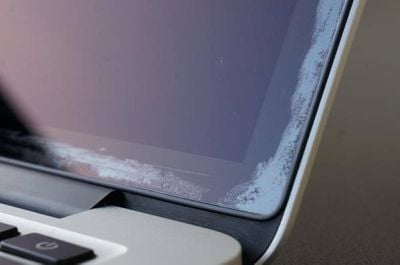
mac anti reflective coating issue
The new policy went into effect January 4, 2021 and means that customers who take an eligible 12-inch MacBook or MacBook Pro exhibiting this issue to an Apple Authorized Service Provider will have their notebook mailed to a centralized Apple depot for the repair to be completed, likely resulting in longer waiting times in most cases. It is unclear if the policy applies to any countries outside of the United States at this time.

Apple launched an internal "quality program" in October 2015 after some 12-inch MacBook and MacBook Pro users experienced issues with the anti-reflective coating wearing off or delaminating on Retina displays. Apple has never publicly announced the repair program on its website, opting instead to handle the matter internally.

Apple continues to authorize free display repairs for eligible Mac notebooks for up to four years after the original purchase date. At this point, it is likely that only select 2016 and 2017 models of the 12-inch MacBook and MacBook Pro still fall within that four-year window, depending on the purchase date. 2018 or newer models of the MacBook Pro and all MacBook Air models have never qualified for the program.

To initiate a Mac repair, visit the Get Support page on Apple's website. Apple has previously said that customers who already paid for a repair related to this issue may be eligible for a refund, which can be initiated by contacting Apple's support.

Popular Stories

iOS 26

iOS 26.1 Available Now With These 8 New Features

Monday November 3, 2025 5:54 am PST by
Following more than a month of beta testing, Apple released iOS 26.1 on Monday, November 3. The update includes a handful of new features and changes, including the ability to adjust the look of Liquid Glass and more. Below, we outline iOS 26.1's key new features. Liquid Glass Toggle iOS 26.1 lets you choose your preferred look for Liquid Glass. In the Settings app, under Display...
Finder Siri Feature

Apple's New Siri Will Be Powered By Google Gemini

Wednesday November 5, 2025 11:57 am PST by
The smarter, more capable version of Siri that Apple is developing will be powered by Google Gemini, reports Bloomberg. Apple will pay Google approximately $1 billion per year for a 1.2 trillion parameter artificial intelligence model that was developed by Google. For context, parameters are a measure of how a model understands and responds to queries. More parameters generally means more...
2024 iPhone Boxes Feature

Apple Adjusts Trade-In Values for iPhones, iPads, Macs, and More

Thursday November 6, 2025 11:12 am PST by
Apple today updated its trade-in values for select iPhone, iPad, Mac, and Apple Watch models. Trade-ins can be completed on Apple's website, or at an Apple Store. The charts below provide an overview of Apple's current and previous trade-in values in the U.S., according to its website. Maximum values for most devices either decreased or saw no change, but the iPad Air received a slight bump. ...
Apple Logo Spotlight

Report: Apple to Launch These New Products in 2026

Sunday November 2, 2025 5:34 am PST by
Apple is planning to launch at least 15 new products in 2026, according to Bloomberg's Mark Gurman. Gurman outlined what to expect from Apple in 2026 in the latest edition of his "Power On" newsletter. He said the company is heading "into one of its most pivotal years in recent memory," with the rollout of major new Apple Intelligence features, intense regulatory pressure on the App Store,...
iOS 26

Apple Releases iOS 26.1 With Liquid Glass Toggle, Slide to Stop Alarm, New Apple Intelligence Languages and More

Monday November 3, 2025 1:11 pm PST by
Apple today released iOS 26.1, the first major update to the iOS 26 operating system that came out in September, iOS 26.1 comes over a month after iOS 26 launched. ‌iOS 26‌.1 is compatible with the ‌iPhone‌ 11 series and later, as well as the second-generation ‌iPhone‌ SE. The new software can be downloaded on eligible iPhones over-the-air by going to Settings > General >...
Liquid Glass General Feature

Apple Shares Liquid Glass Design Gallery

Thursday November 6, 2025 2:45 pm PST by
Apple is promoting the new Liquid Glass design in iOS 26, showing off the ways that third-party developers are embracing the aesthetic in their apps. On its developer website, Apple is featuring a visual gallery that demonstrates how "teams of all sizes" are creating Liquid Glass experiences. The gallery features examples of Liquid Glass in apps for iPhone, iPad, Apple Watch, and Mac. Apple...
apple watch se 3 always on

Apple to Remove iPhone-Apple Watch Wi-Fi Sync in EU With iOS 26.2

Thursday November 6, 2025 4:37 am PST by
Apple in iOS 26.2 will disable automatic Wi-Fi network syncing between iPhone and Apple Watch in the European Union to comply with the bloc's regulations, suggests a new report. Normally, when an iPhone connects to a new Wi-Fi network, it automatically shares the network credentials with the paired Apple Watch. This allows the watch to connect to the same network independently – for...
Early Black Friday Deals 2

The Best Early Black Friday Apple Deals

Sunday November 2, 2025 10:04 am PST by
We're officially in the month of Black Friday, which will take place on Friday, November 28 in 2025. As always, this will be the best time of the year to shop for great deals, including popular Apple products like AirPods, iPad, Apple Watch, and more. In this article, the majority of the discounts will be found on Amazon. Note: MacRumors is an affiliate partner with some of these vendors. When ...

Top Rated Comments

ArmCortexA8 Avatar
63 months ago

Only use a lightly moistened microfiber cleaning cloth and don't use keyboard covers with the screen closed. I've never experienced this ever. I've been on Macs exclusively for the past 25+ years. I had a 2014 AIR, 2017 MBP, 2018 MBP and now my 2019 16". Much of this issue comes from people using solvents to clean the screen.
You need to be careful not to make assumptions relating to maintenance abuse of Apple hardware. No one should be making blanket accusations of using solvents to clean any screen. Most people look after their expensive Apple hardware. I never used anything chemical-based and yet I have had to go through this process around three times on the same MacBook Pro hardware. The AR coating is the issue and the way it's applied during manufacturing. Once the coating breaks it degrades quickly of its own accord. This is a manufacturing defect of which the consumer cannot be blamed and is not responsible for.
Score: 6 Votes (Like | Disagree)
velocityg4 Avatar
63 months ago
I just made a baking soda paste and scoured off the horrible looking anti-reflective coating. Now the glass looks pristine. It takes a while but it works. Don't press too hard or use too much water. Be prepared for a thorough cleanup afterward.
Score: 4 Votes (Like | Disagree)
JS1221 Avatar
62 months ago
I have a 15 inch 2015 Macbook Pro that is starting to have the same problems. I contacted Apple yesterday and they said they had no repair program for this issue. In my opinion, having a laptop screen issue like this is a MAJOR flaw, and they need to address it and own it. I did try the baking soda yesterday on a little bit and did not see much of a difference. Someone also on youtube did a live demo with listerine and it got rid of it. Have not gotten that gutsy yet. Any info you all have, I would really appreciate it.
Score: 2 Votes (Like | Disagree)
Maconplasma Avatar
63 months ago

You need to be careful not to make assumptions relating to maintenance abuse of Apple hardware. No one should be making blanket accusations of using solvents to clean any screen.
Firstly I wasn't making assumptions. Many people on this forum have stated that solvents have been the issue. Secondly don't speak to me that way as if you're scolding me. ?
Score: 2 Votes (Like | Disagree)
Think creative Avatar
63 months ago
I just sent in my 2015 MacBook pro and they replaced the whole screen in less than a week. Fantastic service. Thing was, I bought the computer in 2018 used from a vendor on ebay. I got lucky, and they purchased it in 2017. So when I called to see if I was still eligible, they said yep. This way I can wait for the gen 2 of either the M1 air's or the 14 inch MacBook pro (probably gen 2, unless gen 1 is truly as amazing as I think it will be). I'll give this computer to my mom. Personally, this 2015 is still amazing (low battery count, in a D brand skin to keep it looking new) and for the programs I run (writing software and photo editing) still works great. The new ones mainly appeal for lighter new form factor and battery life.
Score: 2 Votes (Like | Disagree)
CrazedVW Avatar
63 months ago

Stating a fact is not shifting blame. But taking responsibility is something some people should try for once. SMH.
I don't doubt there are some folks that caused the issue by using other things to clean the screen. But there are plenty of folks like myself that have followed Apple's own advice on using only water and a cloth and still experienced the issue on multiple devices. (Based on reading through quite a few posts on various forums over the years.) This isn't my fault or anyone else's that followed Apple's instructions on cleaning the screen. It's a manufacturing defect plain and simple.
Score: 2 Votes (Like | Disagree)