Popular iOS Camera App Darkroom Expands to Macs With Universal App Support
Popular camera app Darkroom was today updated to introduce Universal App support, which means that the newest version of Darkroom works on iPhones, iPads, and Macs. It is compatible with Apple's upcoming M1 Macs and Intel Macs that are running macOS Big Sur.
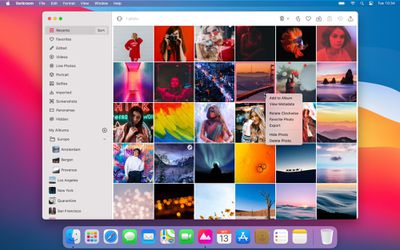
On the Mac, Darkroom offers up editing tools that have been optimized for a Mac experience and designed with the macOS Big Sur aesthetic. There's a translucent sidebar and native window toolbars, and interactions have been optimized for mouse, trackpad, and keyboard input.
Using Darkroom on Mac requires a Darkroom+ subscription, which is priced at $3.99 per month or $19.99 per year and provides access to Darkroom on all platforms. There's also an option to pay $49.99 to unlock the app forever. Darkroom+ includes video editing, curves and selective color tools, watermarking, and more.
Darkroom for Mac and iOS can be downloaded from the App Store. [Direct Link]
Popular Stories
In May, Apple agreed to pay $250 million to settle a U.S. class action lawsuit over Siri AI's delayed launch, and the settlement website is now live.
Apple will pay an estimated $25 per eligible iPhone to eligible customers, who can submit a claim via the settlement website between September 21 and December 21 of this year. The exact payment may be higher or lower than $25 depending on the...
The iPhone 18 Pro Max has a battery capacity over 20 watt-hours, which means there are additional shipping requirements. If an iPhone 18 Pro Max needs to be shipped somewhere, its maximum battery capacity has to be limited through firmware.
According to Apple, the iPhone 18 Pro Max uses an "innovative battery-firmware solution" that limits battery capacity to below 20Wh between when the...
Apple hardware engineering VP Tom Marieb spoke with TechRadar and shared some candid thoughts about Apple's upcoming iPhone Duo.
The iPhone Duo uses a matte nano-texture display, which is meant to cut down on glare and minimize the visibility of the crease. When asked if the iPhone Duo's crease would be more visible over time, as that's what tends to happen on other foldables, Marieb said...