Apple Maps to Get Native Ratings System and Photo Uploads for Places of Interest

The latest iOS 14 beta 6 includes a new way for users to review places of interest and upload photos to Apple Maps that doesn't rely on third party integrations.
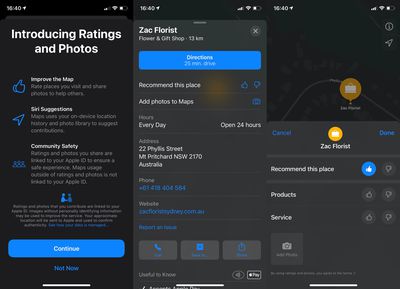
apple maps ratings system ios 14

Images via Twitter user BeauGiles

First spotted by Twitter user BeauGiles and reported by 9to5Mac, the new user interface for places of interest in Maps no longer pulls reviews and photos from the likes of Foursquare, TripAdvisor, and Yelp. Instead, Apple is replacing these third-party services with its own native rating system.

Going forward, users who tap a marker for a place on the map that they have physically visited will be offered the ability to recommend a place using a thumbs up/thumbs down rating that can also distinguish between relevant categories, such as ratings for the quality of products and services in a shop, for example.

Meanwhile, a new "Add Photos to Maps" option in place cards also lets users upload pictures directly to Apple's Maps servers. As outlined in Apple's legal terms for the new feature, the option only appears to users older than 13 years of age and photos are reviewed by humans before appearing in ‌Apple Maps‌.

Currently, the rating system is only visible on some places of interest in the latest iOS 14 beta, as Apple is clearly still in the initial stages of implementing the feature. In future, however, users shouldn't be redirected to third-party apps in the App Store whenever they want to submit a review or photo of a place of interest in ‌Apple Maps‌.

Related Forum: iOS 14

Popular Stories

iOS 26

iOS 26.2 Coming Soon With These 8 New Features on Your iPhone

Thursday December 11, 2025 8:49 am PST by
Apple seeded the second iOS 26.2 Release Candidate to developers earlier this week, meaning the update will be released to the general public very soon. Apple confirmed iOS 26.2 would be released in December, but it did not provide a specific date. We expect the update to be released by early next week. iOS 26.2 includes a handful of new features and changes on the iPhone, such as a new...
AirPods Pro Firmware Feature

Apple Releases New Firmware for AirPods Pro 2 and AirPods Pro 3

Thursday December 11, 2025 11:28 am PST by
Apple today released new firmware designed for the AirPods Pro 3 and the prior-generation AirPods Pro 2. The AirPods Pro 3 firmware is 8B30, up from 8B25, while the AirPods Pro 2 firmware is 8B28, up from 8B21. There's no word on what's include in the updated firmware, but the AirPods Pro 2 and AirPods Pro 3 are getting expanded support for Live Translation in the European Union in iOS...
iOS 26

iOS 26.4 and iOS 27 Features Revealed in New Leak

Friday December 12, 2025 10:56 am PST by
Macworld's Filipe Espósito today revealed a handful of features that Apple is allegedly planning for iOS 26.4, iOS 27, and even iOS 28. The report said the features are referenced within the code for a leaked internal build of iOS 26 that is not meant to be seen by the public. However, it appears that Espósito and/or his sources managed to gain access to it, providing us with a sneak peek...
Google maps feaure

Google Maps Quietly Added This Long-Overdue Feature for Drivers

Wednesday December 10, 2025 2:52 am PST by
Google Maps on iOS quietly gained a new feature recently that automatically recognizes where you've parked your vehicle and saves the location for you. Announced on LinkedIn by Rio Akasaka, Google Maps' senior product manager, the new feature auto-detects your parked location even if you don't use the parking pin function, saves it for up to 48 hours, and then automatically removes it once...
iOS 26

Apple Releases iOS 26.2 With Alarms for Reminders, Lock Screen Changes, Enhanced Safety Alerts and More

Friday December 12, 2025 10:10 am PST by
Apple today released iOS 26.2, the second major update to the iOS 26 operating system that came out in September, iOS 26.2 comes a little over a month after iOS 26.1 launched. ‌iOS 26‌.2 is compatible with the ‌iPhone‌ 11 series and later, as well as the second-generation ‌iPhone‌ SE. The new software can be downloaded on eligible iPhones over-the-air by going to Settings >...
Foldable iPhone 2023 Feature 1

Apple to Make More Foldable iPhones Than Expected [Updated]

Tuesday December 9, 2025 9:59 am PST by
Apple has ordered 22 million OLED panels from Samsung Display for the first foldable iPhone, signaling a significantly larger production target than the display industry had previously anticipated, ET News reports. In the now-seemingly deleted report, ET News claimed that Samsung plans to mass-produce 11 million inward-folding OLED displays for Apple next year, as well as 11 million...
AirTag 2 Mock Feature

Apple AirTag 2: Four New Features Found in iOS 26 Code

Thursday December 11, 2025 10:31 am PST by
The AirTag 2 will include a handful of new features that will improve tracking capabilities, according to a new report from Macworld. The site says that it was able to access an internal build of iOS 26, which includes references to multiple unreleased products. Here's what's supposedly coming: An improved pairing process, though no details were provided. AirTag pairing is already...
iOS 26

15 New Things Your iPhone Can Do in iOS 26.2

Friday December 5, 2025 9:40 am PST by
Apple is about to release iOS 26.2, the second major point update for iPhones since iOS 26 was rolled out in September, and there are at least 15 notable changes and improvements worth checking out. We've rounded them up below. Apple is expected to roll out iOS 26.2 to compatible devices sometime between December 8 and December 16. When the update drops, you can check Apple's servers for the ...
macOS Tahoe 26 Thumb

Apple Releases macOS Tahoe 26.2 With Edge Light

Friday December 12, 2025 10:08 am PST by
Apple today released macOS Tahoe 26.2, the second major update to the macOS Tahoe operating system that came out in September. macOS Tahoe 26.2 comes five weeks after Apple released macOS Tahoe 26.1. Mac users can download the macOS Tahoe update by using the Software Update section of System Settings. macOS Tahoe 26.2 includes Edge Light, a feature that illuminates your face with soft...

Top Rated Comments

Marbles1 Avatar
69 months ago
Apple Maps needs a free, public browser interface.
Score: 22 Votes (Like | Disagree)
Ldubrov Avatar
69 months ago
This may well be the most reliable rating system, as it only permits 1 vote per iPhone and only if that iPhone physically visited the location of the business. That’s pretty amazing. Makes it almost impossible to buy fake up-votes, or ruin a business with fake down-votes.
In aggregate, up or down is just as good as 5 star voting system, if you think about it.
Score: 18 Votes (Like | Disagree)
Caliber26 Avatar
69 months ago

Apple Maps needs a free, public browser interface.
This is the reason why I use Google Maps on my Mac 99.9% of the time. I’ll be looking up something and if I need to view its location for whatever reason, it’s so much simpler to open up a new tab with Google Maps.

I keep forgetting Apple Maps exists on the Mac and I find the app to be kind of weird to use on a desktop.
Score: 14 Votes (Like | Disagree)
kyjaotkb Avatar
69 months ago
I'm glad they aren't relying on Tripadvisor and Yelp anymore. These apps are not nice to use and Tripadvisor's rating are not trustworthy in my personal experience. It'll be hard to reach the level of trust and information density of Google Maps, though.
Score: 12 Votes (Like | Disagree)
ersan191 Avatar
69 months ago
Oh wow, this is kind of a big deal. Now all the Yelp haters can pipe down.

I personally always found Yelp ratings to be far and away the most reliable, but someone made that mediocre documentary about them starring a bunch of bitter owners of underwhelming restaurants and everyone lost their minds. Kind of a big loss for me, but the internet seems to disagree. At least you won't have to open the yelp app to see photos now.

Maybe Apple will come up with an actually good rating system, but Google definitely hasn't so I'm not holding my breath. And a simple thumbs up or thumbs down with no opportunity to type anything is already a really bad sign.
Score: 5 Votes (Like | Disagree)
bchery21 Avatar
69 months ago
Yes yes yes. It was super annoying when trying to look at pictures of a restaurant and being routing to Yelp.
Score: 4 Votes (Like | Disagree)