One of the biggest new features of iOS 14 is Home Screen widgets, which provide information from apps at a glance. The widgets can be pinned to the Home Screen in various spots and sizes, allowing for many different layouts.
When the iOS 14 beta was first released in June, widgets were limited to Apple's own apps like Calendar and Weather, but several third-party developers have begun to test the feature for their own apps. As shown in our screenshots below, this includes:
TestFlight slots are limited, so some apps may be full.
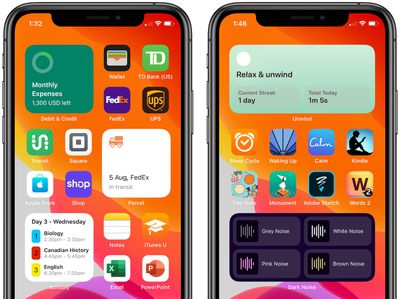
Keep in mind that Home Screen widgets are fairly limited in scope. This is because Apple only allows the widgets to present read-only information, with interactive elements such as scrolling elements or switches not allowed, presumably due to battery life considerations. Tapping on a widget opens the corresponding app.
Also be aware that, as of the fourth developer beta of iOS 14 and iPadOS 14, Apple says that all widgets must be rebuilt using the latest SDK and will not run on previous beta versions. This has temporarily broken some widgets, such as the Aviary widget, which is currently displaying new tweets on a very delayed basis.
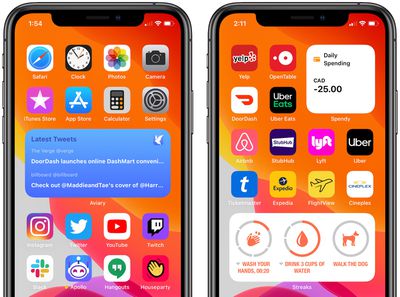
Users interested in trying out these widgets can download Apple's free TestFlight app, tap on the TestFlight links above using an iPhone or iPad, and download a beta version of each app. Not all of the widgets are fully polished yet, so expect some glitches.
Thursday December 11, 2025 8:49 am PST by Joe Rossignol
Apple seeded the second iOS 26.2 Release Candidate to developers earlier this week, meaning the update will be released to the general public very soon.
Apple confirmed iOS 26.2 would be released in December, but it did not provide a specific date. We expect the update to be released by early next week.
iOS 26.2 includes a handful of new features and changes on the iPhone, such as a new...
Thursday December 11, 2025 11:28 am PST by Juli Clover
Apple today released new firmware designed for the AirPods Pro 3 and the prior-generation AirPods Pro 2. The AirPods Pro 3 firmware is 8B30, up from 8B25, while the AirPods Pro 2 firmware is 8B28, up from 8B21.
There's no word on what's include in the updated firmware, but the AirPods Pro 2 and AirPods Pro 3 are getting expanded support for Live Translation in the European Union in iOS...
Friday December 12, 2025 10:56 am PST by Joe Rossignol
Macworld's Filipe Espósito today revealed a handful of features that Apple is allegedly planning for iOS 26.4, iOS 27, and even iOS 28.
The report said the features are referenced within the code for a leaked internal build of iOS 26 that is not meant to be seen by the public. However, it appears that Espósito and/or his sources managed to gain access to it, providing us with a sneak peek...
Wednesday December 10, 2025 2:52 am PST by Tim Hardwick
Google Maps on iOS quietly gained a new feature recently that automatically recognizes where you've parked your vehicle and saves the location for you.
Announced on LinkedIn by Rio Akasaka, Google Maps' senior product manager, the new feature auto-detects your parked location even if you don't use the parking pin function, saves it for up to 48 hours, and then automatically removes it once...
Friday December 12, 2025 10:10 am PST by Juli Clover
Apple today released iOS 26.2, the second major update to the iOS 26 operating system that came out in September, iOS 26.2 comes a little over a month after iOS 26.1 launched. iOS 26.2 is compatible with the iPhone 11 series and later, as well as the second-generation iPhone SE.
The new software can be downloaded on eligible iPhones over-the-air by going to Settings >...
Apple has ordered 22 million OLED panels from Samsung Display for the first foldable iPhone, signaling a significantly larger production target than the display industry had previously anticipated, ET News reports.
In the now-seemingly deleted report, ET News claimed that Samsung plans to mass-produce 11 million inward-folding OLED displays for Apple next year, as well as 11 million...
Thursday December 11, 2025 10:31 am PST by Juli Clover
The AirTag 2 will include a handful of new features that will improve tracking capabilities, according to a new report from Macworld. The site says that it was able to access an internal build of iOS 26, which includes references to multiple unreleased products.
Here's what's supposedly coming:
An improved pairing process, though no details were provided. AirTag pairing is already...
Friday December 5, 2025 9:40 am PST by Tim Hardwick
Apple is about to release iOS 26.2, the second major point update for iPhones since iOS 26 was rolled out in September, and there are at least 15 notable changes and improvements worth checking out. We've rounded them up below.
Apple is expected to roll out iOS 26.2 to compatible devices sometime between December 8 and December 16. When the update drops, you can check Apple's servers for the ...
Friday December 12, 2025 10:08 am PST by Juli Clover
Apple today released macOS Tahoe 26.2, the second major update to the macOS Tahoe operating system that came out in September. macOS Tahoe 26.2 comes five weeks after Apple released macOS Tahoe 26.1.
Mac users can download the macOS Tahoe update by using the Software Update section of System Settings.
macOS Tahoe 26.2 includes Edge Light, a feature that illuminates your face with soft...
I use widgets for Streaks and Things, both of which are essentially useless under the new format. Checking off a quick To Do in a widget or marking a streak as completed, were the entire purpose of these widgets. If I want to open the app, I'll just hit the app icon.
Some widgets still make sense based on the real time information they provide but I can see the usefulness of a large segment of widgets being deprecated.
I've got the Parcel one (fantastic app), although the Widget isn't showing up for me. I assume it's meant to be listed in with the other Apple widgets?
Let’s just say that I am whelmed by these widgets. The only one I remotely find useful is the batteries widget, which sits on my secondary Home Screen all by itself.
I felt the same, although as I adjust how I use apps and as apps add these, I can see the users now. With my new job I'm using my calendar a lot more, and that widget is good. The activity one isn't bad for my fitness too. I can envision good ones for news apps, Slack, MyFitnessPal, Pintrest.
I think this will be like original apps. When the AppStore came along we were arsing about with silly drinking beer apps. It took a wee while for app makers to fully get to grips with what was possible. I think they'll eventually become useful with the third party developers.
Android still has Apple beat by a light year when it comes to widgets. I’m glad Apple is dipping their toe in the water here but lets be real, interactive widgets are fun and actually useful, especially ones with switches/toggles.
I still remember when I first powered on my EVO 4G and the HTC weather/clock widget activated. It had beautiful animations depending the conditions outside.
I know some toggles can be included in the Control Center now but if we’re going to have widgets it’d be nice to include the ability to have them on the home screen too. There are also some widgets that could act like mini versions of the app itself which is also neat...or would be if/when Apple allows it.