

8 Third-Party Home Screen Widgets That You Can Try Out Now on iOS 14 - MacRumors
Skip to Content

8 Third-Party Home Screen Widgets That You Can Try Out Now on iOS 14

One of the biggest new features of iOS 14 is Home Screen widgets, which provide information from apps at a glance. The widgets can be pinned to the Home Screen in various spots and sizes, allowing for many different layouts.

When the iOS 14 beta was first released in June, widgets were limited to Apple's own apps like Calendar and Weather, but several third-party developers have begun to test the feature for their own apps. As shown in our screenshots below, this includes:

TestFlight slots are limited, so some apps may be full.
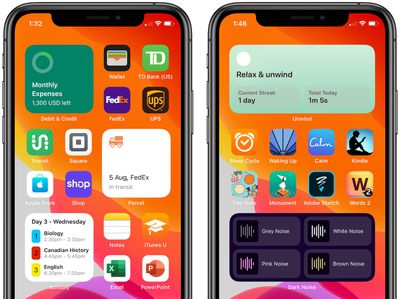
ios 14 third party home screen widgets 1
Keep in mind that Home Screen widgets are fairly limited in scope. This is because Apple only allows the widgets to present read-only information, with interactive elements such as scrolling elements or switches not allowed, presumably due to battery life considerations. Tapping on a widget opens the corresponding app.

Also be aware that, as of the fourth developer beta of iOS 14 and iPadOS 14, Apple says that all widgets must be rebuilt using the latest SDK and will not run on previous beta versions. This has temporarily broken some widgets, such as the Aviary widget, which is currently displaying new tweets on a very delayed basis.
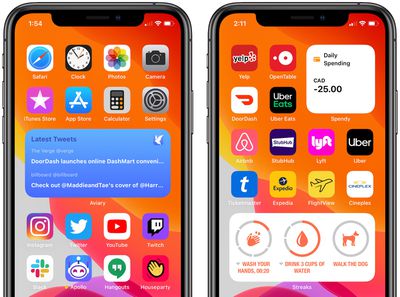
ios 14 third party home screen widgets 2
Users interested in trying out these widgets can download Apple's free TestFlight app, tap on the TestFlight links above using an iPhone or iPad, and download a beta version of each app. Not all of the widgets are fully polished yet, so expect some glitches.

For more, read our guide on how to use Home Screen widgets in iOS 14. Also watch our hands-on video of the widgets in action.

Home Screen widgets will be available to all users when iOS 14 is released in the fall.
Related Forum: iOS 14

Popular Stories

M5 Vision Pro Thumb 2

Apple Has Given Up on the Vision Pro After M5 Refresh Flop

Wednesday April 29, 2026 11:31 am PDT by
Apple has all but given up on the Vision Pro after the M5 model failed to revitalize interest in the device, MacRumors has learned. Apple updated the Vision Pro with a faster M5 chip and a more comfortable band in October 2025, but there were no other hardware changes, and consumers still weren't interested. The Vision Pro has been criticized for its high price tag and its uncomfortable...

app store monthly sub commitment

Apple Introduces App Store Monthly Subscriptions With 12-Month Commitment

Monday April 27, 2026 12:52 pm PDT by
Apple today announced the launch of a new subscription option for App Store developers: monthly subscriptions with a 12-month commitment. The new option allows developers to offer subscribers discounted pricing typically associated with an annual subscription but paid on a monthly basis to keep payments more affordable. This new payment option allows you to offer subscribers more affordable...
Dynamic Island iPhone 18 Pro Feature

This Is What the iPhone 18 Pro Looks Like

Saturday April 25, 2026 10:00 am PDT by
A recent leak provides our best look yet at the design of Apple's upcoming iPhone 18 Pro and iPhone 18 Pro Max models. Leaker Sonny Dickson recently shared images of the first iPhone 18 Pro, iPhone 18 Pro Max, and foldable iPhone dummy models. The images largely conform with rumors about the designs of the three devices and provide the first real visual confirmation of how they will look. ...

Top Rated Comments

ipedro Avatar
75 months ago
I use widgets for Streaks and Things, both of which are essentially useless under the new format. Checking off a quick To Do in a widget or marking a streak as completed, were the entire purpose of these widgets. If I want to open the app, I'll just hit the app icon.

Some widgets still make sense based on the real time information they provide but I can see the usefulness of a large segment of widgets being deprecated.
Score: 16 Votes (Like | Disagree)
tgwaste Avatar
75 months ago
I need a small widget that shows next event, stock price and weather in one widget because apple LOVES wasting vast amounts of screen space.
Score: 6 Votes (Like | Disagree)
Akrapovic Avatar
75 months ago
I've got the Parcel one (fantastic app), although the Widget isn't showing up for me. I assume it's meant to be listed in with the other Apple widgets?
Score: 5 Votes (Like | Disagree)
Caliber26 Avatar
75 months ago
Let’s just say that I am whelmed by these widgets. The only one I remotely find useful is the batteries widget, which sits on my secondary Home Screen all by itself.
Score: 4 Votes (Like | Disagree)
Akrapovic Avatar
75 months ago

Let’s just say that I am whelmed by these widgets. The only one I remotely find useful is the batteries widget, which sits on my secondary Home Screen all by itself.
I felt the same, although as I adjust how I use apps and as apps add these, I can see the users now. With my new job I'm using my calendar a lot more, and that widget is good. The activity one isn't bad for my fitness too. I can envision good ones for news apps, Slack, MyFitnessPal, Pintrest.

I think this will be like original apps. When the AppStore came along we were arsing about with silly drinking beer apps. It took a wee while for app makers to fully get to grips with what was possible. I think they'll eventually become useful with the third party developers.
Score: 3 Votes (Like | Disagree)
Akrapovic Avatar
75 months ago

Can you link the parcel app to your delivery accounts like DPD, UPS, Royal Mail etc so it auto populates the Parcel App or do you have to manually input the tracking number every time?
I think you do it half manually. If you have the tracking number on your clipboard it'll do it (a legit use for the clipboard reading lol)


Yes, it's with all of the Apple Widgets. Same process. I've tried the small and medium sizes. Works just fine.
Cheers my man. Not working for me, but then again this is all beta so I'm sure it'll get fixed soon enough
Score: 2 Votes (Like | Disagree)










































