Apple Shares More 'Behind the Mac' Videos with Tyler Mitchell and James Blake
Apple today shared two new "Behind the Mac" videos on its YouTube channel, offering a look at how Macs can be used in creative workflows. The new videos feature photographer Tyler Mitchell and musician James Blake.
Among the new additions to the series is a spotlight on New York photographer Tyler Mitchell. The video reveals how Mitchell shoots and edits his new portrait series using elements only from his own bedroom, within 24 hours. Apple says that remote cameras were set up around the photographer's apartment, capturing his natural creative process.
The second of the new videos features James Blake as he uses Logic Pro X to create his new song "Ask For More," also shot within 24 hours. This is the second video in Apple's Behind the Mac series that has focused on James Blake, the first of which was released last week.
The new videos are a continuation of Apple's "Behind the Mac" series, launched in 2018, which highlights how various high-profile creative individuals use the Mac for their work on a daily basis.
Popular Stories
Apple today announced it will be permanently closing three retail stores in the U.S. in June, including Apple Trumbull in Trumbull, Connecticut, Apple North County in Escondido, California, and Apple Towson Town Center in Towson, Maryland.
Apple Towson Town Center in Maryland
Apple issued the following statement to MacRumors:At Apple, we are constantly striving to deliver exceptional service...
Apple today released a minor iOS 26.4.1 update for the iPhone 11 and newer. While the release notes for the update only mention unspecified "bug fixes," we have since learned about two specific changes that are included in it.
First, 9to5Mac spotted an Apple Developer Forums thread suggesting that iOS 26.4.1 fixes an iOS 26.4 bug that affected iCloud syncing in some apps.
Second, an...
As we wait for WWDC to kick off next Monday, Apple today announced the winners of its annual Apple Design Awards, recognizing apps and games for their innovation, ingenuity, and technical achievement.
The 2025 Apple Design Award winners are listed below, with one app and one game selected per category:
Delight and Fun - CapWords (App) and Balatro (Game)
Innovation - Play (App) and PBJ -...
Popular Stories
When promoting the MacBook Neo, Apple found a surprise hit with a tiny anthropomorphized version of the Mac Finder icon, which people have taken to calling Little Finder Guy. Little Finder Guy starred in some of Apple's early March TikTok videos, and Apple is now targeting Finder fans with a trio of new videos.
Three tutorials on Apple's TikTok account star Little Finder Guy. Videos feature...
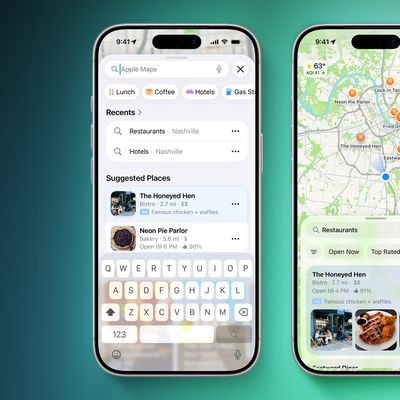
As expected, Apple has officially announced that ads are coming to the Apple Maps app on the iPhone and iPad in the U.S. and Canada starting "this summer."
Apple says businesses in the U.S. and Canada only will be able to place ads in search results and at the top of a new "Suggested Places" section in the app.
"Ads on Maps will appear when users search in Maps, and can appear at the top...
Apple today announced it will be permanently closing three retail stores in the U.S. in June, including Apple Trumbull in Trumbull, Connecticut, Apple North County in Escondido, California, and Apple Towson Town Center in Towson, Maryland.
Apple Towson Town Center in Maryland
Apple issued the following statement to MacRumors:At Apple, we are constantly striving to deliver exceptional service...