2020 iPad Pro Includes Microphone Hardware Disconnect Security Feature - MacRumors
Skip to Content

2020 iPad Pro Includes Microphone Hardware Disconnect Security Feature

Apple has added an anti-eavesdropping feature to the 2020 iPad Pro that ensures the microphone hardware is disabled when a case is attached to the iPad and closed.
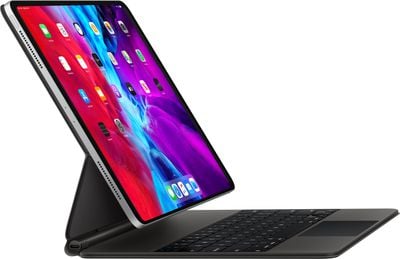
ipadpromagickeyboard
The security feature was first introduced in 2018 in MacBook models using Apple's T2 security chip, which includes a hardware microphone disconnect feature that disables the mics when the notebook's lid is closed.

As spotted by 9to5Mac, an updated version of Apple's Platform Security document makes clear that the anti-eavesdropping is also available on all 2020 ‌iPad Pro‌ models when using an MFi-compliant case.

iPad models beginning in 2020 also feature the hardware microphone disconnect. When an MFi compliant case (including those sold by Apple) is attached to the iPad and closed, the microphone is disconnected in hardware, preventing microphone audio data being made available to any software—even with root or kernel privileges in iPadOS or in case the firmware is compromised.

Apple updated the 11-inch and 12.9-inch ‌iPad Pro‌ models last month with a faster A12Z Bionic chip, a new 10MP Ultra Wide camera to complement the traditional 12MP camera, and a LiDAR depth scanner for improved augmented reality experiences.

For some 2018 ‌iPad Pro‌ owners at least, these updates are relatively modest, but the new security features outlined in Apple's documentation may be enough to tempt more privacy-conscious users.

Related Roundup: iPad Pro
Buyer's Guide: iPad Pro (Neutral)

Popular Stories

All Screen iPhone 2030 Feature Sans Text

iPhone 18 Pro: Nine Reasons Not to Upgrade This Year

Monday September 7, 2026 5:01 am PDT by
Apple is set to unveil new iPhone 18 Pro and iPhone 18 Pro Max models on Wednesday, September 9, and the devices are expected to feature a design that's largely similar to the iPhone 17 Pro models, with a peppering of enhancements inside. Major changes are not expected until next year, when Apple is expected to introduce a radically redesigned 20th-anniversary iPhone. If you're thinking of...
apple surprise and shine event

Apple Event Today: iPhone 18 Pro and iPhone Duo Cheat Sheet

Tuesday September 8, 2026 10:24 am PDT by
Apple's biggest event of the year is almost here, and all eyes are on Cupertino. With the first foldable iPhone expected to headline Apple's "Surprise and Shine" event on Wednesday, September 9, at 10:00 a.m. Pacific Time, the rumor mill has been running full throttle, fuelled by the biggest single design change in the life of the iPhone. To get you up to speed, here's a quick reference...
Four iPhone 18 Pro Colors Mock Feature

iPhone 18 Pro: Release Date and Pre-Orders

Monday September 7, 2026 6:01 pm PDT by
Apple has announced that it will be holding an event on Wednesday, September 9 at 10 a.m. Pacific Time, with the company widely expected to unveil the iPhone 18 Pro, iPhone 18 Pro Max, its first-ever foldable iPhone Ultra, and more. Now that we know the event date, we can make an educated guess about when iPhone 18 Pro pre-orders will begin, but there is a bit of a wrinkle this year....

Top Rated Comments

MakeAppleAwesomeAgain Avatar
84 months ago

What if I want Siri to work?
Doesn't matter if the cover is closed or not, it's still unworkable and incredibly stupid after 8 years.
Score: 37 Votes (Like | Disagree)
84 months ago

I appreciate this kind of thing, Apple.

This also seems to give validity to camera covers.


An optional setting would be good. But if not, only options would be to use Hey Siri on another device if you have one, and to leave your ipad uncovered during the lecture.
The thing I love about the Mac is that the camera and green light are linked together through hardware. If the camera is switched on, that light will show. Because of that, I’ve never worried about a cover on my laptop.
Score: 19 Votes (Like | Disagree)
Falhófnir Avatar
84 months ago
Good, ultimately nothing software based is 100% secure, this at least will be.


Siri works really well for me and I would like it to work even if I have a keyboard case with the cover closed. I hope they have a setting for that.

And this isn’t just about Siri. What if I’m recording a voice memo or something similar. I used to do that a lot with the Smart cover on my iPad 2 to record lectures at the university.
If it's a hardware deactivation of the mic, there's definitely no software path around it, that's the whole point!
Score: 10 Votes (Like | Disagree)
Deimos-7 Avatar
84 months ago
When The camera is activated, the electricity used to power the camera also powers the led for the indicator light. It simply added in series electrically, so it can’t be bypassed with a software hack. If the light is on, the camera is receiving electricity, if it’s off, so is the camera.
It’s a really nice attention to detail by Apple.


Is that true! I didn’t know that :)
Score: 6 Votes (Like | Disagree)
Kabeyun Avatar
84 months ago
Yet more Apple privacy goodness. This is where Apple shines. I will never go Android because I will never trust it. And yes, you can thank Tim Cook for doubling down on privacy as the defining tech issue of our time.

What if I want Siri to work?

Doesn't matter if the cover is closed or not, it's still unworkable and incredibly stupid after 8 years.
True, Siri is a pain in the ass. But I’ll tolerate that pain in exchange for a trustworthy container for my personal data. That’s a far bigger consideration that Siri’s feebleness.
Score: 6 Votes (Like | Disagree)
84 months ago
I appreciate this kind of thing, Apple.

This also seems to give validity to camera covers.


Siri works really well for me and I would like it to work even if I have a keyboard case with the cover closed. I hope they have a setting for that.

And this isn’t just about Siri. What if I’m recording a voice memo or something similar. I used to do that a lot with the Smart cover on my iPad 2 to record lectures at the university.
An optional setting would be good. But if not, only options would be to use Hey Siri on another device if you have one, and to leave your ipad uncovered during the lecture.
Score: 6 Votes (Like | Disagree)