16-Inch MacBook Pro Hands-On: Benchmark and Performance Tests

Apple's new 16-inch MacBook Pro came out last week, and the new machine features a larger display, more maximum RAM, and higher maximum storage, all features designed for Apple's pro user base.

The 16-inch ‌MacBook Pro‌ is using the same 9th-generation Intel processors that were used in the 15-inch ‌MacBook Pro‌ models released in May, but there's a new thermal architecture that Apple says boosts performance. We went hands-on with the new 16-inch ‌MacBook Pro‌ to test those claims, putting it through real world tests and benchmarks.


We tested the base 8-core model, which is the higher-end model priced at $2,799. It has a 2.3GHz Intel Core i9 processor (turbo boost up to 4.8GHz), an AMD Radeon Pro 5500M GPU with 4GB GDDR6 memory, a 1TB SSD, and 16GB 2666MHz DDR4 RAM.

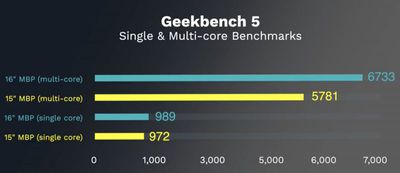
Starting off with Geekbench 5 testing, the 16-inch ‌MacBook Pro‌ outshined the similarly specced 15-inch model that was released earlier this year when it came to multi-core performance.

The 16-inch machine earned a single core score of 989 and a multi-core score of 6733, while the 15-inch machine scored 972 in the single-core test and 5781 in the multi-core test. That's an increase of 16.5 percent, which is a decent performance boost considering these machines have the same processor.
macbookpro16geekbench5
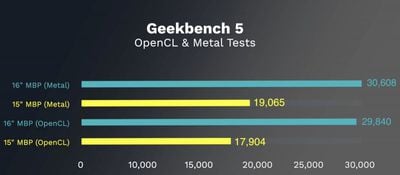
There are even more significant gains with the new 5500M GPU. In an OpenCL test, the 16-inch ‌MacBook Pro‌ scored 30608, compared to the 15-inch ‌MacBook Pro‌'s score of 17904, and in a Metal test, the 16-inch ‌MacBook Pro‌ scored a 29840 vs. the 15-inch ‌MacBook Pro‌'s score of 19065.

macbookpro16openclmetal
Combined, the updated GPU and the new thermal architecture of the 16-inch ‌MacBook Pro‌ have brought some notable performance improvements. Of course, benchmarks aren't reflective of real world usage, so we also did some testing of apps pro users might take advantage of.

In Final Cut Pro X, we exported a five minute 4K video while also running other apps at the same time to test export conditions under heavy RAM usage. The export took two minutes and 35 seconds, half the time of the video.

Conducting the same test in Premiere Pro (with apps like Safari and QuickTime running) the five minute video took three minutes and five seconds to export. These times are similar to what we see with a baseline 2017 iMac Pro.

We also tested Photoshop with multiple other apps open in the background, including Safari with a ton of tabs. The machine was using upwards of 70 percent of the 16GB RAM, but performance was solid with no issues. The fans kicked in of course, but that's to be expected.

It's worth noting that in these tests, the ‌MacBook Pro‌ got just as hot as other i9 MacBook Pros that experienced thermal issues in the past, but power and performance were not throttled per the Intel Power app.

All in all, the new 16-inch ‌MacBook Pro‌ is performing well, and the updated thermal architecture has indeed had a significant positive effect on power management and thermal regulation. The 16-inch ‌MacBook Pro‌ is speedy, stable, and a solid option for the pro user base these machines are designed for.

What do you think of the 16-inch ‌MacBook Pro‌'s performance? Let us know in the comments.

Related Roundup: MacBook Pro
Buyer's Guide: MacBook Pro (Buy Now)
Related Forum: MacBook Pro

Popular Stories

iOS 26

iOS 26.2 Coming Soon With These 8 New Features on Your iPhone

Thursday December 11, 2025 8:49 am PST by
Apple seeded the second iOS 26.2 Release Candidate to developers earlier this week, meaning the update will be released to the general public very soon. Apple confirmed iOS 26.2 would be released in December, but it did not provide a specific date. We expect the update to be released by early next week. iOS 26.2 includes a handful of new features and changes on the iPhone, such as a new...
iOS 26

iOS 26.4 and iOS 27 Features Revealed in New Leak

Friday December 12, 2025 10:56 am PST by
Macworld's Filipe Espósito today revealed a handful of features that Apple is allegedly planning for iOS 26.4, iOS 27, and even iOS 28. The report said the features are referenced within the code for a leaked internal build of iOS 26 that is not meant to be seen by the public. However, it appears that Espósito and/or his sources managed to gain access to it, providing us with a sneak peek...
AirPods Pro Firmware Feature

Apple Releases New Firmware for AirPods Pro 2 and AirPods Pro 3

Thursday December 11, 2025 11:28 am PST by
Apple today released new firmware designed for the AirPods Pro 3 and the prior-generation AirPods Pro 2. The AirPods Pro 3 firmware is 8B30, up from 8B25, while the AirPods Pro 2 firmware is 8B28, up from 8B21. There's no word on what's include in the updated firmware, but the AirPods Pro 2 and AirPods Pro 3 are getting expanded support for Live Translation in the European Union in iOS...
iOS 26

Apple Releases iOS 26.2 With Alarms for Reminders, Lock Screen Changes, Enhanced Safety Alerts and More

Friday December 12, 2025 10:10 am PST by
Apple today released iOS 26.2, the second major update to the iOS 26 operating system that came out in September, iOS 26.2 comes a little over a month after iOS 26.1 launched. ‌iOS 26‌.2 is compatible with the ‌iPhone‌ 11 series and later, as well as the second-generation ‌iPhone‌ SE. The new software can be downloaded on eligible iPhones over-the-air by going to Settings >...
Google maps feaure

Google Maps Quietly Added This Long-Overdue Feature for Drivers

Wednesday December 10, 2025 2:52 am PST by
Google Maps on iOS quietly gained a new feature recently that automatically recognizes where you've parked your vehicle and saves the location for you. Announced on LinkedIn by Rio Akasaka, Google Maps' senior product manager, the new feature auto-detects your parked location even if you don't use the parking pin function, saves it for up to 48 hours, and then automatically removes it once...
AirTag 2 Mock Feature

Apple AirTag 2: Four New Features Found in iOS 26 Code

Thursday December 11, 2025 10:31 am PST by
The AirTag 2 will include a handful of new features that will improve tracking capabilities, according to a new report from Macworld. The site says that it was able to access an internal build of iOS 26, which includes references to multiple unreleased products. Here's what's supposedly coming: An improved pairing process, though no details were provided. AirTag pairing is already...

macOS Tahoe 26 Thumb

Apple Releases macOS Tahoe 26.2 With Edge Light

Friday December 12, 2025 10:08 am PST by
Apple today released macOS Tahoe 26.2, the second major update to the macOS Tahoe operating system that came out in September. macOS Tahoe 26.2 comes five weeks after Apple released macOS Tahoe 26.1. Mac users can download the macOS Tahoe update by using the Software Update section of System Settings. macOS Tahoe 26.2 includes Edge Light, a feature that illuminates your face with soft...


iOS 26

15 New Things Your iPhone Can Do in iOS 26.2

Friday December 5, 2025 9:40 am PST by
Apple is about to release iOS 26.2, the second major point update for iPhones since iOS 26 was rolled out in September, and there are at least 15 notable changes and improvements worth checking out. We've rounded them up below. Apple is expected to roll out iOS 26.2 to compatible devices sometime between December 8 and December 16. When the update drops, you can check Apple's servers for the ...

Top Rated Comments

TheAllmighty Avatar
79 months ago
Wow thats fast! But not as fast as the MacBook Pro 2020 model
Score: 23 Votes (Like | Disagree)
CarlJ Avatar
79 months ago

Wow thats fast! But not as fast as the MacBook Pro 2020 model
That's nothing - on the 2025 model, the tests finish before they begin.
Score: 17 Votes (Like | Disagree)
nezr Avatar
79 months ago

Here are my thoughts on the new MacBook Pro. I love the increased speed and greater RAM offering, but I'm going wait for the Mac lineup to start featuring Face ID before I make any sort of upgrade. I also think at the current price point of MacBook Pros, it should feature an upgraded camera. A 720p camera is not "Pro" and doesn't cut it in 2019. Other than that, I really like the improvements Apple has made and it is a step in the right direction.
Who cares about Face ID when your watch can unlock the MacBook Pro without even looking at it.
Score: 12 Votes (Like | Disagree)
iMi Avatar
79 months ago
I love the performance of the new MacBook Pro. It's a fantastic machine. Really glad I ordered it.
Score: 12 Votes (Like | Disagree)
happyslayer Avatar
79 months ago
Happy to see all the positive reviews and comments about the new 16" MBP. I'm still rocking my 15" 2018 MBP and it's great for what I do. (mainly computer/network support and writing) Also I actually like the feel of the butterfly mechanism keyboard and have had no issues with it. Anyway, one question:

I see all these complaints about the 720p camera. Just curious what do you all use the laptop mounted camera for? I do Skype and Zoom and FaceTime and it's been totally fine. Nobody has complained about the image quality. Do you guys use something special that needs a higher rez cam? Or is it just the idea that a $2400 plus computer "only" has a 720p cam. Just not sure what the complaints about it are. I would like it to have Face ID eventually just for convenience but otherwise, quality seems fine.
Score: 11 Votes (Like | Disagree)
Adult80HD Avatar
79 months ago
I ordered a maxed out (well, all but the SSD, 4TB there is still 3x more than I need) 16" when they launched and it arrived today, two days early. I was using a maxed out mid-2018 15" MBP and this thing is *noticeably* faster in everyday use so far. My big reason for the upgrade was my work, where I edit lots of high-resolution photos on a LG SuperFine 5K display (and the new Pro XDR soon!). Adobe Lightroom has been dogging since version 8.4 moved a lot of processing to the GPU (they say you can turn that off, but doing so has no effect on performance problems introduced with version 8.4). With the new 16" it's zipping along really fast. I also do a lot of image stacking using Helicon Focus and timing the same stacks of images, the new machine is easily twice as fast, and on some stacks it finishes the jobs in 1/4 the time of my previous machine.

I'm loving the extra screen real estate. It's not immediately obvious but after 4-5 hours on the new machine, going back to the old 15" it was immediately noticeable. I actually didn't have problems with the previous keyboard after the first version was updated, but again, after going back from using the 16" I am appreciating the reversion to a keyboard with greater "feel" and depth to the keystrokes.

If upgrading from a very powerful mid-2018 machine is this noticeable, some of you on the much older machines will see a huge performance difference. BTW, the extra size is barely noticeable vs. the 15" MBP.
Score: 9 Votes (Like | Disagree)