YouTube App Adds HDR Support for iPhone 11 Pro and iPhone 11 Pro Max - MacRumors
Skip to Content

YouTube App Adds HDR Support for iPhone 11 Pro and iPhone 11 Pro Max

by

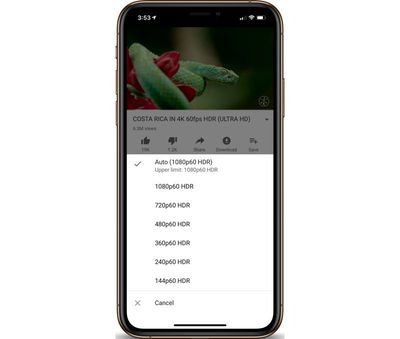
Over the weekend, MacRumors forum users noted that the most recent YouTube App update added HDR support for the iPhone 11 Pro and iPhone 11 Pro Max. YouTube has supported HDR on its iOS app since the iPhone X but has required updates to support new hardware.
iphonexsmaxhdr
To check to see if you are watching YouTube videos at their highest quality, you can simply press the three dots on the top right of the video, and you should see "HDR" options listed on supported videos. HDR options are also only be available on devices released since 2017 that have OLED displays (so that excludes all iPad models and the iPhone 11 and iPhone XR).

Tag: HDR
Related Forum: iPhone
Top Rated Comments

OneInfiniteLooper Avatar
88 months ago

I thought that the X and XS had HDR displays too?
They do, and it’s been supported on those phones as well. Updates came out after release of those phones. Each new phone requires the app be updated, so this is just adding the new 11 models to the mix.
Score: 2 Votes (Like | Disagree)
Caliber26 Avatar
88 months ago

It only took them a month to add HDR support for new iPhone

It’s taking Apple even longer to fix my Reminders, so yeah...
Score: 2 Votes (Like | Disagree)
Justin Cymbal Avatar
88 months ago
I’ve noticed that YouTube tends to update their app pretty much every Sunday
Score: 2 Votes (Like | Disagree)
Banglazed Avatar
88 months ago
It only took them a month to add HDR support for new iPhone 11 but I still hope for 4K support

Score: 2 Votes (Like | Disagree)
arkhanjel Avatar
88 months ago
Nice, now if only they would fix their Apple TV app. Out of all the video playback apps on the platform YouTube is the only one that tries to force HDR on everything even videos that aren't encoded and it leads to a very washed out look.
Score: 1 Votes (Like | Disagree)
88 months ago

Can Google and Apple find a way for iOS to play back 4K on YouTube?
Well, both will switch to AV1 eventually but until then Google likely isn’t going to spent money on transcoding 4K videos to H.265 solely for Apple users.


I use Wipr in Catalina and 1blocker legacy on iOS. I haven't seen an ad before videos in a very long time.
I recently bought 1Blocker X and enabled all options except ‘block comments’, yet I see ads in the YT app like before. I read in the reviews that it blocks ads for other people, but since there is no dedicated toggle for this, idk how to enable it. :/
Score: 1 Votes (Like | Disagree)

Popular Stories

iphone 16 teal

'Siri AI' Lawsuit Update: Apple to Pay Owners of These iPhone Models
Thursday July 9, 2026 7:08 am PDT by
In May, Apple agreed to pay $250 million to settle a U.S. class action lawsuit over Siri AI's delayed launch, and eligible iPhone users could receive up to a $95 payout. This week, the California court overseeing the case held a hearing regarding preliminary approval of the settlement, but the judge has not yet issued a ruling. It will likely be at least a few more months before eligible...
Apple TV Thumb 3

Everything Coming in the 2026 Apple TV 4K

Wednesday July 8, 2026 4:51 pm PDT by
The Apple TV 4K hasn't been updated since 2022, and it's due for a refresh. An update is planned for 2026, but Apple is likely going to wait to launch it after Siri AI launches in iOS 27. Design Apple TV design updates don't happen often, and that's not changing. The next Apple TV is going to have the same squircle shape as the current model, and it'll continue to be made from a black...
apple wallet drivers license feature iPhone 15 pro

Apple Says iPhone Driver's Licenses Will Expand to These 6 U.S. States

Thursday July 9, 2026 7:29 am PDT by
In select U.S. states, residents can add their driver's license or state ID to the Apple Wallet app on the iPhone and Apple Watch, and then use it to display proof of identity or age at select airports and businesses, and in select apps. To set up the feature, open the Wallet app on the iPhone and tap on the plus sign in the top-right corner. Next, tap on Driver's License and ID Cards,...