

Ulysses 17 Gains Keyword Management for iOS, New iPad Fullscreen Mode, and More - MacRumors
Skip to Content

Ulysses 17 Gains Keyword Management for iOS, New iPad Fullscreen Mode, and More

by

Version 17 of Ulysses was released today, bringing some much-requested features to the popular Mac and iOS app for writers.

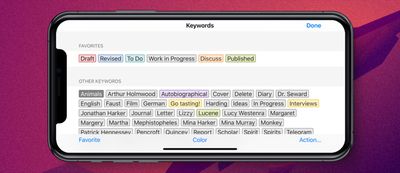
First up, the developers have brought keyword management to the iOS app, following the introduction of the feature on Mac in spring.
ulysses 17 ios
You can now edit or delete keywords, customize colors, and merge several keywords into one, whichever device you're working on.

You can also mark your most-used keywords as favorites for easy access within the app, with full keyword sync across Mac and iOS.

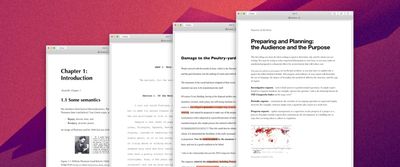
Regular Ulysses users will be familiar with the app's ability to export their texts as a formatted PDF or DOCX document. In this latest release, four new export styles are included.

Business is for laying out reports and strategy papers. Academica is for lecture notes. Review is suited for on-paper editing (the style reproduces comments and text deletions and comes with a large margin for hand-written notes).
ulysses 17 export
Finally, Manuscript is geared to the U.S. layout standards used for submitting literary works to publishers.

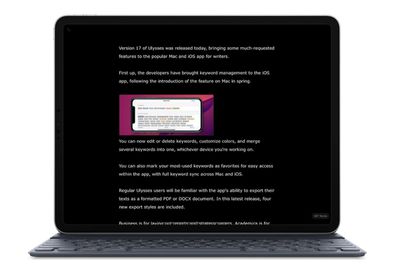
In addition to the above, this version shows image captions in image previews, and for iPad users, there's a completely overhauled fullscreen mode that puts your text front and center.

There are no onscreen toolbars, and sidebars slide into view for quick interactions before sliding out again to keep you focused. With an external keyboard attached, the same Mac shortcut Command-Control-F opens and closes fullscreen mode, and the shortcut bar is hidden.
ulysses 17 ipad
Elsewhere in this update, there's added support for previewing image captions in the editor and exporting them to PDF and DOCX documents, and a handful of bug fixes have been implemented.

Ulysses can be downloaded for free on the App Store and the Mac App Store, with version 17 rolling out to existing users today.

After a 14-day trial period, a subscription is required to unlock the app on all devices. A monthly subscription costs $4.99, while a yearly subscription is $39.99. Students can use Ulysses at a discounted price of $11.99 per six months. The discount is granted from within the app.


Tag: Ulysses

Top Rated Comments

90 months ago
Agreed. Paid for premium price, then they went to subscription. Horrible company.

Moved everything over to iA Writer, Scrivener and Devonthink. Much happier.

Incidentally, a similar thing happened with 1Password. Moved everything over to Enpass and Myki, and couldn’t be happier.

Will not pay subscription prices for these apps. Happy to pay premium for a good app.

IMO, 1Password at least has a foot to stand on since security integrity is more paramount for a password manager. That’s something worth paying into.
Score: 5 Votes (Like | Disagree)
90 months ago
Another example where subscription-based app doesn’t make too much sense. Sigh. People don’t mind paying a bit more for quality software (like with Affinity) but they don’t want to be exploited through monthly payments and constant reminder that they lose access to their data if they stop paying.
Score: 5 Votes (Like | Disagree)
90 months ago
Why would you wish that? I purchased it, used it, loved it, advocated for it, put all my writing into it to the point where it became my full workflow, all on their explicit promise that they'd never go SaaS, and then they held me hostage for it. A case where it was better to never have loved at all than to have loved and lost.
Agreed. Paid for premium price, then they went to subscription. Horrible company.

Moved everything over to iA Writer, Scrivener and Devonthink. Much happier.

Incidentally, a similar thing happened with 1Password. Moved everything over to Enpass and Myki, and couldn’t be happier.

Will not pay subscription prices for these apps. Happy to pay premium for a good app.

Score: 4 Votes (Like | Disagree)
Heineken Avatar
90 months ago
Subscriptions? Yeah, but no.

Score: 4 Votes (Like | Disagree)
Apple_Robert Avatar
90 months ago
Ulysses is 50% off right now.
Score: 3 Votes (Like | Disagree)
90 months ago
I want an app like with no markdown. I want a wiki, I guess Ulysses is made for writers who will export their work in different formats.
Wiki? Did you mean a WYSIWYG editor? Try Scrivener 3.0 for macOS.
Score: 2 Votes (Like | Disagree)

Popular Stories

Apple TV Thumb 3

Everything Coming in the 2026 Apple TV 4K

Wednesday July 8, 2026 4:51 pm PDT by
The Apple TV 4K hasn't been updated since 2022, and it's due for a refresh. An update is planned for 2026, but Apple is likely going to wait to launch it after Siri AI launches in iOS 27. Design Apple TV design updates don't happen often, and that's not changing. The next Apple TV is going to have the same squircle shape as the current model, and it'll continue to be made from a black...
iphone 16 teal

'Siri AI' Lawsuit Update: Apple to Pay Owners of These iPhone Models

Thursday July 9, 2026 7:08 am PDT by
In May, Apple agreed to pay $250 million to settle a U.S. class action lawsuit over Siri AI's delayed launch, and eligible iPhone users could receive up to a $95 payout. This week, the California court overseeing the case held a hearing regarding preliminary approval of the settlement, but the judge has not yet issued a ruling. It will likely be at least a few more months before eligible...
apple wallet drivers license feature iPhone 15 pro

Apple Says iPhone Driver's Licenses Will Expand to These 6 U.S. States

Thursday July 9, 2026 7:29 am PDT by
In select U.S. states, residents can add their driver's license or state ID to the Apple Wallet app on the iPhone and Apple Watch, and then use it to display proof of identity or age at select airports and businesses, and in select apps. To set up the feature, open the Wallet app on the iPhone and tap on the plus sign in the top-right corner. Next, tap on Driver's License and ID Cards,...






































