

Sidecar in macOS Catalina Brings Touch Bar Controls to Non-Touch Bar Mac Users - MacRumors
Skip to Content

Sidecar in macOS Catalina Brings Touch Bar Controls to Non-Touch Bar Mac Users

by

In macOS Catalina, it seems whether or not you own a MacBook with a Touch Bar, Apple still wants you to be able to access those virtual controls, even if that means putting them right on the screen.
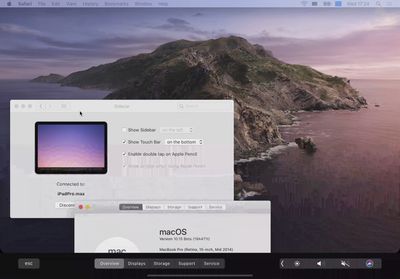
sidecar touch bar macos catalina

Image credit: Reddit user dotmax

Apple's new Sidecar app lets you connect an iPad to your Mac for extra screen space. It works both wired and wirelessly, and supports the Apple Pencil as an input device for the Mac.

And for Mac apps with Touch Bar support, the controls appear at the bottom of your ‌iPad‌ screen — even if your Mac doesn't have a Touch Bar.

In other words, the ‌iPad‌ Touch Bar mirrors the MacBook Pro's Touch Bar on a model with a Touch Bar, and when used with a ‌MacBook Pro‌ that doesn't have a Touch Bar, it lets you tap into functionality that would otherwise be unavailable.

The implementation will be familiar to users of Duet Display, which was first to offer Touch Bar support on a connected tablet's screen.

Since its introduction, the Touch Bar has divided users – some find the functionality useful, while others prefer their ‌MacBook Pro‌ to have a full set of physical function keys instead.

The ‌Sidecar‌ app is compatible with Late 2015 27" iMac or newer, 2017 ‌iMac‌ Pro, Mid 2016 ‌MacBook Pro‌ or newer, Late 2018 Mac mini or newer, Late 2018 MacBook Air or newer, Early 2016 MacBook or newer, and 2019 Mac Pro.


Top Rated Comments

CLS727 Avatar
93 months ago
Nice.... but sucks for the Duet Display people..... talk about getting your business gutted....

Score: 15 Votes (Like | Disagree)
- rob - Avatar
93 months ago
The touchbar is obnoxious for users, who would prefer an actual touch screen and physical function keys, and for developers who have better things to do than support the touchbar for the small percentage of users who have them. At the very least apple should make real function keys an option on all configs of the MacBook Pro, not just the wimpy one with inadequate cooling and slower WiFi.
This is a wild guess but I can actually see this being Apple’s “soft landing” for the Touchbar apps. If it is going to get discontinued, Apple can say: “well, these are still useful they just live in sidecar now.

However, I suspect if this becomes the case it will end up only marginally supported and eventually die completely.
Score: 5 Votes (Like | Disagree)
aaronhead14 Avatar
93 months ago
This is a better implementation of Touch Bar than the actual Touch Bar on MacBooks. Lol.
Score: 4 Votes (Like | Disagree)
93 months ago
Since its introduction, the Touch Bar has divided users - some find the functionality useful, while others prefer their MacBook Pro to have a full set of physical function keys instead.
The touchbar is obnoxious for users, who would prefer an actual touch screen and physical function keys, and for developers who have better things to do than support the touchbar for the small percentage of users who have them. At the very least apple should make real function keys an option on all configs of the MacBook Pro, not just the wimpy one with inadequate cooling and slower WiFi.
Score: 4 Votes (Like | Disagree)
TechGod Avatar
93 months ago
Apple really knocked it out of the park this time.
Score: 3 Votes (Like | Disagree)
93 months ago
It’s not a small percentage, it’s been out years and hundreds of thousands of them will have been sold.
Macs represent about 7% of global computer sales, so even if 1/4 of macs sold have a touchbar, it means developers of cross-platform applications have to do extra work to support 1 in 50 users (and even then how many regularly use an external keyboard & monitor?). Of course some apps have a much larger share with a touchbar depending on the audience, but it's not a huge number. Some devs have done a fantastic job of leveraging the touchbar, but overall I'd rather have an actual touchscreen, and map those touchbar features to traditional function keys so devs can put their efforts into improving other areas of their software.
Score: 2 Votes (Like | Disagree)

Popular Stories

apple back to school sans airpods 2

Apple's 2026 Back to School Offer is Coming Soon

Sunday July 12, 2026 7:29 am PDT by
Apple's stores will be rolling out Back to School marketing materials this week, according to Bloomberg's Mark Gurman. This suggests that the offer will begin in the U.S. in the next few days. Last year, college students and educational staff could receive a free accessory like AirPods 4 or an Apple Pencil Pro with the purchase of a qualifying Mac or iPad model. The Back to School offer is in...
Waze logo

5 New Waze Features Rolling Out Now: Here Are All the Details

Monday July 13, 2026 3:42 am PDT by
Google today announced that Waze is getting a handful of new features, including some Gemini-powered personalization enhancements for Conversational Reporting. Conversational Reporting already uses Gemini when users report traffic incidents like slowdowns, but now you can use it to suggest map updates like road closures or outdated addresses. Saying something like "The road is closed here"...
Mac Pro Feature Teal

Apple's M7 Ultra Chip Designed to Match a 2019 Mac Pro Feat

Sunday July 12, 2026 8:53 am PDT by
Apple's M7 Ultra chip coming in 2028 is designed to support up to 1.5TB of unified memory, according to Bloomberg's Mark Gurman. However, whether such a configuration is offered may depend on the state of the ongoing memory chip shortage. In 2019, Apple released an Intel-based Mac Pro with up to 1.5TB RAM....










































