

Pixelmator Photo for iPad Now Available [Updated] - MacRumors
Skip to Content

Pixelmator Photo for iPad Now Available [Updated]

by

Update: Pixelmator Photo is now available for iPad. Original story follows.

The team behind Pixelmator, the popular photo editing app designed for Mac and iOS, today announced the upcoming launch of a new app, Pixelmator Photo.

Pixelmator Photo is an app designed to allow photographers to edit images on the iPad with a collection of nondestructive color adjustment tools that match those available through the Pixelmator desktop app. Pixelmator Photo was designed specifically for the ‌iPad‌ and takes advantage of Apple's latest iOS technologies.


It features AI-based auto enhancing tools, RAW support, a repair tool for removing unwanted objects from photos, and preset filters inspired by analog film.
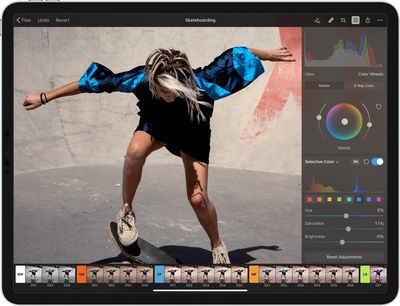
pixelmatorphotocolortools
There are tools for adjusting brightness, exposure, hue, saturation, vibrance, shadows, and highlights, and there are standard features you'd expect to find in any photo editing app like levels and curves, plus options for selectively adjusting colors, fixing white balance, cropping, and more.

The ML Enhance tool powered by machine learning automatically enhances and crops photographs using a Core-ML powered algorithm that the Pixelmator team trained with 20 million professional photos. It fixes white balance, exposure, and individual color range in each image, while also cropping photos to the ideal composition.
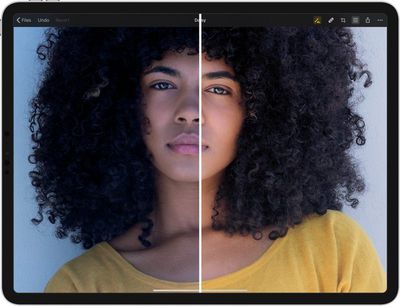
pixelmatorphotoautoenhance
Pixelmator has always had a powerful repair tool, which has been brought to Pixelmator Photo. It can be used to remove blemishes or cut out whole objects accurately from photos while preserving the background.
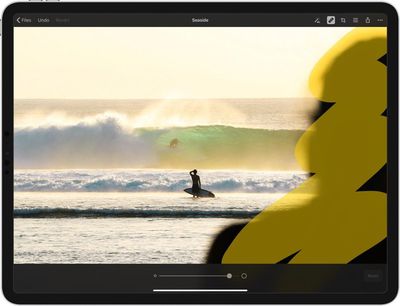
pixelmatorphotorepairtool
The app offers a collection of presets inspired by different photography styles, including black and white, cinematic to emulate the orange and teal film look, classic films based on classic film looks, and modern films for a more modern style. There are also presets for landscape shots, urban shots, and night shots, plus users can save their own custom presets.
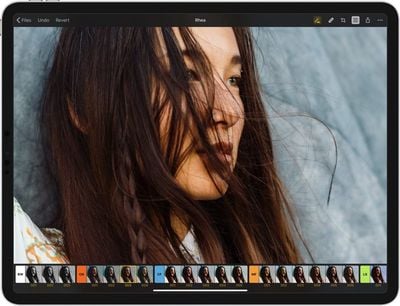
pixelmatorphotoepresets
Pixelmator Photo can be pre-ordered for $3.99, a $1 discount off of the $4.99 launch price. The deal will end when the app becomes available on April 9. [Direct Link]


Top Rated Comments

GoAndrius Avatar
99 months ago
Probably the simplest and most obvious way to put it is: Pixelmator is a layer-based image editor. Kinda like Photoshop. Pixelmator Photo is photo editor with a focus on RAW editing specifically. Kinda like Lightroom. Obviously not the most marketing-y description but probably the kind of description most people will immediately understand. :D

As for the device cut-off — there isn't a way to differentiate between, for example, the iPad Air and the iPad Air 2, so in order to make sure that everybody who gets the app has a great user experience, we've had to set the cut-off point a little later than we maybe would've liked to. Compatible devices are listed on the App Store page ('https://itunes.apple.com/app/pixelmator-photo/id1444636541') and our Pixelmator Photo page ('https://www.pixelmator.com/photo/').
Score: 16 Votes (Like | Disagree)
Amazing Iceman Avatar
99 months ago
Is this app really needed if you already have Pixelmator and Affinity Photo?
What are the advantages?
Score: 6 Votes (Like | Disagree)
99 months ago
Just out of interest, what was it you didn't like about the transition from the original Pixelmator to Pixelmator Pro? Bearing in mind the facts that, for App Store apps, there isn't a way of providing upgrade discounts...
I don’t know how you did the transition so I’m taking this comment without any context but there absolutely is a way of providing an upgrade discount for people who own app A1 and want to buy app A2. You put them in a bundle at a reduced price of A1 price + upgrade price. Complete my bundle does the rest by removing the price they paid in the first place from the amount to pay for the bundle.
Score: 4 Votes (Like | Disagree)
ipedro Avatar
99 months ago
Do you mean creating more than one library for use? Photos does already support that.

[LIST=1]

* Hold down the Option key on your keyboard.
* Double-click on Photos.
* Click the Create New... button in the Choose Library window.
* Name your library.
* Click OK.

https://www.imore.com/how-use-albums-and-libraries-photos-mac

Right. I meant in iOS. The multiple library thing isn’t really meant to be used in that way. For example, it’ll mess up with your iCloud sync which is only built to work with a master library.
Score: 3 Votes (Like | Disagree)
ipedro Avatar
99 months ago
This gets very close to providing a successor to Aperture but on iPad. What’s still missing is a photo management system. A professional photographer needs to be able to keep their hundreds, even thousands of photos per shoot, separate from their personal photos. If Apple were to update the Photos app with multiple libraries, along with this app as an external editor, I can confidently say that I’d drop Lightroom.

In the meantime, I’ll buy this app even though I can’t use it professionally because I want to support the developer. I want to invest in the future of this company. I love how the Pixelmator team sticks so closely to Apple UI standards, so much that their apps look like they were designed by Apple themselves, — essentially what a native advanced photo editing app would look like if Apple were to make one.

I would not be at all opposed to Apple acquiring this company if they kept the team intact and let them do their thing.
Score: 3 Votes (Like | Disagree)
99 months ago
Confused by all these different versions.

I've now got all my photos and videos using iCloud photo library on my 256Gb iPad. I only want very basic editing and organising but want to be fully integrated with iCloud photo library for using on my iMac and iPad.

Which app do I choose?!?
Thanks
It's hard to beat Apple's Photos app for what you describe.
[doublepost=1554257508][/doublepost]
Is there any chance we get a Lightroom competitor for macOS? I've been making due with Capture One, but it would be great to have a true mac-like Aperture alternative. Also, that app icon is really really nice looking
I agree that a third-party Aperture replacement (and alternative to Lightroom) would be great, especially if it could sync with iCloud across devices the way Photos does.
Score: 3 Votes (Like | Disagree)

Popular Stories

Apple MacBook Pro with PROLED XDR Display family lineup feature

Apple Announces OLED MacBook Pro With Touch Display

Wednesday October 28, 2026 10:11 am PDT by
Apple today announced a new high-end MacBook Pro, which is available in 14-inch and 16-inch sizes. The new device has a PROLED XDR display that supports touch gestures, and a glowing rear Apple logo. Pricing on the MacBook Pro starts at $2,899 for the 14-inch model and $3,399 for the 16-inch model. Apple says the MacBook Pro has the "world's best display in a pro laptop." The PROLED...
Apple MacBook Pro 14 in with M6 hero

Apple Announces New 14-Inch MacBook Pro With M6 Chip

Tuesday October 27, 2026 6:01 am PDT by
Apple today announced a refreshed 14-inch MacBook Pro featuring the M6 chip, upgraded connectivity specifications, and more. The M6 chip in the MacBook Pro features a 12-core CPU with 2 super cores, 4 performance cores, and 6 efficiency cores, paired with a 12-core GPU. This is up from the M5 chip with a 10-core CPU with 4 super cores and 6 efficiency cores, paired with a 10-core GPU. M6...
iPad mini OLED feature 1

Apple Executive Comments on New iPad Mini Lacking 120Hz Display

Thursday October 29, 2026 1:47 pm PDT by
While the new iPad mini has an OLED display, the device does not support ProMotion, meaning the display's refresh rate is limited to 60Hz instead of 120Hz. ProMotion support would have allowed for the iPad mini's refresh rate to automatically adjust from 10Hz to 120Hz depending on the content being displayed, but evidently Apple has kept the feature exclusive to the iPad Pro among iPad...
Latest Stories
Samsung Mocks iPhone Duo Display Cracks in New Ad Campaign
1 hour ago
The MacRumors Show: OLED MacBook Pro, iPad Mini 8, and More
2 hours ago
MacBook Pro With Touch Display: 15 More Details Revealed
2 hours ago
Russia Places Apple on State Surveillance Registry
4 hours ago
Halloween Weekend Brings Discounts on Apple Accessories and Pre-Orders
4 hours ago
Apple Has Released More Than 25 New Products in the Past Two Months
4 hours ago
Local Code Launches as Free, Private AI Assistant Tool for Mac
5 hours ago
Apple Acquires Ascend.io
5 hours ago
HomePod Mini 2 Launches Today: All the New Features
6 hours ago
AirTag 2 4-Pack Drops to New Low Price of $69.99
6 hours ago
Rian Johnson's iPhone Camera App Goes Viral
6 hours ago
Where Did All the iPhone Duos Go? Mostly to Apple's Stores
8 hours ago
Apple's Touchscreen MacBook Pro Could Ship 1.5M Units in 2027
9 hours ago
New Apple TV 4K and iPad Mini: RAM Amounts Revealed
18 hours ago
Apple Executive Comments on New iPad Mini Lacking 120Hz Display
22 hours ago
Here's a Hands-On Look at HomePod Mini 2's New Two-Tone Colors
22 hours ago
Apple Lowers App Store Fees in Taiwan Starting October 31
23 hours ago
HomeView Pre-Order Returns to $289.99 on Amazon
1 day ago
Apple Avoids Showing Pinched Fingers on iPad Mini Page in South Korea
1 day ago
Old 'Popcorn Time' App Left Hundreds of Thousands of Macs at Risk
1 day ago
You Can Turn Off the New MacBook Pro's Touchscreen Functionality
1 day ago
MacBook Pro Mini-LED vs. OLED Buyer's Guide: Every Difference
1 day ago
Where to Pre-Order Apple's New MacBooks, iPad Mini, and iMac
1 day ago
Apple Releasing HomePod Mini 2 Tomorrow With These New Features
1 day ago
How macOS Adapts Its Controls for Touch on the New MacBook Pro
1 day ago
Just Got an iPhone Duo? Try These Features First
1 day ago
Apple Announced Scott Forstall's Departure 14 Years Ago Today
1 day ago
Best Buy Opens Pre-Orders for PROLED XDR MacBook Pro With $100 Bonus Gift Cards
2 days ago
Here's Everything Apple Announced This Week
2 days ago
Here's a Real-World Look at the New MacBook Pro's Glowing Apple Logo
2 days ago










































