Apple Alerting Customers to Upcoming Discontinuation of Back to My Mac in macOS Mojave - MacRumors
Skip to Content

Apple Alerting Customers to Upcoming Discontinuation of Back to My Mac in macOS Mojave

Apple today began sending out notifications to customers letting them know that support for Back to My Mac is ending in macOS Mojave.

Back to My Mac was not present in the first developer beta of macOS Mojave and it has not been available in any subsequent beta, but many customers may have missed the news of its imminent sunsetting, which has now been confirmed by Apple.
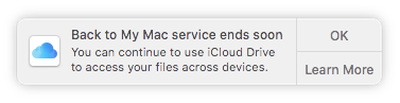
backtomymacending
Back to My Mac is a feature that is designed to allow Mac owners to connect to one Mac from another Mac for file transfers and screen sharing purposes. It lets users set up a network of Mac computers with two or more Macs, but it can be complicated to set up and use, which may be why Apple has decided to discontinue it in favor of simpler measures.

Apple is directing customers to a support document that outlines the changes coming to Back to My Mac, instructing them on how to transition to iCloud Drive, screen sharing, and Apple Remote Desktop.

Back to My Mac will not be available on macOS Mojave. You can get ready now by learning about alternatives for file access, screen sharing, and remote desktop access.

Apple's support document suggests customers can access all of their files across devices with iCloud Drive, operate other Macs with screen sharing, and manage Macs remotely with Apple Remote Desktop, software available from the Mac App Store for $80.

Many Back to My Mac users are likely to be unhappy with Apple's suggestion to transition to Apple Remote Desktop for remote management given its high price and the fact that it sees few updates, but there are other options like TeamViewer and LogMeIn.

Related Forum: macOS Mojave

Popular Stories

iPhone 18 Pro Rumored Colors

What's Coming in September: New iPhones, Apple Watches and More

Thursday August 13, 2026 4:20 pm PDT by
Apple will introduce at least five new devices at its iPhone-centric event next month, and it's also possible we'll get devices waiting on Siri AI like the Apple TV. iPhone 18 Pro The iPhone 18 Pro is going to look like the iPhone 17 Pro, but with a smaller Dynamic Island. It's getting some internal updates, including a new Wide camera with a variable aperture for more control over lighting ...
Four iPhone 18 Pro Colors Mock Feature

iPhone 18 Pro: Pre-Orders and Release Date

Sunday August 16, 2026 8:24 pm PDT by
Apple has yet to reveal when the iPhone 18 Pro and iPhone Ultra will be announced and released, but the dates usually follow a familiar pattern. As usual, the event is expected to take place in the first half of September. Labor Day falls on September 7 this year. The last time the holiday was on that day was in 2020, but the iPhone event that year was delayed until October due to the...
iPhone 17 One Year Later Thumb 1

Should You Buy an iPhone 17 Now or Wait for iPhone 18?

Friday August 14, 2026 12:15 pm PDT by
For the first time since Apple started selling standard and "Pro" iPhones, we're not going to get an entry-level iPhone model this fall. Apple doesn't plan to release an iPhone 18 in September, and will only launch the iPhone 18 Pro, iPhone 18 Pro Max, and foldable iPhone Ultra. The lower-cost iPhone 18 won't come out until spring 2027. Subscribe to the MacRumors YouTube channel for more ...

Top Rated Comments

104 months ago
The fact they think ARD is a viable alternative at $80 is absurd.
Score: 48 Votes (Like | Disagree)

104 months ago
Back to My Mac = Free. Apple Remote Desktop = $79.99. Thanks Apple.
Score: 21 Votes (Like | Disagree)
v1597psh Avatar
104 months ago
What about accessing Time Capsule and Airport Extreme remotely?
Score: 18 Votes (Like | Disagree)
104 months ago
cue anger from 90% of users who have never used back to my mac once in their lives.
Score: 13 Votes (Like | Disagree)
104 months ago
Just received the notification from Apple about Back to My Mac going away. The only way I use this feature today is opening finder and in the sidebar is my home iMac and I click that and click "share screen" to take care of remote tasks like exporting FCP videos or uploading videos to YouTube via screen sharing.

I see "screen sharing" will be an option but I won't be able to access my iMac via Screen sharing remotely without setting some sort of NAT pass through on my router, right? Back to my mac was so easy to use because it required no tech-ery to get it working.

Score: 12 Votes (Like | Disagree)
Mydel Avatar
104 months ago
I'm surprised no one is using the free Google Remote Desktop. Works seamlessly without needing to set up anything complicated.
I really have to have NO choice to use anything google. Sharing my computer access would be the last thing ever...
Score: 10 Votes (Like | Disagree)