Apple Seemingly Unable to Recover Data From 2018 MacBook Pro With Touch Bar When Logic Board Fails - MacRumors
Skip to Content

Apple Seemingly Unable to Recover Data From 2018 MacBook Pro With Touch Bar When Logic Board Fails

In 2016, when Apple introduced the first MacBook Pro with Touch Bar models, the repair experts at iFixit discovered the notebooks have non-removable SSDs, soldered to the logic board, prompting concerns that data recovery would not be possible if the logic board failed. Fortunately, that wasn't the case.
migration assistant
Apple has a special tool for 2016 and 2017 models of the MacBook Pro with Touch Bar that allows Genius Bars and Apple Authorized Service Providers to recover user data when the logic board fails, but the SSD is still intact.

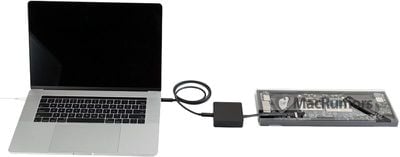
The tool is essentially a little black box that is able to transfer data from a failed logic board to a functioning MacBook Pro. The box has a flex cable that connects to a data recovery port on the failed logic board, while the box and a functioning MacBook Pro are connected via USB-C to USB-C cable.
apple customer data migration tool

Apple's internal Customer Data Migration Tool

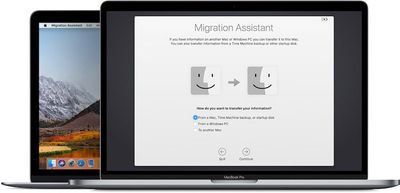
Once the logic board is placed into a special holder, and all cables are connected, technicians simply power on the functioning MacBook Pro, open Migration Assistant, and proceed with the standard steps for data transfer.
apple customer data migration tool connector

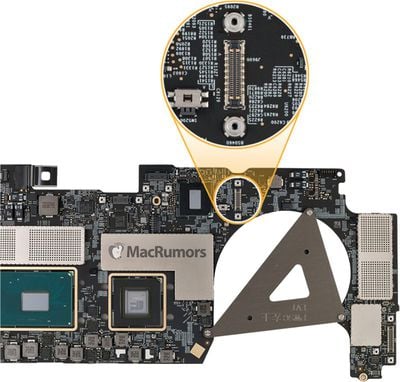
Customer Data Migration Tool connector on 2016 MacBook Pro logic board

While not fail-proof, the tool is a convenient, last-ditch option for data recovery when a MacBook Pro's logic board goes kaput. But, unfortunately, it appears the tool will not work with the latest models.

Last week, iFixit completed a teardown of the 2018 MacBook Pro, discovering that Apple has removed the data recovery connector from the logic board on both 13-inch and 15-inch models with the Touch Bar, suggesting that the Customer Data Migration Tool can no longer be connected.

MacRumors contacted multiple reliable sources at Apple Authorized Service Providers to learn more, and based on the information we obtained, it does appear that the tool is incompatible with 2018 MacBook Pro with Touch Bar models.

Multiple sources claim that data cannot be recovered if the logic board has failed on a 2018 MacBook Pro. If the notebook is still functioning, data can be transferred to another Mac by booting the system in Target Disk Mode, and using Migration Assistant, which is the standard process that relies on Thunderbolt 3 ports.

The data recovery port was likely removed because 2018 MacBook Pro models feature Apple's custom T2 chip, which provides hardware encryption for the SSD storage, like the iMac Pro, our sources said.

Apple's internal 2018 MacBook Pro Service Readiness Guide, obtained by MacRumors, advises technicians to encourage customers to back up to Time Machine frequently, and we highly recommend following this advice, as it now appears to be the only way to preserve your data in the rare event your MacBook Pro fails.

MacRumors also confirmed that Apple's internal document for its Customer Data Migration Tool has not been updated to reflect use with the 2018 MacBook Pro, and nothing else we've seen outlines any alternative solutions.

While it appears Apple itself is unable to recover data from failed 2018 MacBook Pros, the Service Readiness Guide does state that customers can consult with data recovery specialist companies, such as DriveSavers, Knoll, Seagate, and Payam, but it's unclear how they might be able to help.

Update: MacRumors has received the following statement from Mike Cobb, DriveSavers Director of Engineering:

None of the changes mentioned in the iFixit article regarding the MacBook Pro 2018 have had any affect our ability to recover data for our customers. This is due to our advanced capabilities in addressing the logic board. DriveSavers has been very successful in recovering data from the 2018 model as well as all others. It is worth noting that customers need to send us the whole device to complete the data recovery service.

We've reached out to Apple for clarification. If we receive any information, we'll update this article accordingly.


Related Roundup: MacBook Pro
Buyer's Guide: MacBook Pro (Buy Now)
Related Forum: MacBook Pro

Popular Stories

imac video apple feature

Apple Released Yet Another New Product Today

Friday March 20, 2026 2:39 pm PDT by
Apple has unveiled a whopping nine new products so far this March, including an iPhone 17e, iPad Air models with the M4 chip, MacBook Air models with the M5 chip, MacBook Pro models with M5 Pro and M5 Max chips, the all-new MacBook Neo, an updated Studio Display, a higher-end Studio Display XDR, AirPods Max 2, and now the Nike Powerbeats Pro 2. iPhone 17e features the same overall design as...
ios 26 4 pastel

iOS 26.4: Top 10 New Features Coming to Your iPhone

Friday March 20, 2026 2:44 pm PDT by
iOS 26.4 isn't the major update with new Siri features that we hoped for, but there are some useful quality of life improvements, and a little bit of fun with an AI playlist generator and new emoji characters. Playlist Playground - Apple Music has a Playlist Playground option that lets you generate playlists from text-based descriptions. You can include moods, feelings, activities, or...
iPhone 18 Pro Deep Red Feature

iPhone 18 Pro Launching Later This Year With These 12 New Features

Wednesday March 18, 2026 7:39 am PDT by
While the iPhone 18 Pro and iPhone 18 Pro Max are not expected to launch for another six months or so, there are already plenty of rumors about the devices. It was initially reported that the iPhone 18 Pro models would have fully under-screen Face ID, with only a front camera visible in the top-left corner of the screen. However, the latest rumors indicate that only one Face ID component...

Top Rated Comments

100 months ago
Given the reliance on time machine, Apple should consider selling a router that allows you to do wireless backups. How convenient would that be!
Score: 118 Votes (Like | Disagree)
100 months ago
A very stupid move.
Really, the best option would be to retain a removable drive, but if they are adamant to solder it to the logic board then getting rid of the data recovery port is inexcusable.

And it provides such a bad user experience in the long run.
There will be no way to recover customer data when the logic board fails, which no doubt would turn them away from Apple, not helped by the fact that it would be possible on a PC.
Score: 68 Votes (Like | Disagree)
bladerunner2000 Avatar
100 months ago
That's what happens when you solder everything. Everyone involved with the idea of the soldered donglebook, including those who bought it, deserve this. NO SYMPATHY when there's been so much backlash against the recent MacBooks.

You made your bed, now sleep in it :)
Score: 54 Votes (Like | Disagree)
Quu Avatar
100 months ago
Everyone should be backing up and it's very easy with Time Machine.

Personally I'd rather have the encryption and not allow easy ex-filtration of my data than easy recovery. Just get yourself a backup drive for home, lots of routers offer Time Machine compatibility so you can plugin an external USB drive to them and have it work over WiFi.
Score: 48 Votes (Like | Disagree)
100 months ago
But a backup is only as good as the last one you made. It's a portable machine, so we can easiky assume that you can easily go 8 to 12 hours without a backup while out and about. Not a bright move, Apple.
Score: 45 Votes (Like | Disagree)
asdavis10 Avatar
100 months ago
I find it hard to believe Apple would have done this just for the sake of having the T2 chip and "Hey Siri". I get that a customer's data is not Apple's responsibility, but if there is no recovery option then this is very bad.
Score: 45 Votes (Like | Disagree)