

Verizon today announced the evolution of its existing "FamilyBase" parental controls product into "Smart Family," a redesigned app that lets parents track screen time, set content filters, monitor whereabouts, and more.
With the Verizon Smart Family app, parents can instantly pause the internet to manage their kids' screen time, check the battery status of their phone, and look at a summary of their text and call activity. Usage limits can be set by reducing access to texts, calls, and data, and what the parent deems inappropriate can be blocked with content filters for websites and apps.
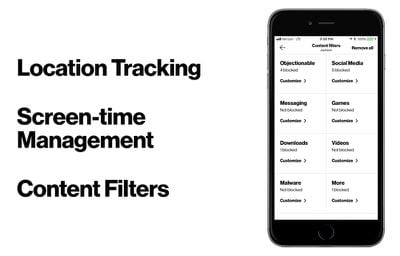
There is also a location tracking feature with alerts that push to the parent's smartphone, notifying them when their kid arrives or leaves a specified location.
“Being a parent in today’s digital world can be daunting, but it doesn’t have to be,” said Susie Fernandes, senior product manager at Verizon. “We created Verizon Smart Family to give parents the tools they need to help them raise tech savvy kids with a healthy and responsible approach to screen time and content viewing.”
Verizon Smart Family is available to download for free [Direct Link], but eventually requires a monthly subscription to access its features. The two subscription tiers include an entry level $4.99/month option that lacks location tracking and alerts, and a $9.99/month Premium plan with all features included (a 30 day free trial is available for Premium as well).
Smartphone over-use has become an increasingly debated topic in the past few months, with Apple investors urging the company to do more to protect its younger users from device addiction. Soon after, Apple said that new and "robust" parental controls would be coming, and such features are now rumored to be one of the major updates to iOS 12 this fall.
Apple CEO Tim Cook has touched upon the topic as well, discussing in an interview earlier this year how he has "put some boundaries" on his nephew's smartphone use. He continued: "There are some things that I won't allow; I don't want them on a social network."


















Top Rated Comments
I am not a parental unit. But, if I were, I would monitor them and their usage.