VLC 3.0 Update Adds Cross-Platform 4K and 8K Hardware Decoding, HDR10, Chromecast Support, and More - MacRumors
Skip to Content

VLC 3.0 Update Adds Cross-Platform 4K and 8K Hardware Decoding, HDR10, Chromecast Support, and More

by

VideoLAN on Friday released VLC 3.0 "Vetinari", a major update to the popular media player that is rolling out across all platforms, including macOS, iOS, and tvOS.

Version 3 includes a huge number of new features and improvements to the app, including automatic hardware decoding for 4K and 8K playback, support for 10-bit HDR, 360-degree video and 3D audio, and Chromecast streaming with support for non-native formats.
Screen Shot 32
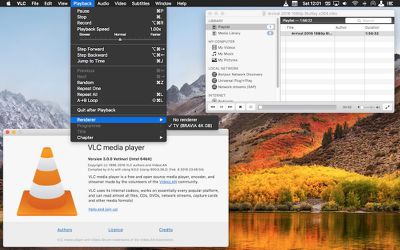
VLC now works with Blu-Ray Java menus and features network browsing support for local network and NAS drives, including those with SMB, FTP, SFTP, NFS filesystems. The iOS app has also been optimized for iPhone X displays, while on Mac, Chromecast streaming to supported devices can be found in the menu bar under Playback -> Renderer.

Among many other changes and improvements in VLC Vetinari, further standout features include: a redesigned and resizable fullscreen controller; a new status bar icon which displays metadata and play controls; support for keyboard blacklight dimming during fullscreen video playback; significant performance improvements in playlist handling; and a simplified preferences window. Check the online changelog for the complete list of updates.

VLC 3.0 is a free downloaded for Mac from the VideoLan website. (Note that version 3.0.0 of VLC removes support for OS X 10.6 Snow Leopard and requires Mac systems to run OS X 10.7 Lion or later.) VLC 3.0.0 is already available on the tvOS App Store, but the iPhone and iPad update still appears to be rolling out as of writing.

Tag: VLC

Top Rated Comments

HobeSoundDarryl Avatar
107 months ago
Wow! Way to go VLC team! A big pile of video upgrades for a whopping cost of free, and no ongoing subscription required either. Amazing.
Score: 21 Votes (Like | Disagree)
berrymetal Avatar
107 months ago
I switched to IINA and never looked back...
Score: 16 Votes (Like | Disagree)
Kabeyun Avatar
107 months ago
First I’m hearing about 8K. Wow. That’s a lot of K. I guess I shouldn’t be surprised. At a certain point consumers really won’t need any more K, but there’ll always be a push for more K. At 4K, I already get treated to the skin pores of the actors I’m watching. With 8K I’ll be able to enjoy actors’ pimples and pores on a screen the size of a bus. I think the K people might be in cahoots with the TV people. I guess that’s O-K.
Score: 9 Votes (Like | Disagree)
Secondempire Avatar
107 months ago
I like the new Yosemite style icon. Call it OCD if you want, but the old Leopard style icon was really annoying after macOS went flat.
Score: 4 Votes (Like | Disagree)
nathansz Avatar
107 months ago
surprised to read so much vlc hate.

must be near 20 years and over many different os from mac to win to bsd and back again and countless machines from the shiniest new box to the alley salvage find. vlc is always one of the first few softwares i put on a machine

it’s never failed me and always does what i need it to do

for me, it always has and still does play any video file, in any format, from any source (networked or locally) at the best possible quality given the machine it is running on

and it can do so much more than that

for free software to have that kind of quality and longevity is amazing

to me anyway


if it doesn’t work for you than yr prob doing it wrong
[doublepost=1518337792][/doublepost]
Respect to VLC for making an effort here, but most people stopped using VLC years ago because it's so resource heavy.
what do you mean by “resource heavy” exactly?

i’ve always found vlc to be quite capable on machines with slow old cpu’s and meagre amounts of ram
[doublepost=1518338575][/doublepost]
I tried on my 2017 iMac and VLC doesn't seem to use HW acceleration for 4K HEVC.
IINA does it.
what real world use case does this difference affect
Score: 3 Votes (Like | Disagree)
haddy Avatar
107 months ago
If you are on macOS you should be using IINA. It has the most streamline "mac/quicktime look" out of any player in respect to the power it packs. It's got everything and possibly the most power out of any Mac video player. It's still in development (alpha currently), but runs like it's polished. It is based on the MPV player.

If you are on Windows you should be using MPC-HC with customization guides out there to get the best for your needs. When I need to bitstream Dolby Atmos to my theater set-up, and make sure the projector is also getting the best frames through 'madVR' and filters, MPC-HC covers everything I need.

Respect to VLC for making an effort here, but most people stopped using VLC years ago because it's so resource heavy.
Ok...used IINA for awhile but couldn't get my Mira infrared remote to work with it (had to use my mouse). VLC does. And to be honest VLC seems actually better than IINA.....so i'll wait until IINA comes of age before trying it again.
Score: 3 Votes (Like | Disagree)

Popular Stories

MacBook Pro Low Angle Wide Lens

Apple to Launch 'MacBook Ultra' With These Six New Features

Friday April 24, 2026 10:32 am PDT by
While the 14-inch and 16-inch MacBook Pro were just updated with M5 Pro and M5 Max chips last month, bigger changes are reportedly around the corner. According to Bloomberg's Mark Gurman, the higher-end MacBook Pro models will be receiving a major redesign by early 2027, and he said that Apple might use "MacBook Ultra" branding for them. If so, the MacBook Ultra would likely be a...
Apple TV Thumb 3

Here's What's Coming in the 2026 Apple TV

Thursday April 23, 2026 12:08 pm PDT by
There are a lot of folks waiting for a new version of the Apple TV because the set-top box hasn't been updated since 2022. There is an update coming this year, but people will need to wait a bit longer because Apple is holding the next Apple TV until the new version of Siri comes out this fall. Design Apple TV design updates don't happen often, and that's not changing in 2026. The next...
Apple Maps General

Tim Cook Calls Apple Maps Launch His 'First Really Big Mistake' as CEO

Thursday April 23, 2026 5:29 am PDT by
Outgoing Apple CEO Tim Cook has named the botched 2012 launch of Apple Maps as his "first really big mistake" in the role, according to a Bloomberg report covering the town hall meeting that was held Tuesday with his recently announced successor, John Ternus. The Maps app launched with mislabeled landmarks, faulty directions, and a user experience that fell well short of Google Maps at the...