iOS 11 Predictive Text Bug Automatically Changes 'I' to 'A[?]' for Some Users [Updated] - MacRumors
Skip to Content

iOS 11 Predictive Text Bug Automatically Changes 'I' to 'A[?]' for Some Users [Updated]

by

A growing number of iOS 11 users have been encountering a strange predictive text bug over the course of the last few days, with the problem outlined on the MacRumors forums.

It seems some users are seeing "A[?]" as the first recommended predictive text word when using the iOS keyboard, and whenever "I" is typed, it autocorrects to A[?].
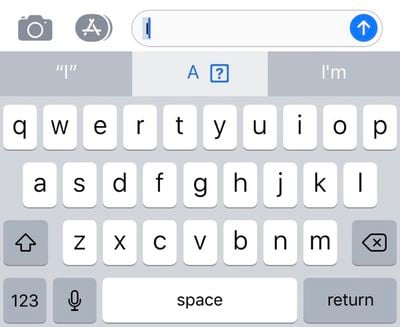
ios11predictivetextbug
It's not clear what's causing the bug, but a fair number of MacRumors readers and Twitter users seem to be experiencing the problem. Not everyone is affected, though, and we have been unable to replicate the issue on our own devices.

It may potentially be linked to emoji, as a strange "I" character also appears under the frequently used emoji for some customers who are affected.
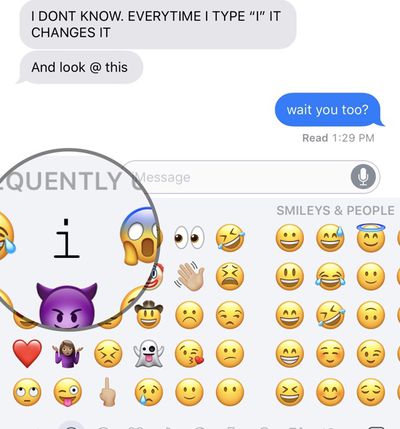
ios11predictivetextbug2
The problem seems to be affecting devices running both iOS 11.0.3 and iOS 11.1, and some users are also seeing the odd predictive text show up on Macs, too, as predictive text is available on all devices via iCloud.

Turning off predictive text is a reliable way of putting an end to the issue, as is using a third-party keyboard, but neither of these options are long term solutions for customers who want to use the full-featured built-in keyboard.

Resetting the keyboard dictionary does not appear to fix the issue, nor does a device restart or reset. One MacRumors reader who got in touch with Apple Support about the issue was told that Apple is aware of the problem and working on a fix.

Update: Apple's support staff is recommending customers affected by this bug use text replacement as a temporary workaround.

To do this, go to Settings > General > Keyboard > Text Replacement. Type in an uppercase "I" for the phrase, and a lowercase "i" as the replacement.

Related Forum: iOS 11

Top Rated Comments

iPhysicist Avatar
116 months ago
A[?] don’t have this bug!
Score: 34 Votes (Like | Disagree)
zorinlynx Avatar
116 months ago
You should try punching the [?] as there might be a coin or maybe even a 1-Up in it.
Score: 22 Votes (Like | Disagree)
DarrenC4 Avatar
116 months ago
I have the issue on my phone. I added “I” as a keyboard short cut, problem solved for the time being.
Score: 3 Votes (Like | Disagree)
marioguarneros Avatar
116 months ago
iOS 11 pretty much bricked my iPhone 6 (unresponsive screen), I am waiting for my new iPhone X but I am certainly worried about how the experience will actually be.

I’ve been on iPhones since the 3G, upgraded every year until I stopped on the 6, now going for the X as mentioned, I am genuinely concerned about this operating system release.

I don’t subscribe to conspiracy theories about Apple slowing down devices and all that which makes it worse because I definitely believe this is just poor quality programming or poor quality control.

iPhone and Apple was always about the best experience, not about specs that meant nothing, these days I’m not feeling it.

Let’s hope it was just a bump in the road.

Rooting for you Apple, I don’t want to change ecosystems, plus I believe in perpetuating and honouring Steve Jobs’ legacy with amazing experiences through Apple products.
Score: 3 Votes (Like | Disagree)
RuffyYoshi Avatar
116 months ago
Seems the quality control team has been fired since Cook took over. At least when it comes to iOS.
Score: 3 Votes (Like | Disagree)
AronDraws Avatar
116 months ago
Im not kidding you, ever since iOS 11 came out, Siri understands me far less than she did before. I have a lisp, but Siri used to do so well, and understood me. Now, she transcribes text correctly, and then "autocorrects" it to be very wrong. Same for when I type. Stuff autocorrects to incorrect things and i'm often trying 3-4 times to just type a simple sentence because everything gets changed even when I have typed it out correctly.

I absolutely hate iOS 11 and regret updating my devices. I hope this gets fixed soon.
Score: 2 Votes (Like | Disagree)

Popular Stories

iPhone Handoff iOS 27 Feature

T-Mobile to Charge $5 a Month for iOS 27 iPhone Handoff

Thursday September 10, 2026 3:58 pm PDT by
T-Mobile will charge customers $5 per month to use iPhone Handoff, an e-SIM feature that allows the same phone number to be used on two separate iPhones. iPhone Handoff requires carrier support, and at launch, only T-Mobile users in the U.S. and Deutsche Telekom users in Germany will be able to use it. T-Mobile says customers can use their number across two compatible iPhone models and...
iOS 27 Feature Dark

Apple Announces iOS 27 Release Date

Wednesday September 9, 2026 10:46 am PDT by
At its event today unveiling the iPhone 18 Pro, AirPods 5, Apple Watch Series 12, and more, Apple announced that iOS 27 will be released later this month. iOS 27 has already been available as a developer beta since June and as a public beta since July, and Apple today said that the update will be released for all users with a compatible iPhone model on Monday, September 14. iOS 27 is...
iphone duo

IMAX Reacts to iPhone Duo's 1:1.4 Aspect Ratio Displays

Friday September 11, 2026 4:42 am PDT by
Production theater company IMAX has responded in a mixed way to Apple's embrace of a 1:1.4 aspect ratio on the iPhone Duo's inner and outer displays. The boxier ratio happens to be very close to the classic "full-frame" IMAX 1.43:1 aspect ratio, which comes from the geometry of the company's original 15-perforation/70mm film system. In response to an X post from someone wondering if we'll see...