

Microsoft Invites Mac Users to Preview Google Calendar Support in Outlook 2016 - MacRumors
Skip to Content

Microsoft Invites Mac Users to Preview Google Calendar Support in Outlook 2016

by

Microsoft has begun inviting Mac users to try its new Google Calendar and Contacts support in Outlook 2016 by downloading and installing the application from its preview site.

Up until now, many of Outlook's more advanced email features have only been available to users with an Outlook.com, Office 365 or Exchange email address. This week's global rollout means anyone with a Gmail account can take advantage of several of Outlook's advanced features, including Focused Inbox and richer experiences for travel reservations and package deliveries.
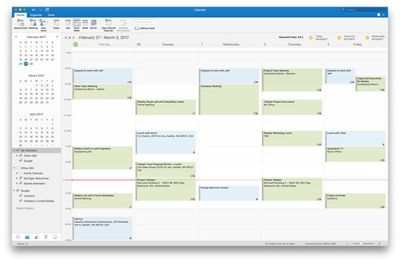
Outlook 2016 for Mac adds support for Google Calendar and Contacts 1
Previously only available to Microsoft's Office Insider Fast Community, the new updates support all the core actions and enable anyone to add, delete, and edit events in a Google Calendar through Outlook for Mac. All changes update between the desktop software and Gmail or Outlook for iOS, ensuring everything is synced across devices.

Anyone who wants to try Outlook for Mac with their Google Account and test drive the new updates should visit the Microsoft preview website and click the Download button. This will install the latest preview version of Outlook 2016 for Mac, which can be used until June 30, 2017.

Outlook users signed up to Office 365 who want to test the features need to join the Insider Fast community, by opening Outlook, clicking Help > Check for Updates, and following these directions.


Top Rated Comments

chucker23n1 Avatar
122 months ago
Google calendar is cross platform. iCal isn’t.
iCal is absolutely cross-platform. iCloud's calendars are CalDAV.
Score: 4 Votes (Like | Disagree)
122 months ago
Wow, now I can combine the world's worst-designed calendar service with the world's worst-designed calendar client! What am I waiting for?
Score: 1 Votes (Like | Disagree)
chucker23n1 Avatar
122 months ago
While that is technically true, Apple unfortunately still doesn't document the CalDAV and CardDAV server URLs for iCloud (which can be different for different users). While it is possible to figure them out, this shows that they do not want to officially support access via 3rd party clients. A bit of a shame really.


This is a fair point, yes.

In any case, the original question, I'm guessing, was really something along the lines of: why is Outlook for Mac implementing Google Calendar support before iCloud support. And the answer is probably: because Google Calendar is more popular. (Is it? I have no idea.)
[doublepost=1492115016][/doublepost]
How hard is it to figure that out?
Go to icloud.com, launch the Calendar Web app, pick a calendar on the left and click the little broadcast icon. Tick Public Calendar. A URL like this will show up:

webcal://p04-calendarws.icloud.com/ca/subscribe/1/wqG1vFFxxxxxxxxxsVsbxySTFHZCRaB9CwbU8EEokSzfJd

Note the p04 part. This could also be, say, p31.

Then, in your CalDAV client, connect to p04-caldav.icloud.com.

Some more details: https://maggiemcfee.com/2011/10/13/icloudical/
Score: 1 Votes (Like | Disagree)
122 months ago
iCal is absolutely cross-platform. iCloud's calendars are CalDAV.
While that is technically true, Apple unfortunately still doesn't document the CalDAV and CardDAV server URLs for iCloud (which can be different for different users). While it is possible to figure them out, this shows that they do not want to officially support access via 3rd party clients. A bit of a shame really.
Score: 1 Votes (Like | Disagree)
chucker23n1 Avatar
122 months ago
That changes nothing.
Outlook is cross platform or not, please answer yes or no.
iCal is cross platform or not, please answer yes or no.

I cannot, I repeat cannot use iCal on Windows 8 regardless of what protocols it supports.
And you cannot (repeat cannot) use Google Calendar on macOS or Windows at all, by that logic, because it's a Web app. That's clearly not what's being discussed.
Score: 1 Votes (Like | Disagree)
jadot Avatar
122 months ago
That changes nothing.
Outlook is cross platform or not, please answer yes or no.
iCal is cross platform or not, please answer yes or no.

I cannot, I repeat cannot use iCal on Windows 8 regardless of what protocols it supports.
Just like you cannot (repeat cannot) use Mac Mail in windows but you can (repeat can) collect your iCloud email messages. You're confusing client with various server protocols.
Score: 1 Votes (Like | Disagree)

Popular Stories

Four iPhone 18 Pro Colors Mock Feature

iPhone 18 Pro: Pre-Orders and Release Date

Sunday August 16, 2026 8:24 pm PDT by
Apple has yet to reveal when the iPhone 18 Pro and iPhone Ultra will be announced and released, but the dates usually follow a familiar pattern. As usual, the event is expected to take place in the first half of September. Labor Day falls on September 7 this year. The last time the holiday was on that day was in 2020, but the iPhone event that year was delayed until October due to the...
apple camera airpods

Apple's Camera-Equipped AirPods Confirmed: See Them in Action

Monday August 17, 2026 6:21 pm PDT by
Apple is working on camera-equipped AirPods that appear to be nearly ready to launch, based on a video MacRumors found in the macOS Tahoe 26.7 release candidate. In a short demo, a man holds a book up so the camera in the AirPods can see the title. "With Visual Intelligence, your world becomes savable. See something you like? Just ask me to save it for later," says the voiceover text. Here ...
iPhone 18 Pro Dark Cherry Feature

iPhone 18 Pro and iPhone Ultra: New Details Leak as Apple Event Nears

Monday August 17, 2026 11:09 am PDT by
"iPhone Ultra" supply will be very limited when the foldable device is first released later this year, according to Fixed Focus Digital, a known leaker on the Chinese social media platform Weibo. The account also claimed that the iPhone 18 Pro's A20 Pro chip will be up to 18% faster and up to 30% more power efficient compared to the iPhone 17 Pro's A19 Pro chip. The A20 Pro chip will be the...








































