Google Calendar App Finally Released for iPad - MacRumors
Skip to Content

Google Calendar App Finally Released for iPad

by

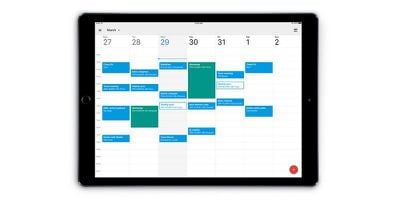
Google today announced it has updated its Calendar app with long-awaited iPad support.
google calendar ipad
The app is essentially the same as the iPhone version, but it is now optimized for the tablet's larger screen. Google said a Today view widget for Notification Center and the Lock screen is coming soon.

Here's a quick overview of the app's features:

• Different ways to view your calendar - Quickly switch between month, week and day view.
• Events from Gmail - Flight, hotel, concert, restaurant reservations and more are added to your calendar automatically.
• To-dos - Use Reminders to create and view to-dos alongside your events.
• Goals - Add personal goals—like “run 3 times a week”—and Calendar will schedule time for them automatically.
• Quick event creation - Smart suggestions for event titles, places and people save you time when creating events.
• All your calendars in one place - Google Calendar works with all calendars on your device, including Exchange and iCloud

Google Calendar can be downloaded for free on the App Store [Direct Link].
Top Rated Comments

119 months ago
Google data mines every service they offer. How soon people forget that it's users ARE its product.
ISPs data mine, credit card companies data mine, etc., etc., etc.
Score: 4 Votes (Like | Disagree)
Stridder44 Avatar
119 months ago
Finally!
Score: 4 Votes (Like | Disagree)
iDento Avatar
119 months ago
ISPs data mine, credit card companies data mine, etc., etc., etc.
Does not justify anything.
Score: 3 Votes (Like | Disagree)
119 months ago
Google data mines every service they offer. How soon people forget that it's users ARE its product.
Score: 3 Votes (Like | Disagree)
119 months ago
Really? I haven't downloaded it, but from the app store details it looks like every other calendar app, where the month view is just a circle around the day and events at the bottom. But at least it's not colored dots.

IMO, Readdle's Calendars5 has the best month view of the several I've tried. The events are actually in words (!) on the day they happen (!!).
Calendars 5 is great, but Google calendar is also quite great as a free calendar app.

I use Android as well and it's easier to go between iOS and Droid if one uses Google calendar. Plus for my school schedule, everything works seamlessly with Google calendar. Not the case for Calenders 5.

Not everyone may use it, but for those of us who do, Google releasing an iPad version and finally a widget is a long awaited day. Especially for those of us who are cross platform.
Score: 3 Votes (Like | Disagree)
citi Avatar
119 months ago
Google data mines every service they offer. How soon people forget that it's users ARE its product.
And for the people like me already using google services....WE KNOW.
Score: 1 Votes (Like | Disagree)

Popular Stories

Gmail General

Don't Like Your Gmail Email Address? You Can Finally Change It

Tuesday March 31, 2026 7:31 am PDT by
Google today announced that you can finally change the Google Account email address that you use for Gmail, Google Calendar, Google Photos, Google Drive, and more, but this ability is only rolling out to U.S. accounts for now. The company did not indicate if or when this functionality will be available in other countries. You can switch to any available @gmail.com address, and your previous...
google chrome vertical tabs

Google Brings Vertical Tabs and Improved Reading Mode to Chrome

Tuesday April 7, 2026 1:27 pm PDT by
Google today updated its Chrome browser with support for vertical tabs, which are displayed in a sidebar instead of at the top of the browser. The tab layout can be changed by right clicking on any Chrome window and choosing the "Show Tabs Vertically" option. Sidebar tabs feature full page titles and make it simple to organize tab groups. Google has also added a new full-page interface...
Chrome Feature 22

Gemini in Google Chrome Gets a Skills Library for Saving Custom AI Prompts

Tuesday April 14, 2026 10:00 am PDT by
Chrome has been updated today with a Skills library that's designed to let Chrome users turn AI tasks into repeatable skills that can be used on any website. Useful prompts you create for Gemini in Chrome can be saved as a Skill that can be accessed later with a single click. If you're shopping for skincare and ask Gemini about the ingredients in a product, for example, you can save the...