Apple Adds iPad Support to Apple TV Remote App
Apple today updated its Apple TV Remote app to introduce iPad support, allowing the Remote app to be used on the iPad for the first time. Prior to today's update, the Apple TV Remote interface was only designed for the iPhone.
For those unfamiliar with the Apple TV Remote app, it's designed to be used with the fourth-generation Apple TV and functions similarly to the hardware-based Siri Remote. It includes support for navigation via touch gestures, Siri commands, gameplay, and more.
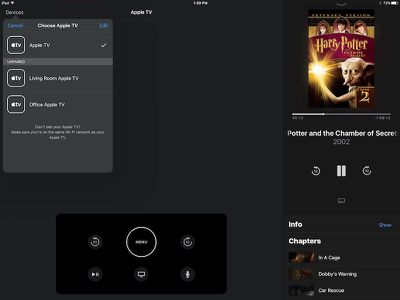
On the iPad, the control interface is similar to the iPhone interface, but there's more screen space to display features like the Now Playing window alongside broader controls.
Along with support for the iPad, today's update introduces an enhanced "Now Playing" experience that includes lyrics and playlists for music and chapters, audio tracks, and captions selection for movies and TV shows.
General performance and stability improvements have also been baked into the update.
Apple TV Remote can be downloaded from the App Store for free. [Direct Link]
Popular Stories
MacRumors contributor Aaron Perris has uncovered an image file from Apple for an unreleased Apple TV 4K, suggesting that a new model will finally be released soon. The image is specifically for an "Apple TV 4K (4th generation)" model.
Apple TV 4K (4th generation) image (on a gradient)
The image reveals that the Apple TV will have the same external design as the current model, with all of its...
Apple today announced a new subscription initiative that turns paid iCloud+ subscriptions into a broader services bundle in more than 100 countries.
In select countries, Apple says every paid iCloud+ plan, including the cheapest 50GB tier, now includes Apple TV and Apple Arcade "at no additional cost," while family sharing extends the storage, TV and Arcade access to up to five people....
The next iPad mini, HomePod mini, and Apple TV 4K models have all leaked, just a few weeks before the devices are expected to be announced. Specifically, MacRumors contributor Aaron Perris discovered a few of Apple's official images of the devices, confirming their existence and some new features that are planned.
The most notable iPad mini details revealed in today's leak include an A20 Pro ...


















































