Some 2016 MacBook Pro Owners Experiencing Keyboard Problems - MacRumors
Skip to Content

Some 2016 MacBook Pro Owners Experiencing Keyboard Problems

Apple's latest line of notebooks introduced an entirely revamped keyboard featuring flatter keys built using a second-generation butterfly mechanism, designed to optimize for stability while also maximizing travel. The butterfly mechanism was originally introduced in the ultra thin MacBook, but a newer version was implemented in the MacBook Pro.

There have been mixed opinions about the keyboard of the 2016 MacBook Pro due to its vastly different feel compared to previous-generation MacBook Pro models, and it appears the new butterfly mechanism may also be less reliable compared to older construction techniques.

A growing number of customers who have purchased a 2016 MacBook Pro are running into issues with the keyboard, including non-functional keys, strange high-pitched sounds on some keys, and keys with a non-uniform feel. There are dozens of threads both on MacRumors and on the Apple Support site.
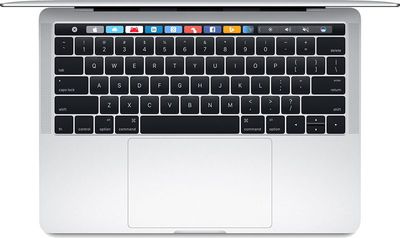
13inchmacbookprokeyboard
One of the most significant issues appears to be keys that make different higher-pitched sounds than other keys in some cases, a problem that was caught on video by MacRumors user monstermac77. As is demonstrated, when the caps lock key is pressed, it makes a sound that's much different than the other keys on the keyboard.


According to monstermac77, the issue is only reproducible when the Mac is warm, a complaint that has been echoed by several other MacBook owners in the thread, suggesting heat plays a role in activating the problem. Some users are experiencing the overly-clicky sound without heat, though.

Within a few hours of using my Late 2016 MacBook Pro 15" with Touch Bar, I noticed some of my keys made a very high pitched click on-key-up (when I lifted my finger from the pressed down key). The affected keys: Caps Lock, left Option, and very occasionally: Delete, 'H', and 'C'.

The high-pitched clicking sound is irritating, but it isn't as serious as some of the other issues MacBook Pro owners have been having with the keyboard. In some cases, certain keys on the MacBook Pro miss clicks, enter double letters, or refuse to respond at all, a problem that we here at MacRumors have also experienced. MacRumors reader rroch describes the problem:

My 2016 15'' MacBook Pro arrived yesterday (as one of the first). 63 of the 64 keys work fine. But the i-key most of the time types the letter twice. I suggest you test out your keyboard thoroughly. With auto-correct it can be easy to think it works. However, my password contains the letter i, and I quickly became super frustrated not being able to get my password right (come to think about it, maybe that's why they added Touch ID, so you don't need the keyboard for passwords). So take a document, turn off auto-correct, and check all the keys. I found that the failure happens more frequently with a slight delay before releasing the key.

It's not clear what's causing the issue with the keys that suddenly become non-functional, but the butterfly mechanism is sensitive and can be interrupted by something as simple as a bit of dust. In our case, with the machine we had that was experiencing issues with a specific key, the problem cleared up on its own, but other MacBook owners have not been so lucky.

One other minor keyboard complaint is an inconsistent feel across keys, with some keys that feel spongier than others or that don't press down consistently. This seems to be related to a problem with the butterfly mechanism which some users report having fixed with a needle or other thin tool, but most people should not try that sort of repair at home.

While many of the complaints seem to be focused on the 15-inch MacBook Pro with Touch Bar, some users have also had problems with both the 13-inch model with a Touch Bar and the 13-inch model with no Touch Bar.

Customers who are experiencing keyboard problems should visit an Apple Store or an Apple Authorized Service Provider. In most cases, Apple is offering repairs and replacements for affected users, especially those who have verifiable hardware problems related to skipping keys, but some MacRumors readers have needed to go through several replacement machines to find a keyboard that doesn't experience issues.

Keyboard replacements are also not a simple matter on a machine as complex as the MacBook Pro, and users should expect repairs or replacements to take multiple days. According to reports from customers who have sought repairs, Apple is outright replacing most Touch Bar models while sending non-Touch Bar models out for repairs.


Related Roundup: MacBook Pro
Buyer's Guide: MacBook Pro (Caution)
Related Forum: MacBook Pro

Popular Stories

M5 MacBook Pro

RIP, MacBook Ultra

Monday October 19, 2026 9:37 am PDT by
Apple today sent out invites for an experience in Los Angeles on Wednesday, October 28, and the "Pro and tell" tagline on the invitation likely means that the rumored MacBook models with touch-enabled OLED displays will stick with MacBook Pro branding instead of the once-rumored "MacBook Ultra" name. The long-rumored "iPhone Ultra" ended up being named iPhone Duo, so speculation that Apple...
MacBook Pro Ultra Feature 1

Apple to Launch Touchscreen OLED MacBook Pro and OLED iPad mini on October 27

Thursday October 8, 2026 1:31 pm PDT by
Apple will introduce new OLED touchscreen MacBook Pro models and an OLED iPad mini "on or around" Tuesday, October 27, reports Bloomberg. The launch will also include an M6 14-inch MacBook Pro and an M6 iMac. The October 27 follows Apple's October 13 debut of a new smart home hub, a revamped Apple TV 4K, and a refreshed HomePod mini. Earlier this month, MacRumors reported that Apple would do ...
Black Apple Event Logo

Apple Now Inviting Media to October 28 'Launch Experience'

Thursday October 15, 2026 4:13 am PDT by
Apple has begun inviting selected members of the media to a product launch experience in Los Angeles on Wednesday, October 28, according to Bloomberg's Mark Gurman. In a post on X, Gurman described the gathering as an "all-day product launch experience" for touchscreen MacBooks, a new iPad mini, and Macs equipped with M6 chips. Gurman previously reported that Apple would introduce the...


Top Rated Comments

126 months ago
I don't care, as long as it is thinner and has less ports I'll buy it.
Score: 124 Votes (Like | Disagree)
126 months ago
Maybe because the keyboard is absolute junk, designed for teenagers who never have to type for extended periods. There was nothing wrong with the keyboard, that's what happens when you fix something that isn't broken. Want a good keyboard? Get a ThinkPad.
Score: 63 Votes (Like | Disagree)
Oblivious.Robot Avatar
126 months ago
2016 MBP is the gift that keeps giving! :D
Score: 48 Votes (Like | Disagree)
DDustiNN Avatar
126 months ago
I can't stand the new keyboard. I've hated it ever since the new MacBook was released. This thread just proves that I was not wrong, haha.

The keyboard in my MacBook Air is absolutely perfect. I still think it's the best computer they've ever made.

I also hate the new click-less trackpad. It just doesn't feel right.

All I want is a MacBook Air with the same keyboard and trackpad, a retina screen, and some higher specs than what I have (2011 model). Been waiting for years and they JUST WON'T DO IT. COME ON, APPLE! I don't like this new crap. The keyboard is garbage (which is now proven).
Score: 34 Votes (Like | Disagree)
126 months ago
Thanks for the needless "innovation" that made everything worse.
Score: 27 Votes (Like | Disagree)
126 months ago
It seems that there are more issues than normal with this generation of MBP. Glad I picked up a PC with an excellent keyboard while I wait for Apple to fix these problems for the next generation.
Score: 24 Votes (Like | Disagree)
Latest Stories
Apple Display Veterans Step Back as New Leaders Take Over
3 hours ago
OLED MacBook Air and iMac Remain in Testing
4 hours ago
Apple Addresses Web Security Threat, Working on macOS Update With Additional Fix
8 hours ago
iPhone Duo Can Run Automations When You Open or Close It
9 hours ago
Adjust iPhone Duo's Outer Display to Accommodate Your Case
9 hours ago
iFixit iPhone Duo Teardown Points to Possible Cause of Screen Cracks
10 hours ago
Apple Stores Reportedly Rolling Out New Anti-Theft System for iPhones
16 hours ago
AirTag 2 Drops to New Low Price of $23 on Amazon
17 hours ago
New iMac and 14-Inch MacBook Pro With M6 Chip Expected This Week
17 hours ago
Apple Reportedly Announcing New MacBook Pro With OLED Touchscreen on Wednesday
17 hours ago
Apple Wants to Fix Safari's Cramped Layout on iPhone Duo
1 day ago
Instagram Launches Apple TV App With Reels and More
1 day ago
Apple's 'Servant' Copyright Lawsuit Win Upheld on Appeal
1 day ago
'Arguably Better Than Face ID': the iPhone Duo Touch ID Tip to Try
1 day ago
Verizon Apologizes for iPhone Duo Pre-Order Delays, Giving Customers $100 Gift Card
2 days ago
Skip the Touch ID Scan: Unlock iPhone Duo With Apple Watch
2 days ago
iPhone Duo Fails JerryRigEverything's Dusty Durability Test
2 days ago
Make iPhone Duo Volume Buttons Follow Screen Rotation
2 days ago
iPhone Duo Teardowns Reveal Two Batteries and More
2 days ago
M5 MacBook Air Returns to Prime Day Low With $200 Amazon Discount
2 days ago
Top Stories: Apple 'Pro and Tell' Debut, iPhone Duo Launch, and More
2 days ago
Apple Store Pickup System for iPhone Duo Just Went Live Again in U.S. and Canada
2 days ago
Apple Closes French Stores Ahead of Further Protests
2 days ago
Apple Pushes Back on DOJ Request for More Evidence
2 days ago
The iPhone Duo Can Be a Tiny Mac, a Toaster, and a Nintendo DS
2 days ago
Using an Apple Pencil With the iPhone Duo: What to Know
2 days ago
Apple Store Pickup for iPhone Duo Starting to Resume But Very Limited
2 days ago
iPhone Duo Jailbroken on Launch Day
3 days ago
Apple Seeds Updated watchOS 27.2 Release Candidate
3 days ago
Apple Store in UK Reopens With New Design on iPhone Duo Launch Day
3 days ago