Smart wireless thermostat maker Ecobee is rolling out a firmware update to Ecobee3 devices that brings individual HomeKit support to the device's remote sensors for the first time.

The Ecobee3 enables owners to use additional remote sensors to keep track of ambient temperature as well as detect motion in different locations within the home. With firmware version 3.7.0.969, currently rolling out to the devices, owners can now access individual sensors directly from within the iOS HomeKit app.
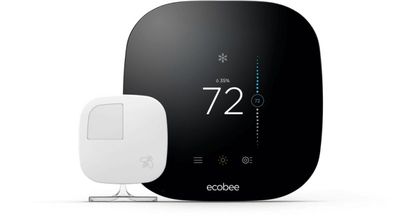
ecobee3
The official change log for the firmware is as follows:

• Automatically Restore HomeKit Connection. Occasionally some ecobees could lose its connection to Homekit and have to be rebooted in order to re-establish the connection. This firmware update enables the ecobee to automatically reconnect without any user action.

• Wireless sensors with homekit enhancement. The wireless sensors now show up as accessories in the iOS Home app. Because of the dual functionality (occupancy detection and temperature sensing) of the sensors, each sensor will show up as two accessories.

• The usual background cleanup and stability. As always, to smooth things out for a better experience.

The Ecobee3 firmware is an automatic update currently being rolled out. Owners unsure of the version of their devices who aren't seeing their sensors in HomeKit should contact Ecobee support.

Top Rated Comments

vipergts2207 Avatar
116 months ago
Wow I have not had the issues you've had. They did fix a bug I brought to their attention about the Notification Centre widget not updating.

Otherwise, I wish their app had a native feel but I see what they're trying to do by mimicking the UI on the Ecobee itself. I don't use the app much because everything is scheduled and I use IFTTT DO Button to manually set Home/Away.

I agree I have not found value in the reports.
I have not had nearly the issues that he has had either. Overall it's been a good experience. My biggest complaint, (and this type of issue seems to be common for many smart home devices), is that the geofence feature built into Ecobee is only useful for bachelors who live alone. It doesn't work with two or more person households. This means I have to use a work around geofence using IFTTT integration and the life360 app. I don't understand why these some of these device manufacturers don't design these features to work for more than one person households, since I suspect most people live with at least one other person. Especially the core market for stuff like this, homeowners.
Score: 4 Votes (Like | Disagree)
az431 Avatar
116 months ago
Awesome news. However, since December I haven't been able to use my Ecobee3 with home kit. Happened after an update at one point. Still doesn't work with the newest firmware update yesterday, unfortunately.
Ecobee is an absolutely horribly bug-ridden device, and unfortunately the developers don't seem to be spending much time fixing issues and making it stable, just rolling out new functionality that most of us don't need.

Both on the iOS app and the web app it is impossible to change the temperature because it: (1) either springs back to another value than the one you set, (2) refuses to adjust in more than 4-5 degree increments, or (3) sets the cool point as the hot point, or vice versa. There are dozens of App Store reviews mentioning this issue, yet after several updates over the past six months it's still unresolved.

It is impossible to manually update the firmware, and many Ecobees are either months behind or forever stuck on earlier firmware. It takes a call to Ecobee to get a firmware update pushed.

The web app is not fully compatible with Safari despite the fact that this device works only with iOS devices. To create an Ecobee account I had to install Chrome, then switch back to Safari.

The reports are a joke. Most are nonsensical and provide nothing in the way of context to determine what they mean. Simply "you're in the 45% of homes" without clarifying whether that's the top 45% or bottom 45% (or even whether your home IS the 45th percentile or somewhere between 0 and 45).

I've also had the same HomeKit issue. Eventually it mysteriously began working, but then began a constant battle between HomeKit and Ecobee about who controlled the temperature in my home. The heat or AC would turn on seemingly at random depending on who won the power struggle. I decided to get rid of the HomeKit integration.

Unfortunately it did not want to remove HomeKit integration without a reset, which led to the next major problem. If for some reason there is an issue that requires resetting Ecobee, it also destroys your Ecobee account and all settings and prior reports, meaning you start from scratch. You can't simply log back on and restore your settings.

The only issue Ecobee has fixed in the one year I owned it is the login and TouchID, where the app was constantly logging you off even if you had used the app in the last few ours, and worse would not accept TouchID. But that took far too long, especially in light of the high percentage of users who had the issue.
Score: 2 Votes (Like | Disagree)
Return Zero Avatar
116 months ago
I love my ecobee. I've never had any significant bugs, except it very occasionally drops the wifi connection, though it does usually reconnect by itself. It's been installed for a year and a half now, and I'm saving a ridiculous 37% on my entire electric bill (about $70 savings a month, down from $190 to $120). I really didn't expect that much savings. Maybe my old thermostat had a problem or something.

At first I bought it because of the option for extra sensors. However I didn't really end up using the one that came with it anyway. It eats batteries about every 6 months and I just stopped using it. I may have to break it back out now with the ability to add it to homekit.
Score: 2 Votes (Like | Disagree)
kingtj Avatar
116 months ago
Yep, this! If your Ecobee stops talking properly w/HomeKit, completely unpair it, reboot your iOS device, and try setting it up like it's a new device in it again. Annoying, but worked for me and is actually the official Ecobee advice in one of the online troubleshooting tips.

I'm glad they're still upgrading these with better support. I like my Ecobee a lot too -- but I also feel like my home is a challenge for it.

I live in a 100+ year old, 2 story house that was upgraded about 10 years ago with a pair of heat-pumps. One for the upstairs and the other for the main level and basement area. I had to buy 2 Ecobee thermostats to control the two of them.

Even with a total of 4 extra temperature sensors in use, strategically? I find it's a constant struggle to keep the house comfortable at the same temperature throughout. It seems like one problem is that warm air rises, so the unit heating the main level winds up working extra hard as that heat goes upstairs and contributes to warming it up. That means the upstairs unit probably doesn't run quite as much as it should to do its part. When the unit upstairs does decide to kick on, it heats the upstairs bedrooms pretty quickly and shuts back off. But then the whole upstairs feels far warmer than the downstairs does for the next hour or two.

I guess I'm not sure if the two Ecobee 3 thermostats actually communicate with each other, but it seems like they don't.


I've had HomeKit get goofed up enough that I had to (from the Ecobee) delete the pairing and then pair it back up again.

Glad I wasn't the only one seeing this! :)
Score: 1 Votes (Like | Disagree)
vipergts2207 Avatar
116 months ago
Help me understand. I've never grasped the concept of how the sensors actually save you money.

I'm guessing most people have one furnace and multiple ducts. If one room requires additional heat (because the sensor in that room is set differently), doesn't the furnace come on heating the whole home? It's not as if each room is separately heated/cooled.
The sensors are mostly for comfort. The savings come from the thermostat being automatically being set back when you leave. There are different ways for that to happen though, one of them being using the sensors to detect occupancy.

Score: 1 Votes (Like | Disagree)
aristobrat Avatar
116 months ago
It eats batteries about every 6 months and I just stopped using it.

Oh wow! I've had six remote sensors going on about 1.5 years and have only had to change one battery so far.

The reports are a joke. Most are nonsensical and provide nothing in the way of context to determine what they mean. Simply "you're in the 45% of homes" without clarifying whether that's the top 45% or bottom 45% (or even whether your home IS the 45th percentile or somewhere between 0 and 45).
Yeah, those reports are frustrating to me without any context.

I do love the runtime reports though! I moved into a new construction house and was able to use those to show the builder (and his HVAC sub) that there was an issue on super-hot days where the upstairs unit couldn't keep up.
[doublepost=1484320065][/doublepost]
Also, I was wondering if the sensors could be WiFi enabled too?
I couldn't see that happening without requiring them to have a power cable attached.
Score: 1 Votes (Like | Disagree)

Popular Stories

iOS 26

15 New Things Your iPhone Can Do in iOS 26.2

Friday December 5, 2025 9:40 am PST by
Apple is about to release iOS 26.2, the second major point update for iPhones since iOS 26 was rolled out in September, and there are at least 15 notable changes and improvements worth checking out. We've rounded them up below. Apple is expected to roll out iOS 26.2 to compatible devices sometime between December 8 and December 16. When the update drops, you can check Apple's servers for the ...
ios 18 to ios 26 upgrade

Apple Pushes iPhone Users Still on iOS 18 to Upgrade to iOS 26

Tuesday December 2, 2025 11:09 am PST by
Apple is encouraging iPhone users who are still running iOS 18 to upgrade to iOS 26 by making the iOS 26 software upgrade option more prominent. Since iOS 26 launched in September, it has been displayed as an optional upgrade at the bottom of the Software Update interface in the Settings app. iOS 18 has been the default operating system option, and users running iOS 18 have seen iOS 18...
iOS 26

Apple Seeds iOS 26.2 and iPadOS 26.2 Release Candidates to Developers and Public Beta Testers

Wednesday December 3, 2025 10:33 am PST by
Apple today seeded the release candidate versions of upcoming iOS 26.2 and iPadOS 26.2 updates to developers and public beta testers, with the software coming two weeks after Apple seeded the third betas. The release candidates represent the final versions of iOS 26.2 and iPadOS 26.2 that will be provided to the public if no further bugs are found during this final week of testing....
Photos App Icon Liquid Glass

John Gruber Shares Scathing Commentary About Apple's Departing Software Design Chief

Thursday December 4, 2025 9:30 am PST by
In a statement shared with Bloomberg on Wednesday, Apple confirmed that its software design chief Alan Dye will be leaving. Apple said Dye will be succeeded by Stephen Lemay, who has been a software designer at the company since 1999. Meta CEO Mark Zuckerberg announced that Dye will lead a new creative studio within the company's AR/VR division Reality Labs. On his blog Daring Fireball,...
iOS 26

When Will Apple Release iOS 26.2?

Monday December 1, 2025 4:37 pm PST by
We're getting closer to the launch of the final major iOS update of the year, with Apple set to release iOS 26.2 in December. We've had three betas so far and are expecting a fourth beta or a release candidate this week, so a launch could follow as soon as next week. Past Launch Dates Apple's past iOS x.2 updates from the last few years have all happened right around the middle of the...
maxresdefault

iPhone Fold: Launch, Pricing, and What to Expect From Apple's Foldable

Monday December 1, 2025 3:00 am PST by
Apple is expected to launch a new foldable iPhone next year, based on multiple rumors and credible sources. The long-awaited device has been rumored for years now, but signs increasingly suggest that 2026 could indeed be the year that Apple releases its first foldable device. Subscribe to the MacRumors YouTube channel for more videos. Below, we've collated an updated set of key details that ...
iphone air camera

iPhone Air's Resale Value Has Dropped Dramatically, Data Shows

Thursday December 4, 2025 5:27 am PST by
The iPhone Air has recorded the steepest early resale value drop of any iPhone model in years, with new data showing that several configurations have lost almost 50% of their value within ten weeks of launch. According to a ten-week analysis published by SellCell, Apple's latest lineup is showing a pronounced split in resale performance between the iPhone 17 models and the iPhone Air....
ive and altman

Jony Ive's OpenAI Device Barred From Using 'io' Name

Friday December 5, 2025 6:22 am PST by
A U.S. appeals court has upheld a temporary restraining order that prevents OpenAI and Jony Ive's new hardware venture from using the name "io" for products similar to those planned by AI audio startup iyO, Bloomberg Law reports. iyO sued OpenAI earlier this year after the latter announced its partnership with Ive's new firm, arguing that OpenAI's planned "io" branding was too close to its...
Intel Inside iPhone Feature

Apple's Return to Intel Rumored to Extend to iPhone

Friday December 5, 2025 10:08 am PST by
Intel is expected to begin supplying some Mac and iPad chips in a few years, and the latest rumor claims the partnership might extend to the iPhone. In a research note with investment firm GF Securities this week, obtained by MacRumors, analyst Jeff Pu said he and his colleagues "now expect" Intel to reach a supply deal with Apple for at least some non-pro iPhone chips starting in 2028....
iPhone 17 Pro Cosmic Orange

iPhone 17 Pro Lost a Camera Feature Pro Models Have Had Since 2020

Thursday December 4, 2025 5:18 am PST by
iPhone 17 Pro models, it turns out, can't take photos in Night mode when Portrait mode is selected in the Camera app – a capability that's been available on Apple's Pro devices since the iPhone 12 Pro in 2020. If you're an iPhone 17 Pro or iPhone 17 Pro Max owner, try it for yourself: Open the Camera app with Photo selected in the carousel, then cover the rear lenses with your hand to...