What's New in iOS 10.2 Beta 2: SOS Feature, Music Changes and New 'TV' App

Apple seeded the second beta of iOS 10.2 to developers this morning, introducing a few new features that join changes introduced in the first beta of iOS 10.2.

As can be seen in the video and outline below, iOS 10.2 includes the TV app Apple promised at its October 27 event, some Apple Music design tweaks, and support for a new SOS feature.


TV app - The TV app is designed to serve as an Apple-designed TV guide to help users discover new content and decide what to watch. It's going to be available for iOS devices and the Apple TV, and it features support for Single Sign-On and Siri Live Tune-In, along with a store for purchasing iTunes content and TV subscriptions and recommendations for new shows and movies to watch.
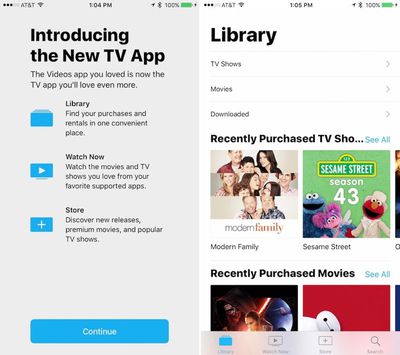
tvappios102
SOS - There's a new SOS feature that will call emergency services when the power button on the iPhone is pressed five times. According to Apple's release notes, SOS works in Australia, Belgium, Brazil, Canada, China, France, Hong Kong, India, Italy, Japan, Russia, Spain, UK, and US. Settings for SOS are available in the Settings app under the General section.
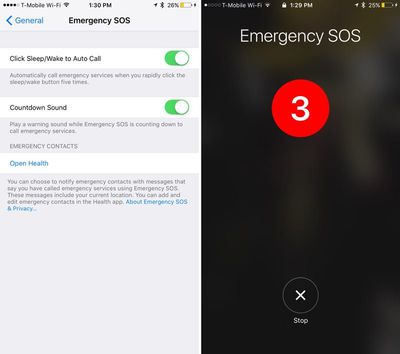
emergencysos
Music - There are more prominent Shuffle and Repeat buttons available in the Music app when playing a song.
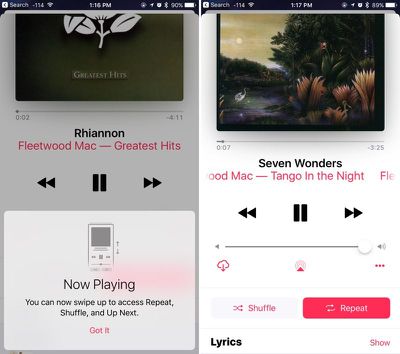
applemusicshufflerepeat
The first beta of iOS 10.2 introduced a selection of new emoji and emoji redesigns, plus it included new wallpapers, a new "Celebrate" Screen Effect, a new option to save camera settings, a Videos widget, and support for Single Sign-On, a feature designed to let those with a cable subscription sign in once to access available content across multiple apps.

The second beta of iOS 10.2 is only available for developers, but Apple will likely make the beta available for public beta testers later this week. Apple has promised a December launch for several of the features in iOS 10.2 (including Single Sign-On and the TV app) so a public launch could come in the early days of the month.


Related Forum: iOS 10

Popular Stories

M3 iPad Air

Apple's Next Two Products Are Coming Soon

Thursday February 12, 2026 11:17 am PST by
Apple plans to release an iPhone 17e and an iPad Air with an M4 chip "in the coming weeks," according to the latest word from Bloomberg's Mark Gurman. "Apple retail employees say that inventory of the iPhone 16e has basically dried out and the iPad Air is seeing shortages as well," said Gurman. "I've been expecting new versions of both (iPhone 17e and M4 iPad Air) in the coming weeks."...
Apple Sales Coach App

Apple Launching New 'Sales Coach' App

Friday February 13, 2026 2:01 pm PST by
Apple plans to launch a rebranded "Sales Coach" app on the iPhone and iPad later this month, according to a source familiar with the matter. "Sales Coach" will arrive as an update to Apple's existing "SEED" app, and it will continue to provide sales tips and training resources to Apple Store and Apple Authorized Reseller employees around the world. For example, there are articles and videos...
m5 macbook pro deal

Why You Shouldn't Buy the Next MacBook Pro

Tuesday February 10, 2026 4:27 pm PST by
Apple is planning to launch new MacBook Pro models as soon as early March, but if you can, this is one generation you should skip because there's something much better in the works. We're waiting on 14-inch and 16-inch MacBook Pro models with M5 Pro and M5 Max chips, with few changes other than the processor upgrade. There won't be any tweaks to the design or the display, but later this...
iOS 26

Apple Releases iOS 26.3 and iPadOS 26.3

Wednesday February 11, 2026 10:07 am PST by
Apple today released iOS 26.3 and iPadOS 26.3, the latest updates to the iOS 26 and iPadOS 26 operating systems that came out in September. The new software comes almost two months after Apple released iOS 26.2 and iPadOS 26.2. The new software can be downloaded on eligible iPhones and iPads over-the-air by going to Settings > General > Software Update. According to Apple's release notes, ...
macbook air prime day 2025

M5 MacBook Air: Release Date, Features, and Performance Predictions

Wednesday February 11, 2026 3:36 am PST by
The MacBook Air is Apple's most popular laptop – a thin, fanless machine that wields quiet power thanks to the efficiency of Apple silicon. While the M4 model isn't exactly old, attention is already turning to its successor. Apple doesn't telegraph new product launches ahead of time, but we can draw a surprisingly clear picture of what to expect by looking at Apple's silicon roadmap,...

Top Rated Comments

Frankied22 Avatar
121 months ago
They had to add an instructional pop up just to tell people how to use the music player. That should tell you something.
Score: 19 Votes (Like | Disagree)
Sirious Avatar
121 months ago
Emergency SOS addition is very welcome. Hope I never have to use it though ;)
Score: 15 Votes (Like | Disagree)
Donoban Avatar
121 months ago
They had to add an instructional pop up just to tell people how to use the music player. That should tell you something.
This seems to be fairly common. New features are added, you get a one time quick pop up advising of the feature then it goes away.
Score: 10 Votes (Like | Disagree)
calzon65 Avatar
121 months ago
Here's an idea ... maybe they should fix the bugs.
Score: 4 Votes (Like | Disagree)
121 months ago
Here's an idea ... maybe they should fix the bugs.
Here's an idea.

They are.
Score: 3 Votes (Like | Disagree)
121 months ago
I really do not understand these huge buttons in the music player. You would think the smaller editions of these buttons would be pretty obvious at this point as to what they do. I mean come on.. if people can use emoji's.. do we need massive buttons that say SHUFFLE and REPEAT? Guess it's just me??
Score: 3 Votes (Like | Disagree)