What's New in iOS 10.2 Beta 1: Unicode 9 Emoji, Preserve Settings for Camera, Videos Widget, Wallpapers and More - MacRumors
Skip to Content

What's New in iOS 10.2 Beta 1: Unicode 9 Emoji, Preserve Settings for Camera, Videos Widget, Wallpapers and More

Apple seeded the first beta of iOS 10.2 to developers this afternoon, marking the second major update to the iOS 10 operating system. While iOS 10.2 doesn't include a single main feature like the Portrait mode that was introduced in iOS 10.1, it does include several smaller features.

There are a bunch of new emoji that were first introduced in Unicode 9, plus there's a new video widget and handy new settings for preserving your camera preferences when taking a photo. For a full overview of the new features, make sure to check out our video.


Emoji - Unicode 9 emoji are included in iOS 10.2. Some of the new emoji include clown face, drooling face, selfie, fox face, owl, shark, butterfly, avocado, pancakes, croissant, and more. There are more than a hundred new emoji, including several profession emoji available in both male and female genders, such as firefighter, mechanic, lawyer, doctor, scientist, and more. Many existing emoji have also seen significant redesigns.
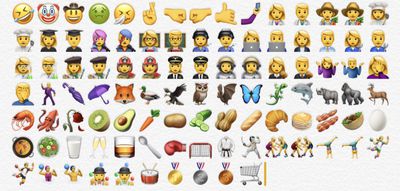
ios102emoji
Wallpapers - There are new wallpapers in iOS 10.2, which use the same graphics that were shown off in iPhone 7 marketing materials.
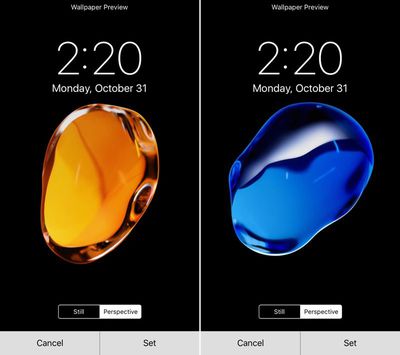
ios102wallpaper
Screen Effects - There's a new "Celebrate" Screen Effect available, accessible when adding an effect to a message.
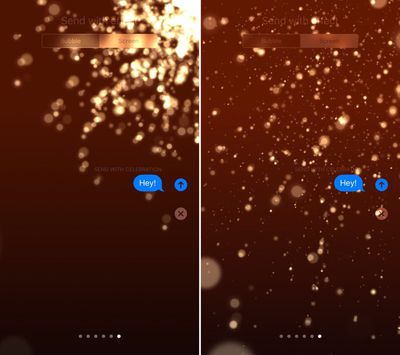
celebratescreeneffect
Camera settings - There's a new option for saving your last known camera settings. This will let you preserve the last Camera Mode, Photo Filter, or Live Photo setting. "Preserve Settings" is available in the Settings App under "Photos & Camera."
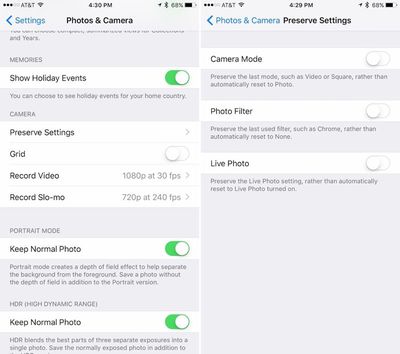
preservesettings
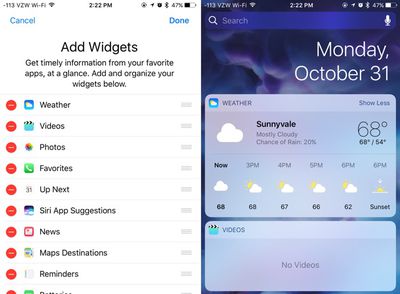
Videos widget - There's a new widget available for the Videos app, accessible on the widgets panel by swiping to the right on the Home screen of an iPhone or iPad. The Videos widget displays movies and TV shows in the Videos app, and a tap will cause content to play automatically.
videowidgetsios102
Emergency contacts - There's a new feature that will automatically notify your emergency contacts when you use the Emergency SOS feature on iPhone or Apple Watch. A popup notification shows up when you open the Health app after installing iOS 10.2.

Apple Music - There's a new option to sort playlists in Apple Music by type, title, and recently added. There are also new options for sorting songs and albums by title or artist.

iOS 10.2 is currently only available for registered developers, but Apple will likely make a beta available for public beta testers in the near future.


Related Forum: iOS 10

Popular Stories

iOS 27 Next to iPhone

Here's When iOS 27 Rolls Out in Every Time Zone

Sunday September 13, 2026 3:00 am PDT by
Apple is about to release iOS 27, which will finally deliver more advanced Siri AI capabilities as well as a variety of other refinements, improvements, and new features to iPhones. It's Apple's biggest software update of the year, and Apple announced at Wednesday's iPhone event that it will be releasing iOS 27 sometime tomorrow – Monday, September 14. iOS 27 won't be the only release on...
deep black iphone 18 pro

Apple Says iPhone 18 Pro Max Sold in U.S. Differs in One Way

Saturday September 12, 2026 3:27 pm PDT by
As noted by Nicolas Lellouche, who writes for the French tech website Numerama, Apple has updated its tech specs pages for the iPhone 18 Pro and iPhone 18 Pro Max to clarify which models are equipped with its new C2 cellular modem and where. Apple now says the iPhone 18 Pro has a C2 modem worldwide, while the iPhone 18 Pro Max uses the chip in every country except for the U.S. According...
iphone duo

IMAX Reacts to iPhone Duo's 1:1.4 Aspect Ratio Displays

Friday September 11, 2026 4:42 am PDT by
Production theater company IMAX has responded in a mixed way to Apple's embrace of a 1:1.4 aspect ratio on the iPhone Duo's inner and outer displays. The boxier ratio happens to be very close to the classic "full-frame" IMAX 1.43:1 aspect ratio, which comes from the geometry of the company's original 15-perforation/70mm film system. In response to an X post from someone wondering if we'll see...

Top Rated Comments

ck2875 Avatar
129 months ago
I guess these two emoji didn't want to update to the 2016 MBP since they still have the glowing Apple logo.

Score: 43 Votes (Like | Disagree)
129 months ago
Not enough emoji. Please discontinue all work on desktop systems and give us more emoji. Thanks. /s
Score: 23 Votes (Like | Disagree)
129 months ago
Apple under Timmy and Jony:

1) Emojis and Messages effects to chase mainstream public*
2) "Pro" products with mediocre enhancements, but PRO pricing
3) The pursuit of margins, margins, and more margins

*I'm not saying emojis and messages effects are bad things; I use them all the time. Or that it's bad to chase mainstream public. But it's sad to see all this be a priority over other things that imo can push innovation and the boundaries. (Flashback of Craig talking about how cool it is to have emojis in the Touch Bar on a freaking PRO computer)
Score: 13 Votes (Like | Disagree)
Hustler1337 Avatar
129 months ago
More Emojis?

At this rate, my phone and Mac are drowning with emojis.
Score: 12 Votes (Like | Disagree)
129 months ago
How else are millennials going to communicate???
soon.... very soon...

PS Anyone else noticing how quickly MacRumors is burying this frontpage article? lol


Attachment Image
Score: 9 Votes (Like | Disagree)
SoSickSadNslOw Avatar
129 months ago
What's the holdup with the dark mode? Enough with the emojis man.
Score: 8 Votes (Like | Disagree)