Among many iOS 10 announcements made at WWDC yesterday, one notable update to Apple's mobile operating system came in the form of third party developer support in Apple's iMessage chat platform. With the new SDK, developers can create app extensions -- similar to third party keyboard apps available now on the App Store -- that let users interact with apps from directly within Messages.

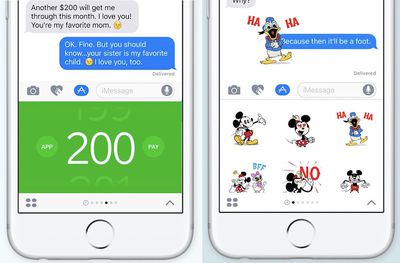
Following its announcement at the keynote, the developer of Square Cash [Direct Link] shared a little bit more information about how their payments service works as an app extension for Messages. Once a user has Square Cash installed, they can find it with their other apps in the new iMessage "App drawer." From there, "Just swipe up to pick an amount and attach it to a message. One tap to deposit it!" The iMessage App is still limited by Square Cash's own restraints, however, so international payment transfers are unavailable as of now.
iMessage apps 2

iMessage Apps for Square Cash (left) and Disney stickers (right)

During the keynote, Craig Federighi gave a demo of another iMessage app, DoorDash [Direct Link], collectively collaborating on a group lunch order without leaving Messages. Once he decided on his menu item and selected the quantity of the order, he shared his choice with a contact in Messages to add his lunch to the group ticket. Other entertainment-focused apps, like JibJab [Direct Link], grant users access to the iPhone's camera to place their faces on GIF-like videos to share with friends.

Although not specifically detailed, the iMessage App extensions for already-existing apps, like Square Cash, will presumably be free upgrades for users who already own or have downloaded the base apps. On Apple's developer site, a heavy emphasis is placed on the "purchase" of various sticker packs, however, suggesting that the various Disney and other brand-related stickers will not be free to download.
iOS 10 imessage apps

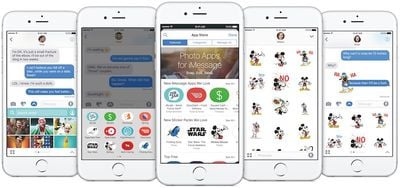
Help users express themselves in richer ways by providing stickers for purchase on the App Store for iMessage. Users can tap to send stickers in a thread, adjust their size, or place them on top of bubbles, other stickers, and photos. There's no need for you to write code to create stickers — simply drag the images into the designated folder in Xcode.

Not many other iMessage Apps have been detailed by Apple and developers yet, but wording on the developer beta site mentions users will be able to "share content, edit photos, play games, send payments, and collaborate with friends." While some might be similar in execution to third-party keyboards in iOS 9, now that Apple has granted developer access to its Messages platform, it'll be interesting to see what new kind of shortcuts and message-enhancing features come out of the new App Store for iMessage.

Anyone who needs to catchup with the WWDC keynote -- or if you just want a refresher -- can do so by watching MacRumors' 7-minute recap video. Likewise, our iOS 10 tidbits post has more information on iMessage updates, individual read receipts, the ability to remove pre-installed apps, and more.

Related Forum: iOS 10

Top Rated Comments

TMDR Avatar
124 months ago
I am so disappointed.
Downloaded the beta to see if this crap can be disabled. This crap is the reason I stay away from FB Messenger and all those others.
I want to send messages and share pictures quickly. That's all. You can't make messaging any better than that. Period.
Score: 13 Votes (Like | Disagree)
macfacts Avatar
124 months ago
Pay for digital stickers? Lmao.
Score: 11 Votes (Like | Disagree)
Shadow Runner Avatar
124 months ago
iMessage is going to become the iTunes of iOS, I just know it.
Score: 11 Votes (Like | Disagree)
TMDR Avatar
124 months ago
Good news for you, you can still just send messages and share pictures if that's all you want to do.
Yeah but I want all that stuff gone. I buy Apple stuff because it is clean and elegant, not because I want this mess.


Score: 11 Votes (Like | Disagree)
lowercaseperson Avatar
124 months ago
I get it, a lot of the stuff really displayed for iMessage seems gimmicky to me - I just won't use it. There is an entire generation of users who are about to need phones who will love those features. As much as I don't like those features, it would be stupid for Apple to ignore the large consumer base that want those features. I'm sure many at Apple weren't happy about it either, but guess who will be buying their phones soon.

More importantly, developer SDKs for iMessage, Maps, and Siri are what I've been waiting for. I'm thrilled. Why should I NEED a Grubhub app? Why should I have to throw my phone to my wife so she can look at the menu from my phone? The ability to complete group transactions from multiple devices or using Siri is only a small glimpse into the future these SDKs are about to usher in.

Don't get caught up in the gimmicks. This is big.
Score: 10 Votes (Like | Disagree)
Bathplug Avatar
124 months ago
Can I disable these features?
Score: 8 Votes (Like | Disagree)

Popular Stories

iOS 26

iOS 26.4 and iOS 27 Features Revealed in New Leak

Friday December 12, 2025 10:56 am PST by
Macworld's Filipe Espósito today revealed a handful of features that Apple is allegedly planning for iOS 26.4, iOS 27, and even iOS 28. The report said the features are referenced within the code for a leaked internal build of iOS 26 that is not meant to be seen by the public. However, it appears that Espósito and/or his sources managed to gain access to it, providing us with a sneak peek...
iOS 26

iOS 26.2 Coming Soon With These 8 New Features on Your iPhone

Thursday December 11, 2025 8:49 am PST by
Apple seeded the second iOS 26.2 Release Candidate to developers earlier this week, meaning the update will be released to the general public very soon. Apple confirmed iOS 26.2 would be released in December, but it did not provide a specific date. We expect the update to be released by early next week. iOS 26.2 includes a handful of new features and changes on the iPhone, such as a new...
iOS 26

Apple Releases iOS 26.2 With Alarms for Reminders, Lock Screen Changes, Enhanced Safety Alerts and More

Friday December 12, 2025 10:10 am PST by
Apple today released iOS 26.2, the second major update to the iOS 26 operating system that came out in September, iOS 26.2 comes a little over a month after iOS 26.1 launched. ‌iOS 26‌.2 is compatible with the ‌iPhone‌ 11 series and later, as well as the second-generation ‌iPhone‌ SE. The new software can be downloaded on eligible iPhones over-the-air by going to Settings >...
AirPods Pro Firmware Feature

Apple Releases New Firmware for AirPods Pro 2 and AirPods Pro 3

Thursday December 11, 2025 11:28 am PST by
Apple today released new firmware designed for the AirPods Pro 3 and the prior-generation AirPods Pro 2. The AirPods Pro 3 firmware is 8B30, up from 8B25, while the AirPods Pro 2 firmware is 8B28, up from 8B21. There's no word on what's include in the updated firmware, but the AirPods Pro 2 and AirPods Pro 3 are getting expanded support for Live Translation in the European Union in iOS...
macOS Tahoe 26 Thumb

Apple Releases macOS Tahoe 26.2 With Edge Light

Friday December 12, 2025 10:08 am PST by
Apple today released macOS Tahoe 26.2, the second major update to the macOS Tahoe operating system that came out in September. macOS Tahoe 26.2 comes five weeks after Apple released macOS Tahoe 26.1. Mac users can download the macOS Tahoe update by using the Software Update section of System Settings. macOS Tahoe 26.2 includes Edge Light, a feature that illuminates your face with soft...
AirTag 2 Mock Feature

Apple AirTag 2: Four New Features Found in iOS 26 Code

Thursday December 11, 2025 10:31 am PST by
The AirTag 2 will include a handful of new features that will improve tracking capabilities, according to a new report from Macworld. The site says that it was able to access an internal build of iOS 26, which includes references to multiple unreleased products. Here's what's supposedly coming: An improved pairing process, though no details were provided. AirTag pairing is already...
ipados 26 1 slide over

Apple Releases iPadOS 26.2 With Multitasking Improvements

Friday December 12, 2025 10:09 am PST by
Apple today released iPadOS 26.2, the second major update to the iPadOS 26 operating system released in September. iPadOS 26.2 comes a month after iPadOS 26.1. The new software can be downloaded on eligible iPads over-the-air by going to Settings > General > Software Update. iPadOS 26.2 continues with the multitasking improvements that were added with iPadOS 26.1. You can now drag and...
bug security vulnerability issue fix larry

Update Now: iOS 26.2 Fixes 20+ Security Vulnerabilities

Friday December 12, 2025 11:11 am PST by
Apple today released iOS 26.2, iPadOS 26.2, and macOS 26.2, all of which introduce new features, bug fixes, and security improvements. Apple says that the updates address over 20 vulnerabilities, including two bugs that are known to have been actively exploited. There are a pair of WebKit vulnerabilities that could allow maliciously crafted web content to execute code or cause memory...