macOS Will Alert You to MacBook Neo's USB-C Port Limitation - MacRumors
Skip to Content

macOS Will Alert You to MacBook Neo's USB-C Port Limitation

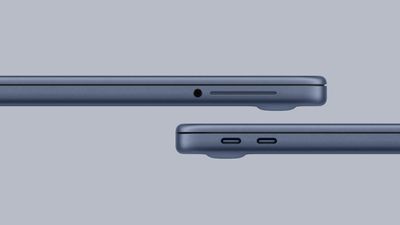
The new MacBook Neo is equipped with two USB-C ports, but they are not the same. The left USB-C port supports USB 3 speeds of up to 10 Gb/s, while the right USB-C port closer to the trackpad is limited to USB 2 speeds of just 480 Mb/s. As a result, Apple says external display connectivity is supported on the left port only.
macbook neo ports
Given the ports are not labeled, this limitation could be an inconvenience. Fortunately, though, Daring Fireball's John Gruber said if you plug an external display into the incorrect port, macOS will alert you to use the other port.

Apple says the MacBook Neo supports one external display with up to 4K resolution at 60Hz.

If you want to learn more about which features and specs you have to live without if you buy a MacBook Neo, read our in-depth list of compromises.

MacBook Neo is available to pre-order now, with U.S. pricing starting at $599 ($499 for college students). The laptop launches Wednesday, March 11.

Related Roundup: MacBook Neo
Buyer's Guide: MacBook Neo (Buy Now)
Related Forum: MacBook Neo

Popular Stories

MacBook Neo Charging Test Here%E2%80%99s Which Apple Charger is the Fastest Feature

MacBook Neo Charging Test: Here's Which Apple Charger is the Fastest

Friday March 20, 2026 8:53 am PDT by
While the MacBook Neo is not "fast-charge capable," according to Apple's tech specs, the laptop can still charge faster with certain Apple chargers. Apple includes its 20W USB-C Power Adapter with the MacBook Neo (except in the UK and the EU, where the laptop does not ship with a charger at all), but a new charging test has revealed that Apple's 35W Dual USB-C Port Compact Power Adapter is a ...
macbook neo product film feature

Apple Announces New Mac Sales Record Following MacBook Neo Launch

Friday March 20, 2026 6:14 am PDT by
Apple's CEO Tim Cook today said the Mac just had its "best launch week ever for first-time Mac customers," which suggests that the new MacBook Neo has been a hit with customers buying their first laptops or switching from Windows. Apple released the MacBook Neo last Wednesday, March 11. In the U.S., pricing starts at just $599 for the general public and an even lower $499 for college...
MacBook Neo Review Thumb 3

MacBook Neo Review: Can Apple's Cheapest Laptop Handle Real Work?

Friday March 27, 2026 10:11 am PDT by
It's been a little over two weeks since the MacBook Neo launched on March 11, and MacRumors videographer Dan Barbera has been using it daily to do a more thorough review. Subscribe to the MacRumors YouTube channel for more videos. At $599 (or $499 for students), the MacBook Neo is the cheapest laptop that Apple has come out with, and given the quality of the product, it's an impressive price. ...

Top Rated Comments

6 weeks ago
I feel like this could easily been avoided with an indicator on the housing…
Score: 37 Votes (Like | Disagree)
turbineseaplane Avatar
6 weeks ago
That's a nice affordance.

It'd still be nice to put a physical "dot" or literally anything next to the physical port.
Score: 36 Votes (Like | Disagree)
6 weeks ago
499/599 computer and too many folks expecting it to do 3d modeling, sing and dance, etc. It’s amazing for what it can do at its price point. Appreciate the Neo for what it offers.
Score: 23 Votes (Like | Disagree)
6 weeks ago

Apple says the MacBook Neo supports one external display ('https://www.macrumors.com/2026/03/04/macbook-neo-one-external-display/') with up to 4K resolution at 60Hz.

That means it does not work with any displays made by Apple, not even their brand-new ones.
If you're buying this computer, you're not paying thousands for an overpriced Apple display.
Score: 14 Votes (Like | Disagree)
JPack Avatar
6 weeks ago
This is one thing Apple got right.

A marking on the chassis would cause confusion. Hardly anyone in this customer group would understand the symbol. Does a "video out" symbol on one port mean it can't take a charge? Now, Apple has to put a "power" symbol on both ports.
Score: 14 Votes (Like | Disagree)
Admiral Avatar
6 weeks ago

What does 4K display look like? I thought you needed 5K to avoid macOS scaling issues.
4K at 60MHz refresh looks fine. I've been using such a display with macOS since 2009. Since then I've added a 5K2K 40" monitor at 120MHz refresh, which is better, but not earthshakingly so.
Score: 13 Votes (Like | Disagree)