Apple Patents Hover-Sensing Multi-Touch Display for Macs and iPhones - MacRumors
Skip to Content

Apple Patents Hover-Sensing Multi-Touch Display for Macs and iPhones

by

The United States Patent and Trademark Office today published a patent filed by Apple last March, which details how inline proximity sensors could be used in tandem with a touchscreen display to detect non-contact hover gestures (via AppleInsider).

The patent, titled "Proximity and multi-touch sensor detection and demodulation", reveals how photodiodes or other proximity hardware work in parallel with traditional multitouch displays to extend user interaction beyond the screen surface.

One embodiment of the patent describes a capacitive sensing element, using a range of proximity sensors and an LCD display, that would let users deploy gestures above a traditional keyboard, resulting in a "virtual keyboard".
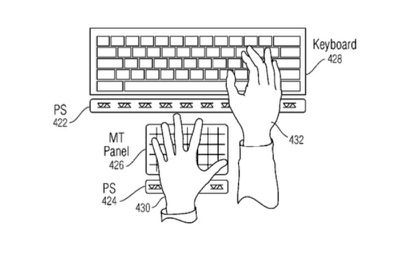
Apple hover-sensing patent
With multiple proximity arrays deployed on every touch sensor or pixel of the panel, the system can detect a finger, palm or other object hovering over the display surface. The detected motion is then translated to a GUI by which users can "push" virtual buttons, trigger functions without physical touch, toggle power to devices and more.

Various configurations of the technology are outlined in the patent, including one which describes a MacBook featuring assistive hover-sensing displays that augment typing and trackpad input.

As with any filed patent, the technology is unlikely to appear in any product soon, if at all, especially given that Apple only recently introduced 3D Touch support and is still actively encouraging app developers to make more use of the feature.

Apple has expressed interest in non-contact user interfacing and motion control for some time. In 2013, for example, the company acquired PrimeSense, the firm responsible for the original technology used by Microsoft for its Kinect platform.
Tag: Patent

Top Rated Comments

LovingTeddy Avatar
135 months ago
WOW...Apple so innovative, Android has to copy that from Apple years ago. I still remember my Moto X react and display notifications when I hoving my hand and Samsung Air gesture...
Score: 3 Votes (Like | Disagree)
furi0usbee Avatar
135 months ago
Wake me when they come up with something better than a mouse/keyboard for "actual" computers. As great as the Apple touchpad is, I still bring my mouse and mousepad everywhere I go. I don't want to touch my screen (try hard NOT to touch it, yucky fingerprints), I don't want to hover, I don't want to get exercise while I'm working at the computer. I just want to get things done. Mouse/keyboard is gonna get things done faster than any other input devices other than a direct line into my brain. All gimmicks in my opinion. Same with VR glasses Apple seems to be working on. I remember back in the 90s VR was going to take the world by storm. Yawns.
Score: 2 Votes (Like | Disagree)

Popular Stories

Aston Martin CarPlay Ultra Screen

Apple Says CarPlay Ultra is Coming to These Vehicle Brands

Thursday May 21, 2026 11:53 am PDT by
Last year, Apple launched CarPlay Ultra, the long-awaited next-generation version of its CarPlay software system for vehicles. Nearly a year later, CarPlay Ultra is still limited to Aston Martin's latest luxury vehicles, but that should change fairly soon. In May 2025, Apple said many other vehicle brands planned to offer CarPlay Ultra, including Hyundai, Kia, and Genesis. CarPlay Ultra...
iOS 27 on iPhone 17 1

iOS 27 Beta Available Tomorrow With These 12 New Features

Sunday June 7, 2026 8:39 am PDT by
Apple is set to unveil iOS 27 during its WWDC 2026 keynote this Monday, and there are many rumored features and changes for iPhones. The first developer beta of iOS 27 will likely be available immediately following the keynote, and a public beta typically follows in July. Following beta testing, the software update should be released to all users with a compatible iPhone in September....
ios 26 iphone 16 pro lock screen notifications feature 1

iOS 27 Notifications Will Slide in From Left Side of Your iPhone's Screen

Friday June 5, 2026 7:24 am PDT by
Bloomberg's Mark Gurman today revealed another iOS 27 change: notifications will slide in from the left side of the screen instead of from the top. In addition, accessing Notification Center on iOS 27 will require swiping down on the top-left corner of the screen. If you swipe down on the Dynamic Island area, a new "Search or Ask" interface tied to the revamped Siri will appear, instead of...