Apple Releases WatchOS 2 With Native App Support, New Watch Faces, Nightstand Mode, and More - MacRumors
Skip to Content

Apple Releases WatchOS 2 With Native App Support, New Watch Faces, Nightstand Mode, and More

Apple today released watchOS 2 to the public, making the first major update to the watchOS software available to all Apple Watch owners. The update requires iOS 9 and can be downloaded over-the-air through the Apple Watch app on the iPhone by going to General --> Software Update.

watchOS 2 was originally scheduled to launch on Wednesday, September 16 alongside iOS 9, but Apple delayed the launch in order to address a major bug that was found shortly before the software was set to debut.

As the first significant update to watchOS, watchOS 2 introduces a lot of new features to the Apple Watch, mainly through new developer tools. watchOS 2 brings native apps that run on the watch itself instead of the iPhone, and it lets developers access several sensors and hardware features including the Taptic Engine, heart rate monitor, microphone, and accelerometer.
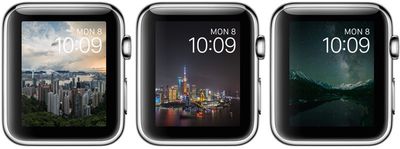
timelapsewatchfaces

The new time-lapse watch faces in watchOS 2

Along with these features for developers, which will lead to more complex and full-featured third-party apps that run much more smoothly, watchOS 2 also includes new watch faces (photo album and time-lapse), third-party Complications, a tweak that makes the screen stay on for up to 70 seconds when activated, and Activation Lock.

There's also a new Time Travel feature for viewing past and upcoming events in a watch face Complication, and a Nightstand mode that's activated when the watch is charging, displaying the time.
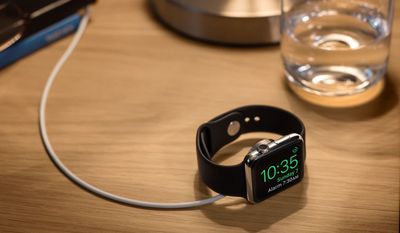
nightstandmode

Nightstand mode

More details on what's new in watchOS 2 can be found in our dedicated watchOS 2 roundup, which includes all of the features the update brings, big and small. Discussion on new features in watchOS 2 is also taking place in our dedicated Apple Watch forum, and we encourage all of our readers to join in with new discoveries and questions about the update.

Related Roundup: Apple Watch 12
Buyer's Guide: Apple Watch (Buy Now)
Related Forum: Apple Watch

Popular Stories

Surprise and Shine Live Coverage Article

Apple Event Live Blog: iPhone Duo, iPhone 18 Pro, and More

Wednesday September 9, 2026 9:10 am PDT by
Apple's "Surprise and Shine" event kicks off today at 10:00 a.m. Pacific Time, where we're expecting to see the foldable iPhone Duo, the iPhone 18 Pro and Pro Max, Apple Watch Series 12 and Ultra 4 models, new AirPods 5 earphones, and perhaps some other announcements. Apple is providing a live video stream on its website, on YouTube, and in the company's TV app across various platforms. We...
apple surprise and shine event

Apple Event Today: iPhone 18 Pro and iPhone Duo Cheat Sheet

Tuesday September 8, 2026 10:24 am PDT by
Apple's biggest event of the year is almost here, and all eyes are on Cupertino. With the first foldable iPhone expected to headline Apple's "Surprise and Shine" event on Wednesday, September 9, at 10:00 a.m. Pacific Time, the rumor mill has been running full throttle, fuelled by the biggest single design change in the life of the iPhone. To get you up to speed, here's a quick reference...
apple watch series 12

Leak Hints at Four New Features for Apple Watch Series 12 and Ultra 4

Monday September 7, 2026 8:57 am PDT by
Ahead of the announcement of the Apple Watch Series 12 and Ultra 4 later this week, code in the watchOS 27 and iOS 27 betas points to a series of new features for the product line. The information comes from a new post from MacRumors forums member "pdfu." The findings include: New "Readiness" app: An all-new separate Watch app referred to in code as "Readiness," distinct from the...

Top Rated Comments

ghost187 Avatar
144 months ago
We took into careful consideration, the amount of time it took for the update to download, so our customers can fully appreciate their Apple Watch, and know what it is like to be without it. This sense of separation from something you hold so dear to your heart truly enhances ones ability to appreciate the very existence of that object. We worked very hard to calculate the exact time it took for a human being to feel separated from the Apple Watch and that's the reason why we unapologetically delayed the update. We have reduced the margin of error to plus or minus 50 milliseconds, to deliver the most memorable experience our customers can feel from updating their software.

Attachment Image
Score: 40 Votes (Like | Disagree)
144 months ago
Thats what I would have thought as well. My work connection is pretty fast. Just odd. Seems slow for only half a gig.
Agreed, I'm in the same boat. Maybe they're hosting the download on an Apple Watch.

Thank you, I'll be here all week.
Score: 10 Votes (Like | Disagree)
Rogifan Avatar
144 months ago
Good god there's people on Twitter complaining because the Watch needs to be on its charger in order to update. Seriously you can't wait until you get home to update? Sheesh.
Score: 9 Votes (Like | Disagree)
parseckadet Avatar
144 months ago
One gripe fest has ended. Let a whole new gripe fest begin.
Score: 8 Votes (Like | Disagree)
144 months ago
im curious how much battery improvement there will be over watchOS 1.0.1?

i have the 38 MM sport green watch band.
The green band means battery life goes down 29%.
Score: 7 Votes (Like | Disagree)
144 months ago
Well it took me under 1 hour give or take a few minutes using home wifi. Some of the directions I thought could have been better and wasted my time putting my watch on the charger when it needed to initially be on my hand. Appreciated the download progress bar but nothing to indicate anything was really happening with verify and install. The download for me was 15-17 minutes I think it said. Think the verify took 10 minutes or so but for me the install was in the area of 30 minutes or so. Like I said no indication it was even doing the install except for the text saying so. I guess I would say be patient.

I also think I could have cut down on my time by putting my watch charger, which was on a stand in the bathroom while doing the update in the adjoining bedroom, next to my phone. If you are reading the thread before downloading I'd say bring them all close together. You do need to have your watch charged to 50% at least to do the Install so take care of that first before the download. Once you start your install the Watch App software will say Do Not Restart Apple Watch or remove it from its charger.

When the install finished my Watch App/General/Software Update screen changed and said "watchOS 1.0.1 / Your software is up to date". Huh??? However I was able to check the Watch App About info to see that it was now listed as Version 2.0. That was confusing. At first I wasn't sure it actually installed the update since it had taken so long and didn't know if it crashed and just put up that screen.

My watch did require a passcode. At some point it put up the Apple logo with the circular ticks as it showed progress finalizing I guess. Then it went black and just put up the white apple logo. And then it completed and I'm off to explore my "new" watch. First checked settings in the Watch App on my phone. Some new ones to check off. I did add the 70 second watch face glance. It's not something that works when you just pick up your arm, you need to tap on the screen to wake it and get the 70 second screen.

Here's a few photos I grabbed as I was going through my install. Hopefully you all see the final apple logo and are good to go.

Then Verified then...

Huh? This screen gave me pause after I had been Installing for last half hour. It updated though. Just confusing screen.
Time to have fun!

BTW I heard about the release being out when I saw the News Alert on CNBC saying the Release was public now. I thought that was funny that a news channel was making that an Alert :p (Just think of the significance of that -- the power of Apple and the public I guess -- funny since the news channels have been saying the watch is a disappointment and flop too!) and when I went to General/Software Update it was still showing being current at 1.0.1. I went out of the settings area and went back a few minutes later and the update to 2.0 was then showing.

Attachment Image

Attachment Image

Attachment Image

Attachment Image

Attachment Image
Score: 5 Votes (Like | Disagree)
Latest Stories
Microsoft OneDrive to Drop Support for These iPhone Models
45 minutes ago
HomePod Mini Waits Reach Eight Weeks Ahead of Rumored Refresh
1 hour ago
Apple Music Is Getting a New Logo
2 hours ago
Apple Quietly Boosts Email Feature for iCloud+ Subscribers
2 hours ago
iOS 27.2 May Let You Hide Specific Suggested Actions in Messages
3 hours ago
Sources: Apple Planning Two Sets of Product Launches in October
10 hours ago
Apple Announces iPhone Duo Apps Can Now Be Submitted to App Store
10 hours ago
macOS 27.2 Adds Touch Gestures Ahead of MacBook Ultra
15 hours ago
Apple and AT&T Have Yet to Explain Cause of iPhone 18 Pro Max Issue
15 hours ago
tvOS 27.2 Code Hints at Apple Intelligence for New Apple TV
16 hours ago
Apple Seeds Third macOS Golden Gate 27.2 Beta to Developers
18 hours ago
Apple Releases Third watchOS 27.2, tvOS 27.2 and visionOS 27.2 Betas
18 hours ago
Apple Releases Third iOS 27.2 Beta
18 hours ago
Apple Cash Adds ID Check for Reloads, Teases Bank Funding
19 hours ago
Apple Configurator App Updated
19 hours ago
Apple One Just Went Up in Price in These Countries
20 hours ago
iPhone 13 Pro vs. iPhone 18 Pro Buyer's Guide: Is It Worth Upgrading?
21 hours ago
iPad Could Get Significantly Thinner Bezels, Leaker Says
21 hours ago
Prime Day Is Not Just Amazon: See the Biggest Competing Deals From Sony, Best Buy, and Walmart
21 hours ago
Apple's Newest Macs Just Got Their Biggest Price Cuts Yet on Amazon
23 hours ago
Apple Watch Prime Day Deals Arrive With New All-Time Low Prices for Series 12 and Ultra 4
1 day ago
Apple Releases MagSafe 3 Charging Cable Firmware Update
1 day ago
AirPods Max 2 Drop to $429 in All Colors for Prime Day
1 day ago
Apple Quietly Triples iCloud Mail Alias Limit to Nine
1 day ago
Mac Users Reclaim 12GB+ of Storage With Apple Intelligence Removal Tool
22 hours ago
iPhone Duo Makes Focus Modes Easier to Toggle From the Lock Screen
1 day ago
EU iPhone and iPad Users Could Still Face Months-Long Wait for Siri AI
1 day ago
Today Marks the 15th Anniversary of Steve Jobs' Death
1 day ago
iPhone 18 Pro's Triple Live Activity Support Comes With a Catch
1 day ago
Apple's New CEO John Ternus is Making Product Design a 'Major Priority'
1 day ago