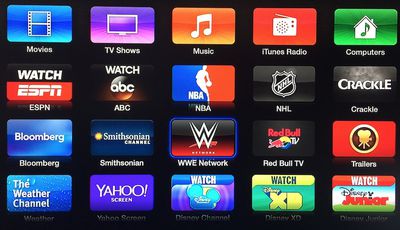
World Wrestling Entertainment today announced that its WWE Network channel is now live on the Apple TV and its updated WWE app is available in the iOS App Store [Direct Link]. WWE subscribers will have full access to the 24/7 live streaming network, which includes replays of classic matches, pay-per-view events like WrestleMania and other original programming.
"Today is a historic day for WWE as we transform and reimagine how we deliver our premium live content and 24/7 programming directly to our fans around the world," said Vince McMahon, WWE Chairman & Chief Executive Officer. "WWE Network will provide transformative growth for our company and unprecedented value for our fans."
At launch, WWE Network programming is available only to U.S. customers, with access coming to other countries such as the United Kingdom, Canada, Australia, New Zealand, Singapore, Hong Kong and the Nordics before early 2015. The service requires a $9.99 monthly subscription with a six-month minimum commitment. Customers can demo the channel using a free one-week trial, which is available for a limited time.
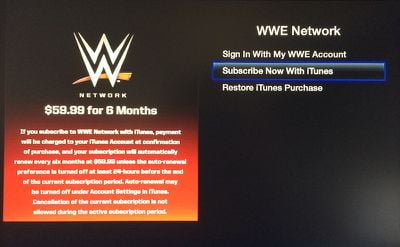
Fans can sign up for the newly launched WWE Network on the service's website or via iTunes from the Apple TV or WWE app. Customers who signup for the WWE Network automatically receive one free week before they are billed for the service.

Saturday April 11, 2026 9:14 am PDT by Joe Rossignol
Last year, Apple launched CarPlay Ultra, the long-awaited next-generation version of its CarPlay software system for vehicles. Nearly a year later, CarPlay Ultra is still limited to Aston Martin's latest luxury vehicles, but that should change fairly soon.
In May 2025, Apple said many other vehicle brands planned to offer CarPlay Ultra, including Hyundai, Kia, and Genesis.
CarPlay Ultra...
As we wait for WWDC to kick off next Monday, Apple today announced the winners of its annual Apple Design Awards, recognizing apps and games for their innovation, ingenuity, and technical achievement.
The 2025 Apple Design Award winners are listed below, with one app and one game selected per category:
Delight and Fun - CapWords (App) and Balatro (Game)
Innovation - Play (App) and PBJ -...
Tuesday April 14, 2026 4:39 am PDT by Tim Hardwick
Apple's iPhone development roadmap runs several years into the future and the company is continually working with suppliers on several successive iPhone models at the same time, which is why we often get rumored features months ahead of launch. The iPhone 18 series is no different, and we already have a good idea of what to expect for the iPhone 18 Pro and iPhone 18 Pro Max.
One thing worth...
Wednesday March 25, 2026 3:33 pm PDT by Joe Rossignol
Apple this week released tvOS 26.4, and the software update includes a handful of new features and changes for the Apple TV.
tvOS 26.4 is compatible with all Apple TV 4K and Apple TV HD models released since 2015. To update your Apple TV, open the Settings app on the device, navigate to System → Software Updates, and select Update Software.
Below, we have recapped what is new in tvOS...
Wednesday March 18, 2026 10:17 am PDT by Juli Clover
Apple today seeded the release candidate versions of upcoming watchOS 26.4, tvOS 26.4 and visionOS 26.4 updates for testing purposes. The software comes a week after Apple released the fourth betas. Release candidates are the final updates that will be provided to the public in the near future if no final bugs are discovered.
The software updates are available through the Settings app on...
Wednesday March 18, 2026 4:17 pm PDT by Juli Clover
tvOS 26.4 includes a new Genius Browse section in the Apple TV app, which gives recommendations for TV shows and movies across multiple suggested categories.
Suggestions vary based on your content preferences, and the categories are updated regularly. Some example categories include Upbeat Workplace Comedies, Tense Psychological Thrillers, History Gets Hilarious, Breathtaking Nature Docs,...
so much Junk on the home screen of Apple TV, would love the ability to delete channels (I know you can set Parental Controls, but...)
So "hide" it in Parental controls and move on with your day.
bitch bitch bitch... :rolleyes:
----------
SWEET! I CAN pay through iTunes... Just picked up some discounted iTunes cards from Best Buy last week! Deal city! Makes subscribing to Netflix and now WWE Network an even better deal!
----------
FYI... the WWE Network isn't working right now. :P
What's with all the stupid channels putting "WATCH" above the name of their channel? I'm surprised Apple allows this. I'm in marketing, so I understand the value of a strong call to action. However, we're already using Apple TV, so it's implicit that all the icons are channels that we can "WATCH". Do app icons put "OPEN" or "RUN" above their name? Do we really need to see "WATCH Disney" instead of just "Disney"?
I wouldn't mind not being able to remove of these icons if they weren't so ugly and promotional. Not to mention, they almost all require a cable subscription, which I do not have and do not want.