

United Airlines Launches Redesigned iOS App with Travel Cards, Multi-Location Booking - MacRumors
Skip to Content

United Airlines Launches Redesigned iOS App with Travel Cards, Multi-Location Booking

by

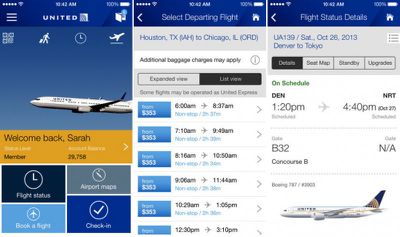
United Airlines has launched a redesigned app for iOS 7, with features focused on delivering glanceable information and easier access to flight-related details. The new app now includes travel cards, which are shortcuts appearing on the app's home screen that automatically update with information such as departure times and reservations. Travel cards also include scannable codes for flights, allowing a user to present the code on their phone as a mobile boarding pass.
unitedairlines_ios7

The new app for iOS includes current features our customers love as well as several new functions presented in a clear, touch-friendly, personalized design. The new easy-to-use home screen, travel cards and travel wallet add convenience right from the beginning of your travel experience. The organized look and larger graphics help you manage your travel with just one touch, and you can book fights and get information about your flight using the app’s personalized features.

Also included in the app is a new booking feature that allows users to make multi-segment bookings, an updated flight status view that includes details about flight times, seat maps, standby, and upgrades, and a travel wallet that holds information about boarding passes, reservations, flight notifications, and United Club memberships in one place.

United Airlines is a free app for iOS devices and can be downloaded through the App Store. [Direct Link]


Top Rated Comments

162 months ago
Yea, but United Breaks Guitars.
Score: 5 Votes (Like | Disagree)
giantfan1224 Avatar
162 months ago
Problem is United is the WORST airline I have ever flown! There was an issue with my seat when I flew with my wife and there were several deadheads on the flight. They made one of US leave the flight, even though several of the deadheads said they could have easily went on a later flight and been fine.

I am not sure under what circumstances this is considered acceptable. My wife was the one to leave, as she could see that I was steaming mad and it would have been a bad situation. The did give her a first class seat and a lunch voucher, but only after she talked with several people there about it. That should have been offered from the beginning.

I'm not sure that your one experience is indicative of the airline as a whole and, for someone that has flown a lot, I have my fair share of horror stories for each airline but what exactly does that have to do with the app?
Score: 3 Votes (Like | Disagree)
162 months ago
The update notes say they added the TSA Pre-Check logo to the Passbook boarding pass. This would suggest Passbook support has been maintained.

Interesting to compare the Delta App with the United one. Delta could do well to add the live update feature to the Passbook card to reflect gate changes etc in realtime, like the United one.
Score: 2 Votes (Like | Disagree)
Ledgem Avatar
162 months ago
I hope that they maintain Passbook support. I had the opportunity to use it recently, and it was wonderful.

I used their app to load the checked-in tickets into Passbook. The morning of the flight, my lock screen included the airline tickets on-screen. I could swipe on them to bring the tickets up, and could easily swipe between my and my wife's tickets. This made it easy to bring the tickets up for scanning at the airport (TSA security point and the airline gate). We had a connector, and upon getting out of "airplane mode" the phone automatically cycled to having the connector's tickets on the lock screen. When I landed at my destination, the tickets disappeared from the lock screen. All four tickets were still available inside of the Passbook application, if I really wanted to see them. The return flights home provided the same experience.

It's much more convenient than having to unlock the phone, find the app, and then fumble with it to pull up the boarding pass.
Score: 2 Votes (Like | Disagree)
giantfan1224 Avatar
162 months ago
I also agree with others that the "where is this aircraft coming from" feature is gold. On more than one occasion I rebooked a flight because I could see it being late before it was ever posted by the airline.

United was smart to leave in all the good stuff that came from the Continental app. In fact, most of what makes United a somewhat decent airline today is a hold over from Continental (i.e. showers in the clubs in Houston. Nothing is better than a hot shower after a red-eye).
Score: 2 Votes (Like | Disagree)
balamw Avatar
162 months ago
I use this app as I travel almost exclusively on united. I will give this new version a whirl. I did think in the old app it was a bit clunky the way you had to load passbook with your boarding pass, so hopefully this will be an improvement.

Yeah, the old app was clunky but quite powerful this one has the potential to be even better.

I hope they kept the "where is this plane coming from" feature in flight status as it has helped me predict when flights are going to be late even though they still claim to be "on time".

B
Score: 2 Votes (Like | Disagree)

Popular Stories

Tim Cook Rainbow

Apple CEO Tim Cook Stepping Down, John Ternus Taking Over

Monday April 20, 2026 1:33 pm PDT by
Apple CEO Tim Cook is stepping down as Apple's chief executive officer, and hardware engineering chief John Ternus is set to take over, Apple announced today. Cook will continue on as Apple CEO through the summer, with Ternus set to join Apple's Board of Directors and take over as CEO on September 1, 2026. Cook is going to transition to executive chairman, and he will "assist with certain...
Four iPhone 18 Pro Colors Mock Feature

iPhone 18 Pro Launching in September With These 10 New Features

Monday April 20, 2026 7:13 am PDT by
While the iPhone 18 Pro and iPhone 18 Pro Max are not launching until September, there are already plenty of rumors about the devices. It was initially reported that the iPhone 18 Pro models would have fully under-screen Face ID, with only a front camera visible in the top-left corner of the screen. However, the latest rumors indicate that only one Face ID component will be moved under the...
macOS 27 on MacBook Pro

macOS 27 Will Mark the End of an Era

Saturday April 18, 2026 6:45 am PDT by
During its Platforms State of the Union segment at WWDC 2025, Apple revealed that macOS 26 Tahoe is the final major macOS version for Intel-based Macs. The upcoming macOS 27 release will be compatible with Apple silicon Macs only, meaning that you will need a Mac with an M-series chip or a MacBook Neo with an A18 Pro chip in order to install the software update. macOS 27 should be available...













