

Other World Computing Releases Aftermarket SSD Upgrade for Retina MacBook Pro - MacRumors
Skip to Content

Other World Computing Releases Aftermarket SSD Upgrade for Retina MacBook Pro

by

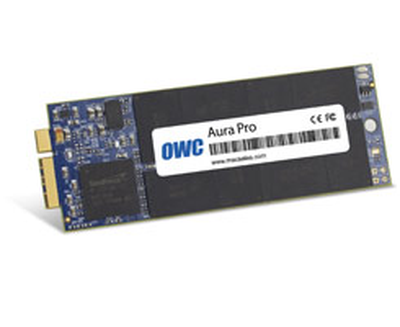
NewImageOther World Computing has released a 480GB aftermarket SSD upgrade for the Retina MacBook Pro. However, while OWC's upgrades for the MacBook Air are very price-competitive with the storage upgrades available at the Apple Online Store, the 480GB Aura Pro 6G is less clear-cut.

In its blog post announcing the release, OWC notes that "when introduced this past June, the MacBook Pro with Retina display base model offered a 256GB SSD configuration with no upgrade option." While this used to be true, at the beginning of this month, Apple expanded the custom configuration options for the Retina MacBook Pro. Now, users can upgrade the base model with either 512 or 768GB of storage.

The 512GB upgrade costs $500 from Apple, while OWC offers the 480GB SSD for $579.99. Though it appears to be more expensive, the OWC upgrade does allow users to keep the 256GB drive that comes in the notebook by default. For purchasers ordering the Mercury Aura Pro before September 30, OWC will include the $60 OWC Envoy Pro for free, an external USB 3.0 enclosure for the SSD drive from the Retina MacBook Pro. This gives users a very speedy (and very small) external drive.


Top Rated Comments

182 months ago
ha, and iFixit said the rMBP wasn't upgradeable at all!
Score: 11 Votes (Like | Disagree)
Codyak Avatar
182 months ago
What kind of warranty does it have? I doubt it's as convenient to replace as going to the Genius Bar by any measure, and that means your machine is going down for days
3 Year warranty and it takes someone with average intelligence and the correct screwdriver about 5 minutes to replace the SSD in the rMBP. :rolleyes:

At that price? No thanks. I would rather buy a crucial m4 512gb SSD for $400 and connect it to a thunderbolt adapter.
Don't forget the $100 cost of that adapter.
Score: 9 Votes (Like | Disagree)
182 months ago
Why would anyone want to put super fast storage modules into a crappy USB 3 enclosure?

Thunderbolt or GTFO.

Is 500MB/s not fast enough for you?
Score: 5 Votes (Like | Disagree)
Anonymous Freak Avatar
182 months ago
ha, and iFixit said the rMBP wasn't upgradeable at all!

At the time, it wasn't.
Score: 5 Votes (Like | Disagree)
longofest Avatar
182 months ago
Why would anyone want to put super fast storage modules into a crappy USB 3 enclosure?

Thunderbolt or GTFO.

Because Thunderbolt is incredibly expensive, and USB 3 is plenty fast for this purpose.
Score: 4 Votes (Like | Disagree)
Codyak Avatar
182 months ago
Why would anyone want to put super fast storage modules into a crappy USB 3 enclosure?

Thunderbolt or GTFO.
The Apple SSD can read/write ~450MB/s, USB 3.0 can theoretically do 600MB/s (although probably less in practice).
Score: 4 Votes (Like | Disagree)

Popular Stories

iphone 16 teal

'Siri AI' Lawsuit Update: Apple to Pay Owners of These iPhone Models

Thursday July 9, 2026 7:08 am PDT by
In May, Apple agreed to pay $250 million to settle a U.S. class action lawsuit over Siri AI's delayed launch, and eligible iPhone users could receive up to a $95 payout. This week, the California court overseeing the case held a hearing regarding preliminary approval of the settlement, but the judge has not yet issued a ruling. It will likely be at least a few more months before eligible...
Apple TV Thumb 3

Everything Coming in the 2026 Apple TV 4K

Wednesday July 8, 2026 4:51 pm PDT by
The Apple TV 4K hasn't been updated since 2022, and it's due for a refresh. An update is planned for 2026, but Apple is likely going to wait to launch it after Siri AI launches in iOS 27. Design Apple TV design updates don't happen often, and that's not changing. The next Apple TV is going to have the same squircle shape as the current model, and it'll continue to be made from a black...
apple wallet drivers license feature iPhone 15 pro

Apple Says iPhone Driver's Licenses Will Expand to These 6 U.S. States

Thursday July 9, 2026 7:29 am PDT by
In select U.S. states, residents can add their driver's license or state ID to the Apple Wallet app on the iPhone and Apple Watch, and then use it to display proof of identity or age at select airports and businesses, and in select apps. To set up the feature, open the Wallet app on the iPhone and tap on the plus sign in the top-right corner. Next, tap on Driver's License and ID Cards,...















