Restoring Your iOS Device with Folder Organization Intact - MacRumors
Skip to Content

Restoring Your iOS Device with Folder Organization Intact

by

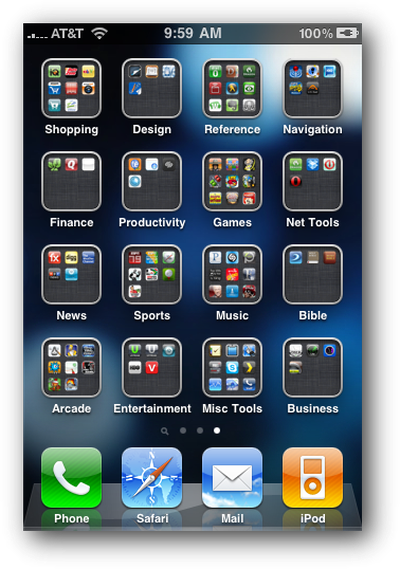
foldersIMG 0975ios4 5Image via ThinkMac

Macworld writer Dan Frakes details his frustration at losing his iPhone's folder organization one night. All his iPhone's organized apps had been strewn about folderless. In his attempt to restore the process, he figured out the right way to restore from iTunes to ensure his folder organization remains intact.

It turns out that iTunes actually offers two kinds of restores. The first is the one described above, accessed by clicking the Restore button in iTunes' Summary view for your iOS device. The other one is less obvious--you access it by right-clicking (Control-clicking) your iOS device in iTunes' sidebar and choosing Restore from Backup. As the dialog that appears explains, the latter procedure restores only your data and settings, not the iPhone’s firmware or OS. What the dialog doesn't note is that your third-party apps apparently remain on the phone, as well. In other words, it gives iTunes that “second pass” at restoring your Home-screen app organization.

Frakes details the multi-step process to avoid losing hours of tidying work.

Top Rated Comments

cleggster83 Avatar
198 months ago
And if you have a jailbroken iphone and have infinifolders installed, When you restore the phone and install all the apps, reinstall infinifolders and when it resprings it will automatic rearrange all the apps back to the original state.

Score: 2 Votes (Like | Disagree)
198 months ago
I've restored probably 4 times and had this problem half the time.

The problem for me was that it would apply firmware, restore the apps, then start syncing all my music/video/photos back on which took forever (or the phone would ring during that time!). So I would cancel it at that stage, and all the apps would be alphabetical all over the place.

If you can make sure you don't touch the phone until it's fully completed it's restore and sync, the apps are fine. It must do that as the very last thing.

Your note though will be very useful next time I stuff up. I can then do this shorter restore like you describe to get the apps back in their right place!
Score: 1 Votes (Like | Disagree)

Popular Stories

apple wallet drivers license feature iPhone 15 pro

Apple Says iPhone Driver's Licenses Will Expand to These 6 U.S. States

Thursday July 9, 2026 7:29 am PDT by
In select U.S. states, residents can add their driver's license or state ID to the Apple Wallet app on the iPhone and Apple Watch, and then use it to display proof of identity or age at select airports and businesses, and in select apps. To set up the feature, open the Wallet app on the iPhone and tap on the plus sign in the top-right corner. Next, tap on Driver's License and ID Cards,...
apple silicon 1 feature

Apple Silicon is Taking an Unexpected Turn

Friday July 10, 2026 7:24 am PDT by
Ever since the Mac switched from Intel processors to Apple silicon starting in 2020, each generation of M-series chips has included higher-end Pro and Max variants. If a recent report proves to be accurate, though, that streak will be coming to an end. According to Bloomberg's Mark Gurman, Apple will be releasing a regular M6 chip, but it has no plans to offer higher-end M6 Pro and M6 Max...
iphone 16 teal

'Siri AI' Lawsuit Update: Apple to Pay Owners of These iPhone Models

Thursday July 9, 2026 7:08 am PDT by
In May, Apple agreed to pay $250 million to settle a U.S. class action lawsuit over Siri AI's delayed launch, and eligible iPhone users could receive up to a $95 payout. This week, the California court overseeing the case held a hearing regarding preliminary approval of the settlement, but the judge has not yet issued a ruling. It will likely be at least a few more months before eligible...