AT&T Says iPhone 4 to Be Initially Available Only in Black? [Updated]
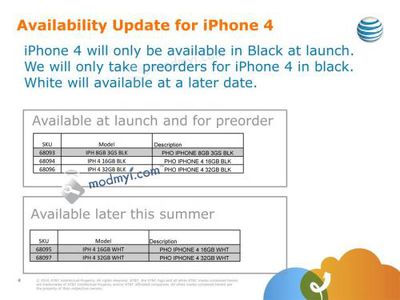
ModMyi reports that it has received a purported internal AT&T memo from a source revealing that the carrier will only be taking pre-orders for black iPhone 4 models, with white models not set to become available until "later this summer".
Apparently (see above image emailed to AT&T employees) the iPhone 4 will ONLY be available in black for pre-orders and launch. The initial lineup will be the 3G[S] in 8GB, and the black iPhone 4 at 16GB and 32GB.
The white 16GB and 32GB iPhone 4 will be available "later this summer."
It is unclear whether such restrictions would apply only to AT&T distribution or if it is a broader issue that will result in a delay of the sale of white iPhone models from Apple and other distribution points. No reason is given for the delay.
Apple is set to begin taking pre-orders for iPhone 4 tomorrow morning, but has not specified when its site will go live to accept sales.
Update: German site Macerkopf.de is reporting that Deutsche Telecom will also only be offering iPhone 4 in black at launch.
Popular Stories
Update 10:04 a.m.: iOS 27 is rolling out now, though it may take a bit for all users to see it, so keep checking!
Apple is about to release iOS 27, which will finally deliver more advanced Siri AI capabilities as well as a variety of other refinements, improvements, and new features to iPhones. It's Apple's biggest software update of the year, and Apple announced at Wednesday's iPhone event...
Update — 10 a.m. Pacific Time: Apple has released iOS 27.
During its iPhone 18 Pro and iPhone Duo event last week, Apple announced that iOS 27 will be released widely on Monday, September 14.
iOS 27 should be available around 10 a.m. Pacific Time / 1 p.m. Eastern Time today via the Settings app, under General → Software Update.
Below, we have highlighted eight new features and...
Apple today announced a new subscription initiative that turns paid iCloud+ subscriptions into a broader services bundle in more than 100 countries.
In select countries, Apple says every paid iCloud+ plan, including the cheapest 50GB tier, now includes Apple TV and Apple Arcade "at no additional cost," while family sharing extends the storage, TV and Arcade access to up to five people....