iPad Enclosure Has Empty Space for Camera?
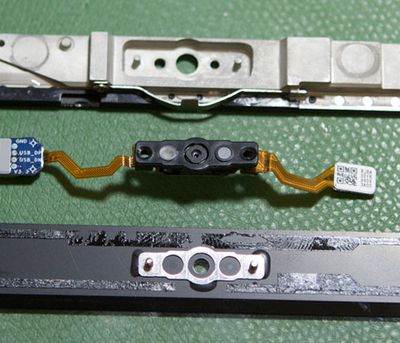 Top: iPad frame, Center: Camera, Bottom: MacBook Frame
Repair company
Mission Repair has
posted images of what is supposedly the iPad outer frame. While the iPad is not yet shipping, the company seems to have gotten a supply of iPad parts through unofficial channels. Identical photos have been
circulating on other websites. Assuming these are actual iPad parts, it appears that Apple did build in a space for a camera at the top of the device.
The photo above is particularly convincing as the iPad frame is compared to a MacBook frame which does house a camera. The holes seem identical. Even if this is all true, Apple ultimately chose not to include a camera from the first version of the iPad. The iPad will begin shipping in late March.
Popular Stories
Apple's upcoming foldable iPhone Ultra is winning over the few people who have had hands-on time with the device, though the camera setup may leave some users wanting, according to Bloomberg's Mark Gurman.
Writing in his latest Power On newsletter, Gurman says people who have used the device – which is reportedly referred to internally as the iPhone Ultra – like how it fits in your...
It is now late August, meaning that Apple's annual iPhone event is just around the corner. Below, we take a look at when the event might be held this year.
This September, Apple is expected to unveil the iPhone 18 Pro, iPhone 18 Pro Max, and an all-new foldable iPhone that will reportedly be named the iPhone Ultra. The regular iPhone 18, a lower-end iPhone 18e, and the iPhone Air 2 are not...
Apple today quietly introduced updated Magic Keyboard models with revised U.S. English key labeling.
On the new keyboards, the tab, caps lock, shift, return, and delete keycaps are labeled with glyphs rather than edge text. On the full-size models with a numeric keypad, the change goes further, with the home, page up, page down, end, clear, and enter keys also swapping their text labels for...