Luna Display today introduced a new Mac-to-Mac mode that allows any Mac released within the last decade to be used as a second display for another Mac. This includes any combination of Macs, ranging from a MacBook Pro and an iMac to a MacBook Air being used as the primary display for a Mac mini.

To use Mac-to-Mac mode, users must purchase a Luna Display dongle that plugs in to the second Mac. USB-C and DisplayPort options are available for $69.99 each, and Luna is offering 25 percent off through Friday.
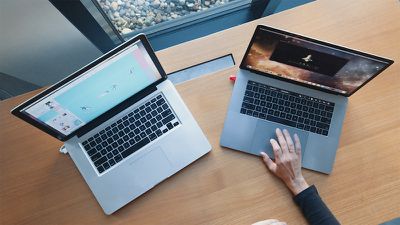
luna display mac to mac mode
The primary Mac must be running OS X El Capitan or later, while the secondary Mac requires OS X Mountain Lion or later. In addition, both Macs must be connected to the same network via Wi-Fi or Ethernet, and each require the free Luna Display app available to download on the Luna Display website.

Luna Display is pushing forward despite Apple adding Sidecar in macOS Catalina, a native solution for using an iPad as a second display for a Mac.

"With all of the hype around Sidecar, one of the biggest gripes we've heard is that it only works with a limited range of Mac models," wrote Luna Display co-founder Giovanni Donelli in an email. "That got us thinking about how we can push Luna Display to bring even more value to our Mac devices."

Apple also has a feature called Target Display Mode that allows late 2009 to mid 2014 iMacs to be used as as external display for another Mac.

Luna Display's solution includes full keyboard, trackpad, and mouse support on both Macs. The company has shared complete step-by-step instructions on how to set up Mac-to-Mac mode on its website.


Top Rated Comments

justperry Avatar
83 months ago

https://symless.com/synergy

Works across all OS's and screens without a dongle, and has been around for years.
Huh, this has nothing to do with the article, it's about a second display, not mouse/keyboard sharing between computers.
Score: 9 Votes (Like | Disagree)
palev Avatar
83 months ago

It's literally the same features.
No, it isn't. That is only mouse & keyboard sharing. Nothing about screen sharing.
Score: 8 Votes (Like | Disagree)
fhall1 Avatar
83 months ago

It's literally the same features.
Better go check some Youtube videos - Synergy is not the same thing at all.
Score: 8 Votes (Like | Disagree)
StellarVixen Avatar
83 months ago
I admire that they didn't throw in the towel when Apple announced the Sidecar (which was originally their idea).


I currently do not have use for this, but there are people who might find this useful.
Score: 7 Votes (Like | Disagree)
Kinotto Avatar
83 months ago
When Sidecar was announced I thought it’ll be the death of Astropad, but Apple’s lack of insight on what some Sidecar users will need played in favour of the little company.

Amongst the most notably lacking features there are:

-Pencil pressure sensitivity settings
-Customisable shortcuts
-Full on-screen keyboard
-Full touch support

All of those are fundamental features for a digital artist working on iPads, and them missing on Sidecar is a clear indication that Apple made this app not with artists in mind, as I was hoping ( which would have been an earthquake in the world of digital art).
Again Apple demonstrates there’s no visionary at the steering wheel, just a sad bean counter...
Score: 4 Votes (Like | Disagree)
Kinotto Avatar
83 months ago

It is just their first run at it, it is obviously a popular feature. I can see they will improve on it and eventually replaced Astropad, Duet, etc
EDIT: 4 years ago I would have agreed, but I don’t believe anymore Apple’s will is to deliver the best.
The Apple we all knew would never have released a software inferior at launch compared to alternatives developed by software houses with 1/1000 of the resources Apple have.

And the same applies to hardware: as I stated in another thread, besides the iPhones the rest of the product lineups are full of “premium” devices with stupid trade-offs and limitations, with the only logical reason behind being a will to keep customers in a neverending upgrade cycle which benefits no one but Apple itself.

You want a MacBook? Get ready for awful keyboards, graphics and thermals. Want an iPad Pro ? Sure, we give you the best, but don’t put it in your backpack or it will bend. Want a Pro desktop? Sure, but you can’t upgrade it, got to buy a whole new one.
Score: 3 Votes (Like | Disagree)

Popular Stories

maxresdefault

Apple Shows Off a Key Reason to Upgrade to the iPhone 17

Saturday February 7, 2026 9:26 am PST by
Apple today shared an ad that shows how the upgraded Center Stage front camera on the latest iPhones improves the process of taking a group selfie. "Watch how the new front facing camera on iPhone 17 Pro takes group selfies that automatically expand and rotate as more people come into frame," says Apple. While the ad is focused on the iPhone 17 Pro and iPhone 17 Pro Max, the regular iPhone...
apple wallet drivers license feature iPhone 15 pro

Apple Says These 7 U.S. States Plan to Offer iPhone Driver's Licenses

Monday February 9, 2026 6:24 am PST by
In select U.S. states, residents can add their driver's license or state ID to the Apple Wallet app on the iPhone and Apple Watch, and then use it to display proof of identity or age at select airports and businesses, and in select apps. The feature is currently available in 13 U.S. states and Puerto Rico, and it is expected to launch in at least seven more in the future. To set up the...
m5 macbook pro deal

Why You Shouldn't Buy the Next MacBook Pro

Tuesday February 10, 2026 4:27 pm PST by
Apple is planning to launch new MacBook Pro models as soon as early March, but if you can, this is one generation you should skip because there's something much better in the works. We're waiting on 14-inch and 16-inch MacBook Pro models with M5 Pro and M5 Max chips, with few changes other than the processor upgrade. There won't be any tweaks to the design or the display, but later this...
iOS 26

Apple Releases iOS 26.3 and iPadOS 26.3

Wednesday February 11, 2026 10:07 am PST by
Apple today released iOS 26.3 and iPadOS 26.3, the latest updates to the iOS 26 and iPadOS 26 operating systems that came out in September. The new software comes almost two months after Apple released iOS 26.2 and iPadOS 26.2. The new software can be downloaded on eligible iPhones and iPads over-the-air by going to Settings > General > Software Update. According to Apple's release notes, ...
Apple Logo Zoomed

Apple Expected to Launch These 10+ Products Over the Coming Months

Tuesday February 10, 2026 6:33 am PST by
It has been a slow start to 2026 for Apple product launches, with only a new AirTag and a special Apple Watch band released so far. We are still waiting for MacBook Pro models with M5 Pro and M5 Max chips, the iPhone 17e, a lower-cost MacBook with an iPhone chip, long-rumored updates to the Apple TV and HomePod mini, and much more. Apple is expected to release/update the following products...