

Review: OWC's ThunderBlade V4 Offers Blazing Fast External Storage for Professionals - MacRumors
Skip to Content

Review: OWC's ThunderBlade V4 Offers Blazing Fast External Storage for Professionals

by

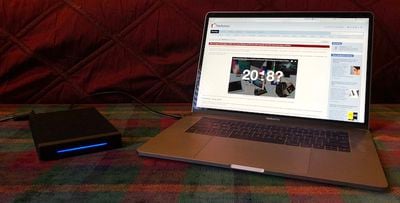
OWC this week is announcing the newest member of its family of "extreme performance drives," the ThunderBlade V4. The ThunderBlade V4 is an external drive targeted at professional users who need the fastest possible speeds, and it packs four M.2 solid state drive blades into a single enclosure that runs over Thunderbolt 3, with total capacities ranging from 1 TB to 8 TB. The result is what OWC says is the "fastest SSD ever made," with read speeds topping out at 2800 MB/s and write speeds up to 2450 MB/s.
thunderblade v4 mbp
We've spent a bit of time with the ThunderBlade V4, and it's definitely an impressive piece of technology, although its pricing that starts at $1200 and rises significantly from there will limit the potential market. This is an accessory for demanding professionals who need to squeeze every bit of performance out of their external drives and is undoubtedly overkill for consumers simply looking to back up their computers.

Design

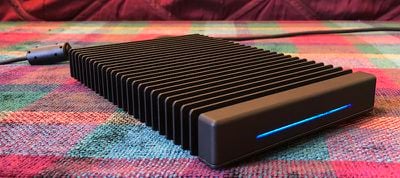
The ThunderBlade V4 comes in a hefty aluminum enclosure covered in large fins to help with heat dissipation, as this drive can get fairly warm when you're reading and writing a lot of data. There is no active cooling in the drive, which helps with the ThunderBlade V4's ruggedness as there are no moving parts.

The ThunderBlade V4 measures just under 5 inches wide, a little over 7.5 inches deep, and just over an inch high. It weighs a little under two pounds, which gives it a solid feel and good stability on a desk. A separate power adapter also adds some bulk to deal with elsewhere.
thunderblade v4 front
The only feature on the front of the ThunderBlade V4 is a thin three-inch long LED that shines white when connected to power (and also when connected to a sleeping computer) and blue when the drive has an active connection to a computer. While the LED appears to be a single thin indicator, it's actually made up of four distinct segments, one for each M.2 drive in the ThunderBlade.

Each segment will blink blue when data is being written to or read from the corresponding drive. With the speed of the drive and the four onboard SSDs, you'll see a sort of flickering ripple effect across the LED as data is moved.

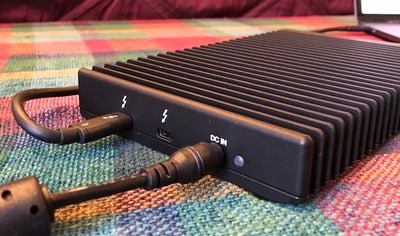
An ambient light sensor on the rear of the ThunderBlade V4 dims the front LED in dark environments.
thunderblade v4 rear
In addition to the light sensor, the rear of the ThunderBlade includes a port for the power adapter connection and a pair of Thunderbolt 3 ports. One Thunderbolt 3 port is used to connect the ThunderBlade to your computer using the included 0.5-meter Thunderbolt 3 cable, while the second is available for daisy chaining a display or other peripherals.

The Thunderbolt 3 ports are capable of supplying 15 watts of power each, but that won't be enough to power a MacBook Pro. This isn't intended as a true docking station, however, so it's not surprising that the power output is limited and primarily intended to drive downstream peripherals rather than host computers.

Speed Tests

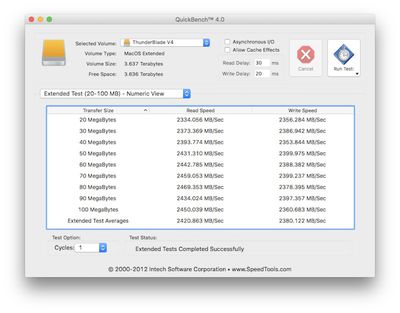
We ran some QuickBench disk speed tests on the ThunderBlade V4, and while we didn't quite hit OWC's top numbers, the drive still showed some seriously fast performance. Connecting directly to a 2016 15-inch MacBook Pro, we saw read and write performance in the range of 2400 MB/s in extended testing mode with transfer sizes in the 20–100 MB range.
v4 direct qb
Similar speed tests using Blackmagic with larger transfer sizes of 5 GB yielded slightly lower speeds of over 1900 MB/s read and 2100 MB/s write, although it is difficult to directly compare the two different methodologies. Even that performance allowed the ThunderBlade to ace Blackmagic's "Will it Work?" rating system that determines whether a drive is fast enough to handle video in various combinations of formats, resolutions, and frame rates.
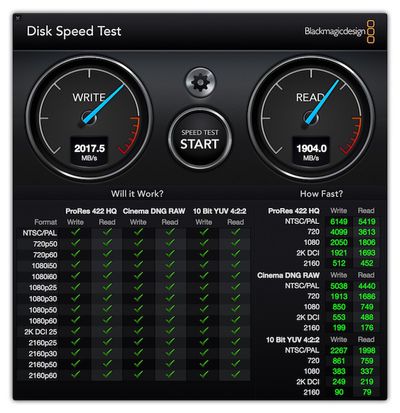
v4 direct bm full
Results were similar in various configurations even when other peripherals up to and including a pair of LG UltraFine 5K displays were connected to the MacBook Pro's other Thunderbolt 3 ports.

With an LG UltraFine 5K connected to the downstream Thunderbolt 3 port on the ThunderBlade, we obviously saw lower speeds as some of the bandwidth was being dedicated to the display. Write speeds were impacted most significantly, dropping to around 800 MB/s, while read speeds dipped slightly to around 2050 MB/s.
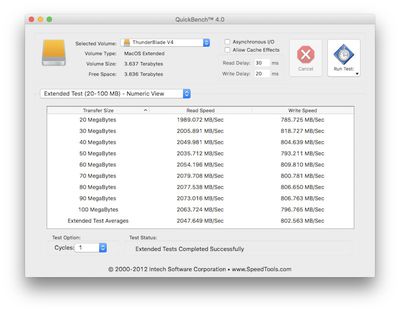
v4 display qb

RAID

The four SSDs inside the ThunderBlade V4 come preconfigured in RAID 0 format to offer the full stated capacity of the drive. A license for OWC's SoftRAID XT (formerly SoftRAID Lite) is included with the ThunderBlade, and the software can be used to reformat in RAID 1 to provide mirrored redundancy.

While RAID 0 and 1 give you the option to prioritize storage capacity or data redundancy, it would be nice if some of the higher RAID modes were available on the ThunderBlade to offer more flexibility.

With the downstream Thunderbolt 3 port on the ThunderBlade V4, you can daisy chain multiple units together for even more storage, although you're of course limited by the total bandwidth of the single Thunderbolt 3 connection they're all running over. You can even set up two ThunderBlade V4 units as a single RAID array.

PC Compatibility

While OWC is focused on Macs and the ThunderBlade V4 comes formatted for Mac as a RAID 0 Journaled HFS+ volume, it can also be used with PCs once the drives have been reformatted and reconfigured. Unlike on Mac, however, booting from the ThunderBlade is not supported on Windows.

Pricing and Availability

As should be expected for a product with large storage capacities using the fastest SSD designs and Thunderbolt 3, the ThunderBlade V4 isn't cheap. The 1 TB model is priced at $1199.99, with the 2 TB model at $1799.99, the 4 TB model at $2799.99, and the 8 TB model at $4999.00.

But for professional users who need the absolute fastest external storage, the ThunderBlade V4 looks like a solid option that takes maximum advantage of the bandwidth offered by Thunderbolt 3. All models come with a rugged case, a three-year warranty, and one year of complimentary Level 1 data recovery coverage. All four models will be available from OWC starting January 8.

Note: OWC provided the ThunderBlade V4 to MacRumors for the purposes of this review, and it will be returned to OWC. No other compensation was received. MacRumors is an affiliate partner with OWC and may earn commissions on purchases made through links in this article.


Top Rated Comments

115 months ago
the 8 TB model at $4999.00.
The iMac Pro seems like a bargain now!
Score: 21 Votes (Like | Disagree)
115 months ago
Nice design. Will buy one for me Word documents.
Score: 16 Votes (Like | Disagree)
115 months ago
Outstanding! I know most people do not have a need for the speed this little beast provides, but I certainly do. This will be the perfect device for me. I travel extensively and this will be perfect for the productions I work on in which I need to collect and edit multi-cam full-frame (35mm) 4K 60 fps files. And the best part? When I walk back into my studio, I can simply plug it right into the iMac Pro (that I will be getting in two months) and pick up right where I left off when I was on the road. No transferring files...just one super fast portable drive that can be plugged into the machine of choice.


Bravo OWC!
Score: 5 Votes (Like | Disagree)
SecuritySteve Avatar
115 months ago
I've known Larry (owner of OWC) for more than 20 years. Just emailed him asking for one. :D
*jealousy intensifies*
Score: 5 Votes (Like | Disagree)
OldSchoolMacGuy Avatar
115 months ago
Where from?
I've known Larry (owner of OWC) for more than 20 years. Just emailed him asking for one. :D
Score: 5 Votes (Like | Disagree)
115 months ago
No video? Come one, you don't expect us to read all that, right?
Please. I just read that in way less time than I'd spend watching some video that shows less information but parcels it out more slowly.
[doublepost=1515259520][/doublepost]
... the finned, aluminium casing suggests that the unit is designed to run hot (or at least warm). I wonder how much that will shorten the life of the SSDs.
If the unit was designed to "run hot" it would not have the heat-dispersing fins, right? I mean, it generates heat but is apparently engineered to move that heat away from the interior.
Score: 4 Votes (Like | Disagree)

Popular Stories

Apple MacBook Pro with PROLED XDR Display family lineup feature

Apple Announces OLED MacBook Pro With Touch Display

Wednesday October 28, 2026 10:11 am PDT by
Apple today announced a new high-end MacBook Pro, which is available in 14-inch and 16-inch sizes. The new device has a PROLED XDR display that supports touch gestures, and a glowing rear Apple logo. Pricing on the MacBook Pro starts at $2,899 for the 14-inch model and $3,399 for the 16-inch model. Apple says the MacBook Pro has the "world's best display in a pro laptop." The PROLED...
iPhone Duo Display Cracking

Apple Alerts Stores to iPhone Duo's Display Cracking Issue

Friday October 30, 2026 3:20 pm PDT by
In a memo shared with Apple Stores and Apple Authorized Service Providers this week, and later obtained by MacRumors, Apple provided technicians with guidance on how to diagnose and address the iPhone Duo's inner display cracking issue. If a customer reports the issue, Apple advised technicians to inspect the iPhone Duo and repair or replace it in accordance with their standard procedures....
iPad mini OLED feature 1

Apple Executive Comments on New iPad Mini Lacking 120Hz Display

Thursday October 29, 2026 1:47 pm PDT by
While the new iPad mini has an OLED display, the device does not support ProMotion, meaning the display's refresh rate is limited to 60Hz instead of 120Hz. ProMotion support would have allowed for the iPad mini's refresh rate to automatically adjust from 10Hz to 120Hz depending on the content being displayed, but evidently Apple has kept the feature exclusive to the iPad Pro among iPad...
Latest Stories
Apple Watch Ultra 4 Hits All-Time Low Price With Amazon's $99 Discount
2 hours ago
Reminder: Apple's Big Discount on Beats 360 Ear Cushions Ends Today
2 hours ago
Here's a New Tour of Apple's HomeView Software
2 hours ago
Apple Reveals New iPad Mini's Battery Capacity
3 hours ago
Top Stories: Apple's Big MacBook Pro, iPad mini and iMac Updates
4 hours ago
'Pluribus' Season 2 Reportedly Starts Production Today
11 hours ago
iPhone 18 Pro Sales Surge in China, Offsetting Decline in U.S. and Japan
11 hours ago
HomeView Software 27.2: Wallpapers, Control Center, and More
18 hours ago
Apple Alerts Stores to iPhone Duo's Display Cracking Issue
19 hours ago
iOS 27.3 Will Enable These Apple Intelligence Features in China
20 hours ago
Apple Says iOS 27.3 Beta Coming Next Week
20 hours ago
Apple's Flash Storage Suppliers Are Finally 'Getting Their Revenge'
21 hours ago
14 New Things Your iPhone Can Do in iOS 27.2
22 hours ago
iPhone Duo Review: One Week Later
23 hours ago
Samsung Mocks iPhone Duo Display Cracks in New Ad Campaign
1 day ago
The MacRumors Show: OLED MacBook Pro, iPad Mini 8, and More
1 day ago
MacBook Pro With Touch Display: 15 More Details Revealed
1 day ago
Russia Places Apple on State Surveillance Registry
1 day ago
Halloween Weekend Brings Discounts on Apple Accessories and Pre-Orders
1 day ago
Apple Has Released More Than 25 New Products in the Past Two Months
1 day ago
Local Code Launches as Free, Private AI Assistant Tool for Mac
1 day ago
Apple Acquires Ascend.io
1 day ago
HomePod Mini 2 Launches Today: All the New Features
1 day ago
AirTag 2 4-Pack Drops to New Low Price of $69.99
1 day ago
Rian Johnson's iPhone Camera App Goes Viral
1 day ago
Where Did All the iPhone Duos Go? Mostly to Apple's Stores
1 day ago
Apple's Touchscreen MacBook Pro Could Ship 1.5M Units in 2027
1 day ago
New Apple TV 4K and iPad Mini: RAM Amounts Revealed
2 days ago
Apple Executive Comments on New iPad Mini Lacking 120Hz Display
2 days ago
Here's a Hands-On Look at HomePod Mini 2's New Two-Tone Colors
2 days ago










































