How to Fix Wi-Fi 'Blocking Encrypted DNS Traffic' Warning Message on iOS - MacRumors
Skip to Content

How to Fix Wi-Fi 'Blocking Encrypted DNS Traffic' Warning Message on iOS

by

Since iOS 14, Apple has supported encrypted DNS, which in a nutshell makes it much harder for snoopers on the same Wi-Fi network as you to see the domain names of the websites you are visiting.
settings
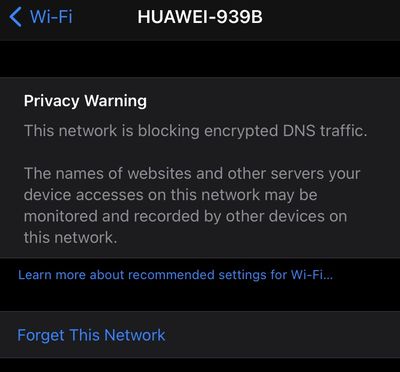
Because Apple's mobile operating system supports domain name encryption, sometimes you might see a warning that the Wi-Fi network you're connected to is blocking encrypted DNS traffic.

This privacy warning appears in the information screen for a Wi-Fi network in Settings -> Wi-Fi. (You can get to this screen by tapping on the circled 'i' next to a listed network).

If you see the warning message, don't panic -- it's actually normal behavior if the network you're connected to doesn’t meet the security standards recommended by Apple.

Given that there are many different Wi-Fi routers and network setups, it's difficult to offer the specific steps involved in changing settings for your particular situation to make the warning message go away. That said, some users have found one of the following actions to work for them:

  • Restart your iOS device.
  • Opt to Forget This Network on your iOS device, then reconnect.
  • Restart your Wi-Fi router.
  • Make sure your router's firmware is up-to-date.

If you're comfortable digging into the settings on your Wi-Fi router using an app or a browser, Apple maintains a support article called "Recommended settings for Wi-Fi routers and access points" that's worth referencing. If you set up your router in alignment with Apple's recommendations, you shouldn’t see the encrypted DNS warning message on your iOS device again.

Popular Stories

Waze logo

5 New Waze Features Rolling Out Now: Here Are All the Details

Monday July 13, 2026 3:42 am PDT by
Google today announced that Waze is getting a handful of new features, including some Gemini-powered personalization enhancements for Conversational Reporting. Conversational Reporting already uses Gemini when users report traffic incidents like slowdowns, but now you can use it to suggest map updates like road closures or outdated addresses. Saying something like "The road is closed here"...
Apple 2026 Back to School Graphic

Apple's 2026 Back to School Offer Just Went Live in Select Countries

Wednesday July 15, 2026 11:48 am PDT by
Apple's annual Back to School promotion is now live in select countries in Asia, including China, India, Malaysia, the Philippines, Singapore, Taiwan, Thailand, and Vietnam. The offer provides college students and educational staff with a free item with the purchase of an eligible Mac or iPad model. The exact offer varies by country, with options including a pack of four AirTags, AirPods 4,...
iphone 17 cyber

Apple Closes Unlocked iPhone Loophole for T-Mobile and Verizon Financing

Wednesday July 15, 2026 3:20 pm PDT by
Carrier-financed iPhones purchased from Apple will soon be locked to the carrier, ending a workaround customers used to purchase an unlocked iPhone on a payment plan. Until the rule change, buying an iPhone from Apple and opting for financing through Verizon or T-Mobile meant you would get an iPhone not locked to either carrier's network. That's no longer the case, and now iPhones financed...