iOS 16: How to Use Multi-Stop Routing in Maps - MacRumors
Skip to Content

iOS 16: How to Use Multi-Stop Routing in Maps

by

In iOS 16, Apple Maps has received an update that brings multi-stop routing to the navigation app. Keep reading to learn how to use it.
iOS 16 Maps Guide Feature Warm
With iOS 16, the Maps app allows you to plan a route that has multiple stops instead of just a single destination. While Google Maps has had this feature for some time, this is the first version of Apple's Maps app to include support for it.

When entering a destination, ‌Apple Maps‌ allows you to add up to 15 locations to stop at en route, and the app will navigate you to each stop in turn. Here's how it works.

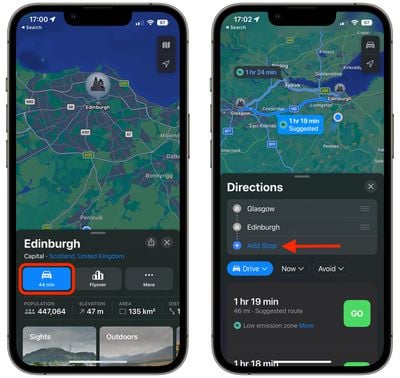
  1. In ‌Apple Maps‌, enter your destination and then tap the Directions button for your chosen mode of transport.
  2. In the Directions panel, tap Add Stop to search for and include a stop en route to your destination. Repeat this step up to 15 times to add multiple stops to your journey.
    maps

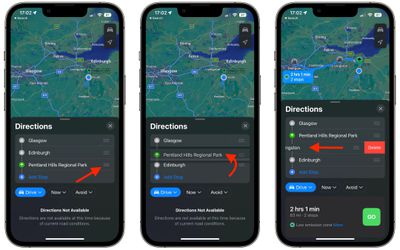
  3. Use the hamburger icons (the three lines) beside each location name to drag your stops so that they are in the desired order.
  4. To remove a stop from your journey, simply swipe left on the stop and tap the Delete button that appears.
  5. When you're happy with your journey plan, choose a directions option below and tap the Go button to get started.
    maps

Note that the Maps app does not optimize the route, so you'll need to do that manually when you type in stops.

Tip: If you're already on the road and want to insert a stop into your route, you can use Siri voice commands to do so.


Popular Stories

Ads Are Coming to Apple Maps Feature

Apple Won't Allow These Ad Categories in the Maps App

Wednesday July 15, 2026 2:01 pm PDT by
Apple this week shared a new Advertising Services policy outlining the kinds of ads that won't be allowed in the Maps app. As noted by TechCrunch, Apple has a list of ad categories that are not permitted in Apple Maps. Home services - Ads that directly or indirectly promote home services are not allowed. That includes but is not limited to plumbing, electrical, locksmith, HVAC, pest...

Apple 2026 Back to School Graphic

Apple's 2026 Back to School Offer Just Went Live in Select Countries

Wednesday July 15, 2026 11:48 am PDT by
Apple's annual Back to School promotion is now live in select countries in Asia, including China, India, Malaysia, the Philippines, Singapore, Taiwan, Thailand, and Vietnam. The offer provides college students and educational staff with a free item with the purchase of an eligible Mac or iPad model. The exact offer varies by country, with options including a pack of four AirTags, AirPods 4,...
iphone 17 cyber

Apple Closes Unlocked iPhone Loophole for T-Mobile and Verizon Financing

Wednesday July 15, 2026 3:20 pm PDT by
Carrier-financed iPhones purchased from Apple will soon be locked to the carrier, ending a workaround customers used to purchase an unlocked iPhone on a payment plan. Until the rule change, buying an iPhone from Apple and opting for financing through Verizon or T-Mobile meant you would get an iPhone not locked to either carrier's network. That's no longer the case, and now iPhones financed...