Skip to Content

How to Use the Onscreen Floating Keyboard in iPadOS

by

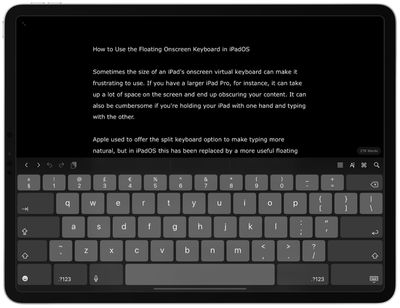
Sometimes the size of an iPad's onscreen virtual keyboard can make it frustrating to use. If you have a larger iPad Pro, for instance, it can take up a lot of space on the screen and end up obscuring your content. It can also be cumbersome if you're holding your ‌iPad‌ with one hand and typing with the other.
how to use floating keyboard ipados 1
Apple used to offer the split keyboard option to make typing more natural, but in iPadOS this has been replaced by a more useful floating iPhone-style keyboard that you can move freely around the screen. It also supports Apple's QuickType swipe-typing feature, making it more convenient for one-handed use.

How to Enable the Floating Keyboard in iPadOS

  1. Open an app that allows text input via the onscreen virtual keyboard. In our example, we're using Ulysses.
  2. Tap inside the editing window to activate the text cursor and the onscreen keyboard.
    how to use floating keyboard ipados 3

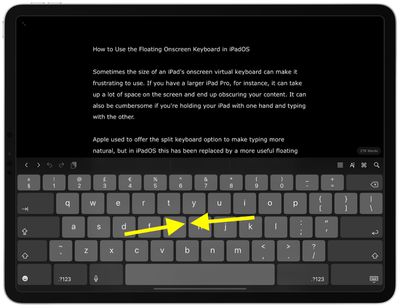
  3. Now, using your thumb and index finger, pinch inwards anywhere on the onscreen keyboard.
    how to use floating keyboard ipados 4

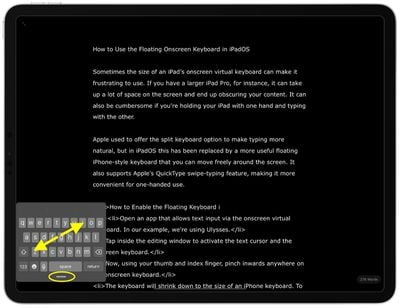
  4. The keyboard will shrink down to the size of an iPhone keyboard. To move the keyboard to a different area of the screen, drag it via the pill-shaped grab handle below the keys.
  5. To return the keyboard to the full-width of the screen, pinch outward anywhere on the key layout.
floating keyboard ipados
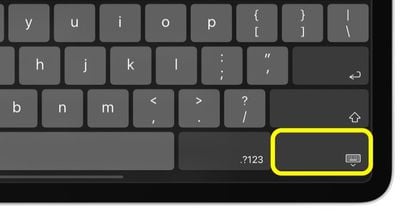
Another way to activate the floating keyboard is by holding the Minimize Keyboard key (it's the one with the keyboard symbol, located at the bottom-right corner of the key layout) and tapping the Floating button that pops up.


Related Forum: iOS 13

Popular Stories

Multicolored Low Cost A18 Pro MacBook Feature

Apple Accidentally Leaks 'MacBook Neo'

Tuesday March 3, 2026 7:00 am PST by
Apple appears to have prematurely revealed the name of its rumored lower-cost MacBook model, which is expected to be announced this Wednesday. A regulatory document for a "MacBook Neo" (Model A3404) has appeared on Apple's website. Unfortunately, there are no further details or images available yet. While the PDF file does not contain the "MacBook Neo" name, it briefly appeared in a link...
imac video apple feature

Apple Unveils Two New Products

Monday March 2, 2026 7:49 am PST by
Apple today introduced two new devices, including the iPhone 17e and an updated iPad Air. iPhone 17e features the same overall design as the iPhone 16e, but it gains Apple's A19 chip, MagSafe for magnetic wireless charging and magnetic accessories, Apple's second-generation C1X modem for faster 5G, and a doubled 256GB of base storage. In the U.S., the iPhone 17e starts at $599, just like the ...
Apple iPhone 17e feature

Apple Announces iPhone 17e With A19 Chip, MagSafe, and More

Monday March 2, 2026 6:07 am PST by
Apple today announced the iPhone 17e, featuring the A19 chip, MagSafe connectivity, faster charging, and more. The iPhone 17e contains the A19 chip introduced in iPhone 17. It features a 6-core GPU and a 4-core GPU. Apple pointed out that this makes it up to 2x faster than the iPhone 11. The new 16-core Neural Engine is optimized for large generative models. The iPhone 17e also contains...