Skip to Content

iOS 18.2: End Accidental Camera Control Presses on iPhone 16

by

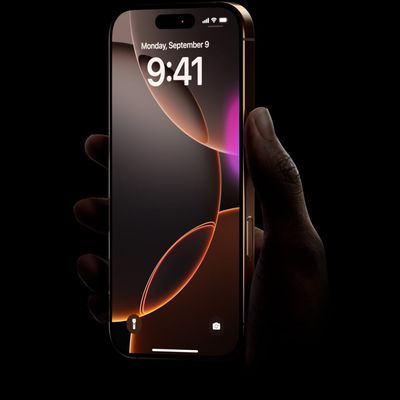
In iOS 18.2, Apple has introduced a thoughtful new feature for the Camera Control button on iPhone 16 models that helps prevent accidental camera launches by requiring the screen to be on before the button will register clicks. Keep reading to gain more control over when the Camera app opens.
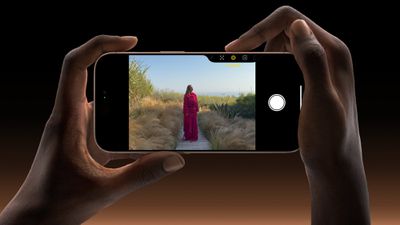
iphone 16 pro capture button
Apple located the Camera Control button to make it conveniently placed for quick access, but it can sometimes be too responsive – especially during those moments when you're not actually trying to take a photo.

Recognizing the potential for this, Apple in iOS 18.2 has added a new Require Screen On feature for Camera Control. It's particularly useful if you often find your iPhone accidentally opening the Camera app while it's in your pocket or bag. By requiring the screen to be on first, you can significantly reduce those unwanted camera launches while still maintaining quick access when you need it.

Require Screen On for Camera Control

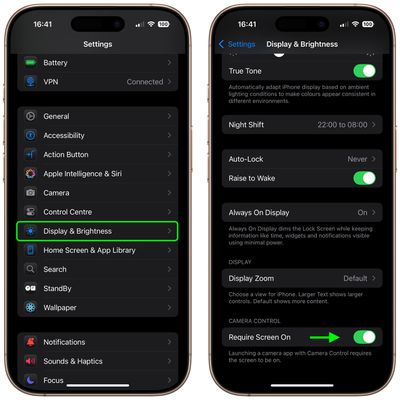
Here's how to enable the new option to prevent accidental Camera Control presses:

  1. Open the Settings app on your ‌iPhone 16‌.
  2. Scroll down and tap Display & Brightness.
  3. Look for the Camera Control section.
  4. Toggle on Require Screen On.

settings

Once enabled, you'll need to wake your iPhone's screen before the Camera Control button will respond. This extra step adds just enough friction to prevent accidental activation while keeping the camera readily accessible when you need it.

Related Roundup: iPhone 16
Related Forum: iPhone

Top Rated Comments

Spock Avatar
16 months ago
What is the point of the button again?
Score: 17 Votes (Like | Disagree)
16 months ago
The article is a bit misleading. This has been the way camera control has worked since it was launched. iOS 18.2 adds an option to turn it off for the first time.

I immediately turned it off, as I want the camera button to always do the same thing no matter what.

I think the default behavior is the worse behavior honestly, since it makes camera control inconsistent: sometimes it requires 2 presses, and sometimes just 1. Especially if you’re pulling the phone out of your pocket at the same time you’re opening the camera, it’s pretty much a crapshoot: will the motion of the phone wake up the screen before I press the button or not?

If you’re like me and don’t have an issue with accidentally opening the camera, I recommend turning the Require Screen option off. Otherwise, I would actually recommend the option in camera control settings to always require two button presses. This reduces the chance of accidental activation while allowing you to still have an action that does the same thing every time.
Score: 13 Votes (Like | Disagree)
16 months ago
Surely this is backwards and Apple has added the ability to launch the camera with the screen off instead?

I'm rocking 18.1 and since day 1 my camera button will only launch the camera if the screen is on. If the screen is off it wakes the device only and requires a second click to launch the camera. That it doesn't reliably take me to the camera in all cases has been extremely annoying.
Score: 10 Votes (Like | Disagree)
16 months ago
I prefer to change it to double-press to activate, this way it works with the screen on or off, reliably and without messing around with getting the screen turned on first.
Score: 10 Votes (Like | Disagree)
LoveToMacRumors Avatar
16 months ago
feature will be defunct in less than 2 years
Score: 7 Votes (Like | Disagree)
Kylo83 Avatar
16 months ago
This was always on by default before and how it worked the option now lets you cancel it so it will open any time, so the story is wrong
Score: 6 Votes (Like | Disagree)

Popular Stories

Apple Event Logo

Apple Released Seven New Products Today

Wednesday March 11, 2026 7:05 am PDT by
Starting today, the seven new Apple products that were announced last week are available at Apple Stores and beginning to arrive to customers. The colorful MacBook Neo and all of the other new products are on display at most Apple Store locations around the world starting today. Apple Stores have inventory of the new products for both walk-in customers and Apple Store pickup, but...
iOS 27 Mock Quick

10+ New Features Coming in iOS 27

Friday March 13, 2026 2:13 pm PDT by
We're only three months away from Apple's WWDC 2026 event, which will see the company unveil iOS 27. With the fully revamped version of Siri possibly delayed until September, iOS 27 is shaping up to be the update we wanted iOS 26 to be. There will be new Apple Intelligence features, updates for the iPhone Fold, and more, with the latest rumors summarized below. Foldable iPhone Features...
Apple 50 Years of Thinking Different

Apple Announces 50th Anniversary Plans

Thursday March 12, 2026 6:10 am PDT by
Apple today announced that it will celebrate the company's 50th anniversary over the coming weeks, but it has yet to reveal any specific plans. Apple was founded on April 1, 1976, so the company will turn 50 on April 1, 2026. "While Apple is known for looking forward, this milestone offers a special moment to reflect on the journey that has brought the company here, to celebrate the...